Problems with Sophos VPN Automatic authentication. Only some parts of username/password is entered
Problems with Sophos VPN Automatic authentication. Only some parts of username/password is entered
Hello,
the issue we are experiencing ist the same as the issue with the OpenVPN client and RDM.
We need to use Sophos VPN, because users and software should not be executed with higher privileges as needed (policy).
The issue only occurs on machines with faster SSDs. All clients with slower SSDs do not experience any problems.
The issue just occured when changing 2 notebooks SSDs.
Help/suggestions appreciated
Best regards
Daniel
All Comments (30)
Hello,
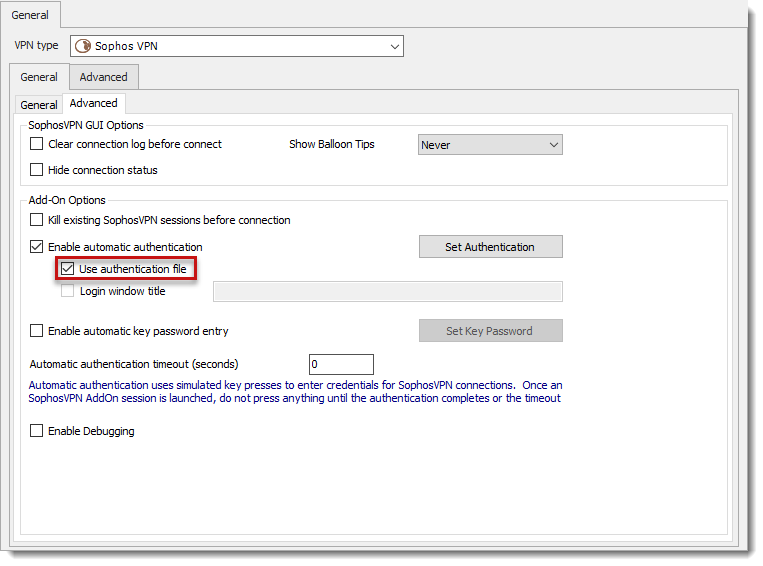
With the latest Sophos VPN add-on (1.4.0.0) we add the authentication file feature.
Could you please update your add-on from tools -- add-on manager and test if the option solve the issue?
Best regards,
David Grandolfo
Sophos_auth_file.png
Hello,
Thank you.
I tested it. Connection works now with some test entries, but disconnect does not work 100%.
When I close a session via RDM, the Sophos VPN systray symbol still exists and the connection also. It does not close the connection.
What helps is: events -> After disconnect -> command line
"taskkill.exe /im openvpn-gui.exe /im openvpn.exe /f"
That's not a big deal, but it would be nicer, if it would work out-of-the-box.
Any ideas?
Regards
Daniel
Hello,
If you click Close on the VPN before closing RDM, is the exe is still running?
Regards,
David Grandolfo
Hi,
as I wrote: "When I close a session via RDM"
I do not close RDM. I close the session via the "close" button on the right side of the "Open Session" button.
What I also encountered is, that when it suddenly works (closing the vpn session), right after it, I may not open the session again,
because there is a warnung "SSL VPN Client already running". "Kill existing SophosVPN sessions..." is checked.
The strange thing is, that closing vpn sometimes works and then it does not. When it stoped working, then it won't work
again at this point.
Regards
Daniel
Hi,
I read too fast your last reply regarding closing the session not RDM. I will ask the engineering department about which exe we kill when closing session.
Best regards,
David Grandolfo
Thank you.
Btw: Is it possible to centrally update all Sophos VPN Addons (so my colleagues do not need to update it on their own)?
I have to do this for our company.
Beste regards
Daniel
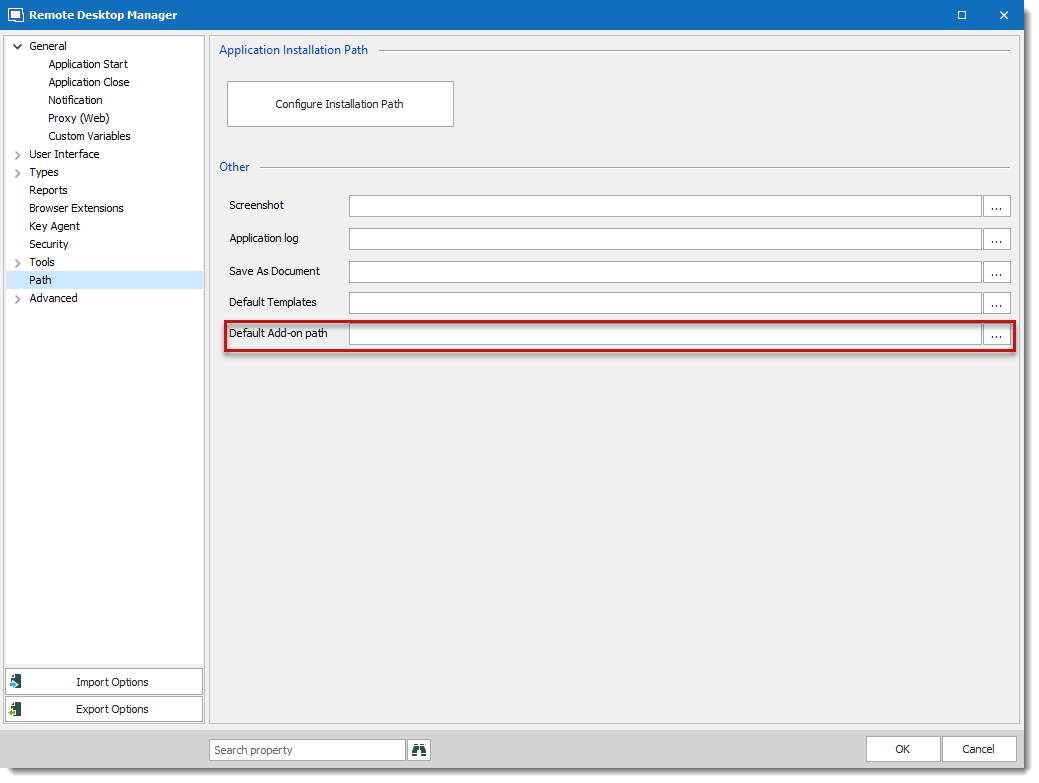
Add-ons are installed by default in %localappdata%\Devolutions\RemoteDesktopManager folder. That being said, if you manually copy the DLL of the add-on in the installation path (Program File (x86)) this DLL will be used.
Otherwise, in File -- Options -- Path you can overwrite/centralize the location of the DLLs. You can use UNC path and control the DLL version directly from there.
Best regards,
David Grandolfo
default-add-on-path.png
Thanks!
Hi,
"I will ask the engineering department about which exe we kill when closing session."
any news on this?
In the meantime we changed all Sophos SSL-VPN connections to "Use authentication file". That works fantastic - except
the delay, because of the necessary use of Events -> Before Connect / After Disconnect -> Command line -> Command "taskkill.exe /im openvpn-gui.exe /im openvpn.exe /f"
So again - no big deal, but it would be perfect (better), if the connections do work out of the box.
Thanks, best regards
Daniel
Hi,
Thanks for testing this option. I had a chat with engineers and they told me that we kill every Openvpn task. This means both in your case.
Could you test starting RDM as admin if the issue could be the UAC.
Regards,
David Grandolfo
Hi,
I tested it - but no good news. It worked (starting as "administrator") and afterwards it also worked without admin-rights. Not better ...
because it just won't work sometimes (the open vpn processes do not get terminated sometimes).
I understand, if this doesn't help, qualifying the problem. ;)
UAC is btw at maximum (security purposes - that does not change anything in our case).
So I can not tell you, when it exactly happens.
If you kill every open vpn process, it seems so, that this does not work all the time.
I try to gather more informations.
Best regards
Daniel
Hi,
Thanks, if you get any event or details that can help us improve this. Please let us know.
Best regards,
David Grandolfo
Hello,
so here's the feedback (steps and reactions):
Pushing button "Open Session" -> VPN window opens, but empty without text and hangs
Pushing button "Close" -> nothing happens
Systray vpn symbol "red+yellow" (stuck)
Pushing button "Close" again -> nothing happens
This happens not allways, but often, without any special context.
And again only thing that helps is, working with events to kill processes, so there must be a difference, you are
killing the processes in comparison how i do it with "taskkill.exe /im openvpn-gui.exe /im openvpn.exe /f".
As far as I understood you right, you are killing the processes with the "Close" button and with "Open Session", if the option "Kill existing SophosVPN sessions before connection" is checked?
Best regards
Daniel
Hello,
You bring good questions, after few searches with the engineering department we will improve the way we close OpenVPN applications.
At the moment we are using this code to close OpenVpnbool procKilled = false; foreach (Process clsProcess in Process.GetProcesses()) { if (clsProcess.ProcessName.Contains("openvpn")) { try { clsProcess.Kill(); procKilled = true; } catch { return procKilled; } } } return procKilled;
I compare your command and I found that openvpn-gui.exe and openvpn.exe can be closed even if openvpnserv.exe cannot be killed.
The improvement will be to kill every openvpn process even if one failed. We will also add in the logs the failed process.
Indeed, this will be used with Close button or with the option "Kill existing SophosVPN sessions before connection".
I do not have any ETA but it should be built in November major release.
Regards,
David Grandolfo
Hello David,
I am interested to see that change. In the meantime, we use the events.
Thanks for your feedback.
Regards
Daniel

Hello,
We did the improvement you asked. When closing OpenVPN It will close every process.
It will be included in the next release of RDM.
Best Regards,
Hello Carl,
thanks for the update. I am looking forward to it.
Best regards
Daniel
Hello again,
it still does not seem to work - was the update implemented?
The situation is now:
- We start RDM without admin privileges
- We open Sophos SSL-VPN connections out of RDM
- Processes "openvpn-gui.exe" + "openvpn.exe" are in memory
- We close the Connection via "Close" button in RDM
- Both process are sometimes(!) not killed
...
- When we open up another SSL-VPN connection, it won't work
- Popup "SSL VPN GUI is already started"
The RDM option "Kill existing sessions beforce connection" is activated, but does not help 100%.
In my testings, it seems, that killing the processes when "closing" works 100%.
So, we again use an RDM event to kill these processes (only on "Close").
This problem exists on all our RDM-Clients.
May you have another look into this?
Maybe add an option to "Kill existing Openvpn processes" after disconnection (when hitting "close").
Regards,
Daniel
Hello,
The change was definitely implemented in RDM 2019.2.X.0, but we will take a look at why it isn't working for you. I have opened a ticket.
Regards,
Hubert Mireault
Hello,
This issue should be fixed as soon as version 2019.2.21 is released.
Regards
Jonathan Del Signore
Hi,
thanks fo the feedback!
Regards,
Daniel
Hi,
we are on 2019.2.24.0 and still facing auth problem
anyone can confirm?
Kind Regards
Markus
======================
Hey there,
we are on 2019.2.22.0 and I think, it got better with a lot less issues.
What kind of issues do you exactly have?
Best regards,
Daniel
username get's cut,
tried to use "Login window title" but it seems to ignore this setting too
Kind Regards
Markus
======================
as erica suggested:
we are using Sophos SSL VPN Client 2.1.
Kind Regards
Markus
======================
Hello Markus,
we are using the Sophos SSL-VPN client, too.
We don't use the "legacy" method with username/password submission via "copy'n'paste" anymore.
These are the settings, we use: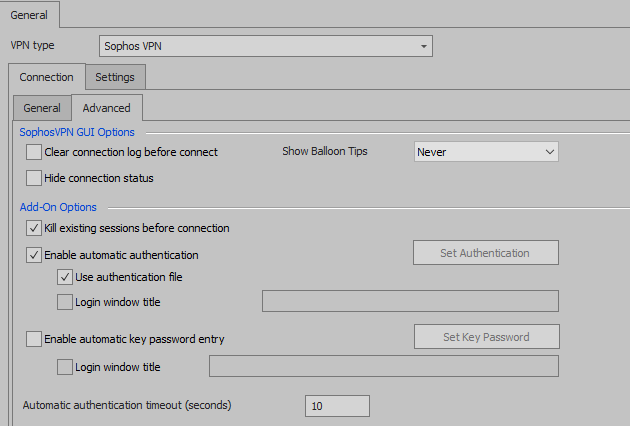
Regards,
Daniel
1.PNG
@Daniel,
Thanks for the posts, this is right the new feature Use authentication file improve many authentication issue.
Regards,
David Grandolfo
thank you for your tipps, i'll try this solution
Kind Regards
Markus
======================
Hi,
the "Use authentication file" did the trick.
Thank you!
Kind Regards
Markus
======================
Hi Markus,
Thanks for letting us know.
Regards,
David Grandolfo