Running batch files via the Remote Desktop Agent
Hi,
I'm struggling to figure out how to run batch files correctly via the remote agent. I have no trouble running Powershell scripts, but can't seem to find the same success running batch files. When I right-click a saved remote desktop (or multiple saved remote desktop) and click 'Execute script via Agent', it won't allow me to to select an actual batch file when I have the Command Line option select. How do I actually select a batch file as I do a script when I have Powershell selected (it provides a filename option)?
I've also tried using the 'Run' option, but when I point it to a batch file and then execute it nothing happens. And, actually, if I input a command directly into the command line option, sometimes even though the command appears to execute it doesn't actually do what it was supposed to do. For example, if I use this command to empty the recycle bin 'rd /s c:\$Recycle.Bin' in the Command Line option, it brings up a CMD window asking me to verify that I want to empty the recycle bin. I input Y for yes, but the recycle bin is not emptied.
The only solution I've found so far is to actually put the batch file on the remote machine's desktop and then run a command to execute it, but that's not quite as efficient as I'd like it to be. Any help solving this issue will be much appreciated!
Also, it there a way it import my own local scripts into RDM so that they are available in the Script/Tools tab when executing via the Agent? I can't find an option to do so in the Script/Tool Manager or anywhere else.
Thanks!
All Comments (13)
Hello,
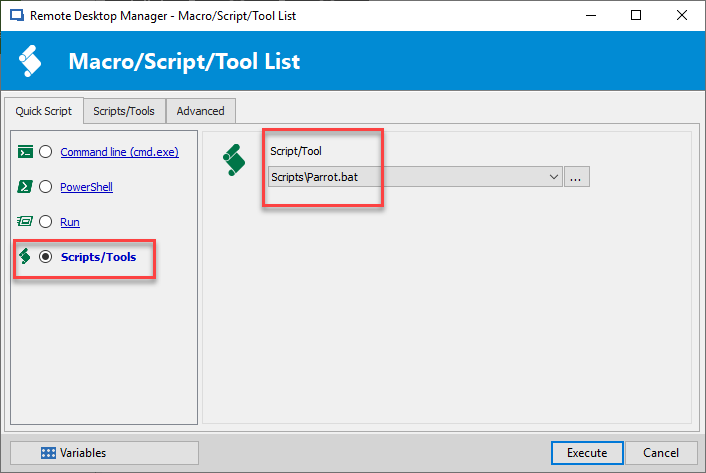
In the "Execute Script via Agent window, if you select Script/Tools at the bottom, are you able to select the session that you are looking for?
Regarding the import script, where are your scripts presently? In what type of file are they currently saved?
Best regards,
Jeff Dagenais
2019-03-18_14-35-04.png
Currently, my scripts (they are .bat files that I use to tidy up Windows after updating) are saved in a folder called Scripts in My Documents. How do I actually get them to show up on the Script/Tool drop-down menu? When I go there as of this moment there's nothing showing up there. When you say "are you able to select the session," I'm not sure what you mean. Do I need to actually create the scripts in RDM itself?
I guess I'm confused by the fact that when selecting the Powershell option I can simply navigate to my powershell scripts via the Filename option and then execute my .ps1 of choice, which could effectively be located anywhere on my PC. It doesn't appear to be the same procedure for .bat files, however.
Hello,
You would need to create a Command Line Macro/Script/Tool session in RDM for each of your script.
If they are not created as a session in RDM, RDM will not be able to run them.
Best regards,
Jeff Dagenais
Out of curiosity, what makes it possible to select a file from my PC for .ps1 files and execute it via the RDM Agent, but not be able to do the same for .bat files without creating an independent session?
I found some info in the docs about creating a command line session. Do I have to create a session for each host?
What's the difference between adding the script as a session and just using the Add Macro/Script/To option?
I've created a folder in my RDM database named Scripts, and then used the Add Macros/Script/To option to create a cmd session for a simple .bat file that empties the recycle bin. I indicated that I wanted the script to 'Allow run via agent' and 'Allow batch execute' as well. I then right-click a running RDP session and select Execute Script Via Agent. My script now shows up in the Script/Tools option, however, when I select it and click execute nothing happens on the remote host.
If I simply click execute on the created CMD session, the .bat file successfully executes on my local machine. It just doesn't seem to do so on remote hosts.
Hello,
For each .bat script, you would need to create an entry in RDM.
Regarding the execution, since you are using the agent to execute the script, the RDP sessions needs to be opened. Is the RDP session opened?
Best regards,
Jeff Dagenais
Hi Jean,
Yes, the RDP session is open and the Agent is running on the remote host.
If I simply click execute on the .bat entry, the .bat file successfully executes on my local machine. It just doesn't seem to do so on remote hosts via the agent.
Screenshots attached to show the process I am doing.
I noticed on the Docs page that it says about the command line entry, "This entry is used to integrate a Windows Command Line. It will execute a command on the local machine," which would seem to indicate that I can't actually use it to execute command line files on remote hosts via the RDM Agent? Or am I not understanding that correctly?
I'm clearly doing something wrong, I just don't know what it is haha :)
3.PNG
2.PNG
1.PNG
I just tested a .ps1 script and it works fine using the same method (with remote poweshell selected as the entry type). It's just seems to be.bat files that are the issue.
Hello,
Probably a little miss configuration yes.
Could you send us an email at ticket@devolutions.net and mention this thread so that we can schedule a remote session with you to have a look at this issue.
Best regards,
Jeff Dagenais
Email sent. Thanks!
Hello,
Turns out that this behavior cannot be ByPassed, as the .bat file is not transferred to the host to then be executed. The solution is to make the bat file available from a shared folder / mapped network drive so the host can access it.
Thanks @ah for your time
Best regards,
Alex Belisle
Thanks, Alex. Appreciate your help this morning!

thank you this is very informative. Also didn't work for the first time but this thread is wonderful. Feel so obliged to be a part of such a informative community.