RDM choose number of column and buffer size for SSH (puTTy)
Hello,
I use kitty when i need to paste large number of commands inside SSH because kitty show lot of lines in screen and have large buffer size for paste.
With putty i found the settings "Max scrollline size" and Windows "column and rows"
Where i can found this settings on RDM for use it as default instead of default putty settings ?
The last time i have to past 1000 SSH commands (written in txt file) but in rdm (and default putty settings) i can past only almost 20 lines by 20 lines and via kitty i can paste almost 50 lines (default kitty settings).
So my real questions are :
Can i change the buffer size for paste on SSH in RDM ?
Can i change default column and row line in SSH RDM ?
And can i set kitty as default ssh and if yes how ?
thanks for your helps
All Comments (17)
Hello,
In RDM, our SSH Shell session is based on Putty, so if it's working in Putty, it should work in RDM.
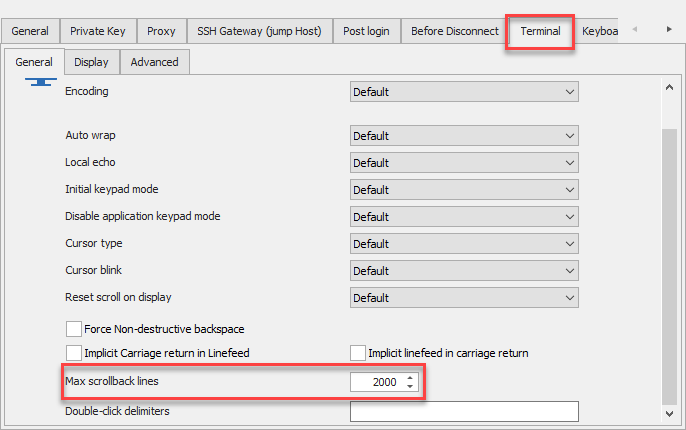
In that type of session, the Max scrollback lines is located on the Terminal Tab.
In conclusion, if you would like to use Kitty as your SSH engine in RDM, please go in File -> Options -> Types -> Putty and select Kitty.
Best regards,
Jeff Dagenais
2019-03-10_21-16-32.png

You have supplied the answer to two of the three questions. I also am looking for where the settings are for specifying the rows/columns to display in an SSH terminal. Do I need to define a putty session and then somehow point my Devolutions session to use that?
@jdcarroll1501,
Our SSH Shell integration is based on Putty, so if this option is available in Putty, we should have it or it should be possible to implement it.
What is the option in putty that you are referring to?
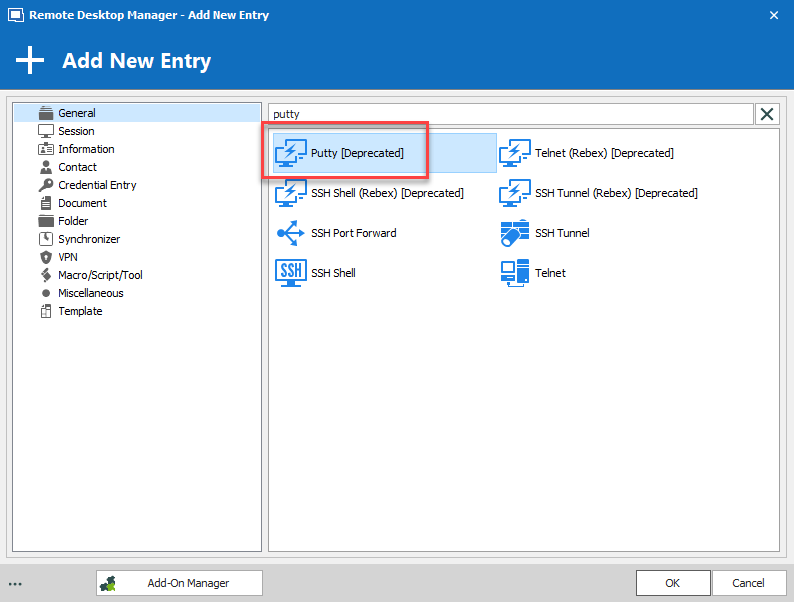
On a side note, if you want to use Putty in RDM, this is also possible. In the New Entry window, press on the ellispsis button at the bottom left and select Show Deprecated Entries.
Then, it would be possible for you to select Putty in the New Entry window.
Best regards,
Jeff Dagenais
2019-04-01_14-19-32.png
In the putty configuration settings for the Window, it's possible to set the columns and rows. If it matters, I am referring to putty version 0.70 64bit windows release. If there's no setting to specify the number of rows/columns of a display session in an SSH terminal window, then I will use the process you've outlined to utilize a putty session directly from RDM.
Screenshot - 4_1_2019 , 1_25_28 PM.png
Hello,
Thank you for the suggestion.
A ticket has been opened to our engineering department so that they can add this functionnality into RDM.
The ticket number is RDMW-2397.
Best regards,
Jeff Dagenais
HI,
I will be working on this new feature. There is something I would like to know before I start. When specifying rows/columns, do you expect it will remain fixed regardless of the window size? This would require a scroll bar or resizing the font. I wish I could understand better why you need to specify the terminal dimensions this way.
As for pasting size, I do not think there is a limitation in RDM. I tested pasting 1500 lines and they all executed correctly. Of course, the output can get mingled with the pasted commands and overflow the scrollback, but all pasted commands are executed.
Thank you for your time.
Denis Vincent
Hello,
I have similar question about buffer size.
currently Putty is deprecated. But i dont feel any issue when paste to putty ssh shell session.
but when we start using ssh shell (which is supported now by RDM) we cannot paste huge lines to it. I think there is some limitation.....
is there any setting related to it?
Hi,
Well I have to admit I was wrong about buffer size, there is currently a limit in RDM (just not where I looked). I will see to it that it is removed. Sorry about the misunderstanding.
Regards.
Denis Vincent
should i expect that on next release??
or any way to fix that manually?
I do not think this fix will make it on the next release, but I hope to get it done for the one after that.
Sadly, there is no manual fix, it really is a bug of mine, sorry.
Regards.
Denis Vincent
Hi, is there any news about ticket number RDMW-2397?
Best regards,
Luís Sousa
Hello,
Thank you for reaching back on that matter!
After having a discussion with our Engineering Department on this, they explained that they had to work on more pressing features first and sadly did not have
the time to implement this feature yet.
That being said, it is still on their Todo list and we will update this thread as soon as we will have news.
Best regards,
James Lafleur
Thought I'd give this a nudge as it is causing me issues too, you said you wanted to understand why someone would want to adjust the row and column size.
esxtop in putty (expected output)
esxtop in RDM ssh integration
I guess that the same as me, when I see RDM not formatting output as I'd expect I'd like to at least be able to specify the parameters myself to get something usable.
This isn't limited to top or esxtop, it seems the rows and columns just don't work in your integration, if you could make RDM change the number of rows and columns the same as putty that'd be great, as many tools and command outputs are unusable
For now as long as you don't deprecate actually using putty, I'll be using that instead as right now for me it's the only usable option
Hello,
Thank you for the details.
We will analyze this with our engineering department and get back to you.
Best regards,
Jeff Dagenais
Hi,
We have added a way to set the terminal to a fixed size internally. This should be available starting with version 2021.2.9
Regards,
Jean-Francois Duchesne
Hi,
We have added a way to set the terminal to a fixed size internally. This should be available starting with version 2021.2.9
Regards,
Was this supposed to be fixed?
Running 2022.1.22
Hi,
Yes it should be fixed, you should be able to set the "Terminal size" to "Fixed size" in the terminal display options, then have access to columns and rows.
If there are any issue please let us know.
Regards,
Jean-Francois Duchesne