Create new AD user not working

HI,
I try to add a new user to RDM. I can click the "..." enter the username, and it is found, and the domain is inserted correctly. All settings can be made, but when I try to save, I get the error "Unable to save the user in the database. Windows NT user or group not found. Check the name again."
I'm on the latest version (14.1.3.0)
Please advise
Kenneth
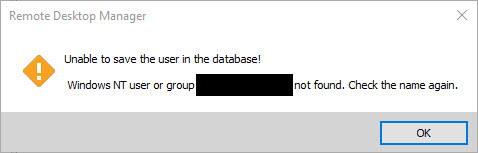
rdm-error.jpg
All Comments (10)
Hello,
What data source type are you connected to?
If it is Devolutions Password Server, what version are you using?
Best regards,
Érica Poirier
My data source is a local SQL express instance. 3 other users are working fine, but they were created years ago,
Please note that this is a 3-user license.
Best regards
Kenneth
Hello,
Could you please try to manually type the domain\username instead of getting it using the ellipsis button "..."?
Best regards,
Érica Poirier
HI,
I already did that, but that didn't help. I also tried with the full domain name as well as the netbios domain name.
Please note that the domain type credential isn't visible.
BR
Kenneth
create user RDM.jpg
Hello,
Could you please try to create the user account directly on the SQL Server using SQL Server Management Studio (SSMS) to be sure that it's not related to a communication issue with the AD?
Open SSMS, expand the Security node and right-click on Logins and select New Login... Do you get the same error message in SSMS?
Best regards,
Érica Poirier
Ok, it seems to work now, after first creating the users in the SQL directly.
I decided to move the database to a newly installed server and a new version of SQL(MS SQL 2017).
This fixed all errors.
Best regards
Kenneth
Hello,
Thank you for your feedback and glad that moving the database on a fresh new server solved your issue.
One last question. How have you moved your database?
Best regards,
Érica Poirier
I moved the database by doing a backup and a restore, and manually creating the account that RDM uses to log on to the SQL db
Best regards
Kenneth
Hello,
Thank you for the information. This is the right method to move a RDM SQL database using full backup/restore operation. Using another tool or method could lead to some problems.
Best regards,
Érica Poirier