Support 2FA on RDP session with OTP
0 vote

Hello,
for remote access to our servers I use 2FA with AuthLite and with yubikey or soft token via smartphone apps.
The following credentials are used in RDP:
User: domain \ name-code
Password: assigned password
Variable is the code given by yubikey or the soft token for 30s.
My question: How can I enter the code via an additional query by RDM before connection?
Many Thanks!
Michael Kirnich
All Comments (25)
Hello,
Remote Desktop Manager use standard RDP protocol to connect to target computer.
How could you process this with MSTSC directly?
Is there any line you need to add in the .rdp file?
Best regards,
David Grandolfo
Hello David,
I have created a connection with the required credentials for testing in the RDM and then exported as an rdp file.
Username: domain \ user-code
Password: known password
rdp:
prompt for credentials: i: 0
negotiate security layer: i: 1
username: s: xxx-domain \ test-833775
domain: s: xxx-domain
The code changes every 30 seconds. I need a query to enter the code before connecting. The other data does not change.
many Greetings
Michael Kirnich
Hello,
Thanks for the details, that being said, this is unfortunately not an RDM feature. I will transfer the topic to the feature requests section.
Best regards,
David Grandolfo
Old post, but I was looking for a solution and there didn't seem to be one.
Here is what I ended up doing with a client that deployed Authlite. I created a new set of credentials with the username formatted like this;
<domain>\<username>-$ONE_TIME_PASSWORD$
and the password set as usual.
Configuring the OTP settings in the RDP connection as 'specific to session' and now I can log in, with elevated credentials and not have to dink around with the OTP.
Works like a charm. RDM is super awesome. Would be nice owuld be an override of username to something like $USERNAME$-$ONE_TIME_PASSWORD$
To say can't is to fail before you begin
Hello Bill,
Thank you for mentioning the workaround that you have found for this situation!
Would it be possible for you to provide us with more information about what you would like to see added to RDM? If I am not mistaken, you would like to have to possibility to configure a User Specific Settings that would overwrite the content of the username field of your RDP entry and replace it with the variables $USERNAME$ and $ONE_TIME_PASSWORD$?
Since the $USERNAME$ variable already returns the information kept in the username field of the entry, another variable would need to be used to fetch the information you are looking for.
Best regards,
James Lafleur
Hey James,
I did put in a feature request OTP as part of username (devolutions.net) with more details, screenshots, etc.
Thank you!
-Bill
To say can't is to fail before you begin
Hello Bill,
You are more than welcome! Thank you for submitting a feature request.
Best regards,
James Lafleur
James,
You're welcome. I'm a super big fan of Remote Desktop Manager. Been using it for years and love it. Keep up the good work and rock on!
-Bill
To say can't is to fail before you begin
Apologies for bringing back such an old post, but I'm trying to implement the same (or similar) workaround.
We have Authlite in our environment. I added an OTP to a linked Vault username/password, but when I set the user to USERNAME-$ONE_TIME_PASSWORD$, it instead passes just "USERNAME-" as the user without including the OTP from the OTP tab. Is there something I'm missing here?
Authlite prefers to have users enter their OTP in a separate field, but it will accept USERNAME-OTP as a login as well. If I can get Remote Desktop Manager to pass the OTP stored in the vault, I could get this to work without having to manually enter my credentials each time.
I feel like I very nearly have this right but I'm missing some critical detail. I've set the OTP key up both in the OTP tab of the linked vault account, and as it's own OTP entry separate from the main credentials. The issue seems to be getting Devolutions to populate the $ONE_TIME_PASSWORD$ variable when signing in.
Hello,
In your session entry (RDP for example), you need to configure the OTP in the One Time Password tab, and configure the "usage" to be in "append to username", and in your case, specify "-" as the combination string, which will be the string put between the username and the OTP value: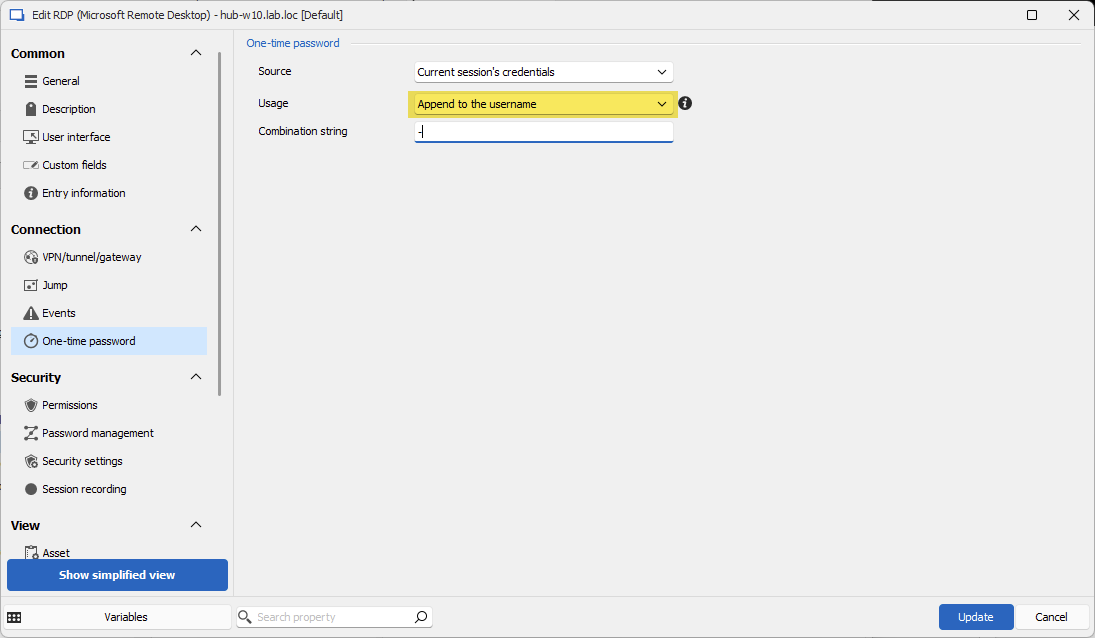
Let us know if that helps!
Regards,
Hubert Mireault
6b952ff8-e089-44df-b818-02e051dec3fe.png
Perfect, thank you, that's exactly what I needed!
Glad to hear this works for you, let us know if you need any additional help.
Regards,
Hubert Mireault
Sorry for revising a year old thread but we use AuthLite as well and I cannot figure out how to make this work.
How do I configure the OTP settings? If I just try to manually enter the information in the credential prompt as username-otp it does not work.
I've tried following these instructions but it doesn't work. It never prompts for the one time passcode.
I get the error "The key is either empty or contains invalid characters".
Hello @cliffwilliams44,
With the error you're encountering, I suspect that the OTP configuration in your entry is incorrect. How did you configure your OTP information in your entry?
Regards,
Hubert Mireault
Hello @cliffwilliams44,
With the error you're encountering, I suspect that the OTP configuration in your entry is incorrect. How did you configure your OTP information in your entry?
Regards,
@Hubert Mireault
I think this is where my consfusion is.
Here is my entry OTP settings
When I try to launch a session for this host I get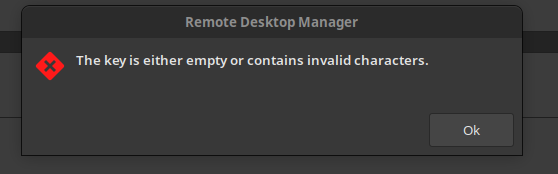
048b657c-ff4b-4b63-9a3e-1d1abc232df0.png
6188a49b-5001-4bd0-aa98-26ca3731f2c0.png
Hello,
Your source is "current session's credentials" which, unless the main section of your entry has an entry with an OTP configured (like the username/password entry with the OTP tab filled out), means there is no valid configuration so the error is to be expected.
Regards,
Hubert Mireault
Hello,
Your source is "current session's credentials" which, unless the main section of your entry has an entry with an OTP configured (like the username/password entry with the OTP tab filled out), means there is no valid configuration so the error is to be expected.
Regards,
@Hubert Mireault
Yes, that's where I am confused. what do I do in this form?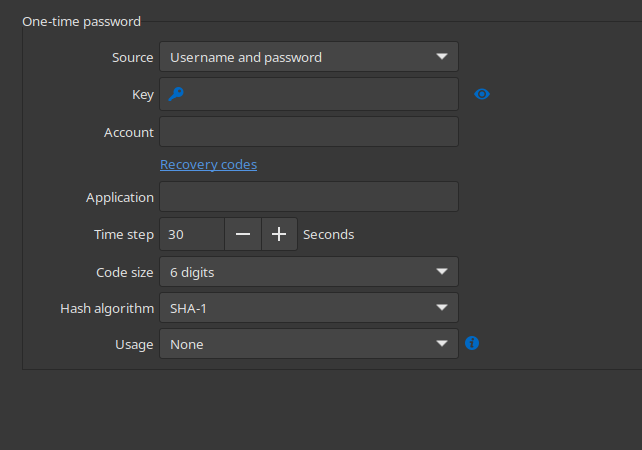
We use AuthLite with the MS Authenticator. I am not sure where to get this information from?
f39b05c6-46e3-4068-8ad0-a946cddc0fb3.png
The information you need to enter here is principally the key, which is required for the application generate the OTP. We only support generating Time-based OTP (TOTP), which from looking into it, Authlite does support: https://www.authlite.com/docs/2_3/id_1862925976
Other modes are not supported by RDM, as it's not possible for us to generate the OTP otherwise.
Regards,
Hubert Mireault
The information you need to enter here is principally the key, which is required for the application generate the OTP. We only support generating Time-based OTP (TOTP), which from looking into it, Authlite does support: https://www.authlite.com/docs/2_3/id_1862925976
Other modes are not supported by RDM, as it's not possible for us to generate the OTP otherwise.
Regards,
@Hubert Mireault
Yes, thiis is how we have ours setup, what I don't understand is where I am supposed to get the value for the key field in the parent folder OTP setup.
Hello,
I'm not familiar with AuthLite and we don't have an environment for it here, but I believe the Base32 code is what you should enter as the key (see the red square on the picture):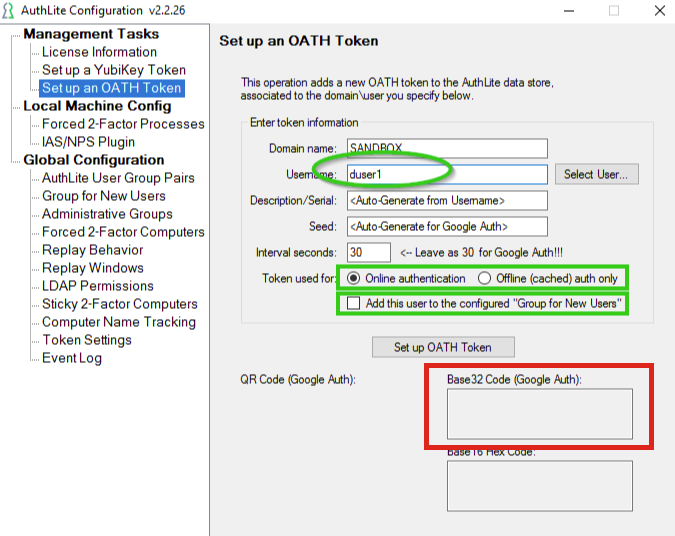
Looking into it, Microsoft Authenticator doesn't let you view the key of a TOTP stored into it so it's not possible to extract it from there. You have to get this key from AuthLite, in this case.
Regards,
Hubert Mireault
35e83465-84cc-4011-833a-cfdd8788d033.png
Here is the thing, I don't need all of this. I only need to be able to pass username-XXXXXX to the RDP session. Why won't that work?
I have no credential assigned to my entry and then enter them manually on launch.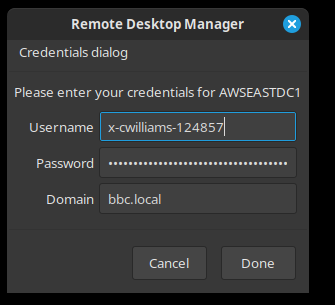 This doesn't work. This works in MSTSC, in Remmina but not in RDM.
b980f804-fe3c-4c84-912b-36fcd55b2095.png
Hello,
Sorry, I thought you wanted to fill this information automatically. If you'd like to enter the generated code manually, then you should be able to configure the OTP settings in your RDP entry to be in "Prompt" mode, with the "append to username" usage method, like this: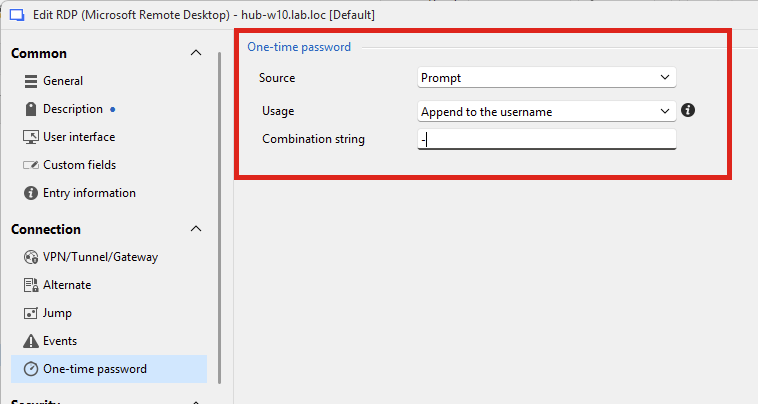
When you open the entry, you'll be prompted for your OTP. When you send this information, RDM will then send the necessary information to RDP with the username in the <USERNAME>-<OTP> format.
Let me know if this helps.
Regards,
Hubert Mireault
5ff8bd89-55ce-4a2b-9224-a6ca87230d8f.png
I am on the Linux client, I don't have an option for 'prompt'.
Hello cliffwilliams44,
I have created a ticket so that we can add this "Prompt" option in RDM Linux.
Regards,
Gabriel Dubois
Gabriel,
I just downloaded and installed the latest version of RDM for Linux and this now works.
Much appreciated!