Certificate as Security Provider - Error message

Disabled
Hello,
I'm currently evaluating RDM in our company. In my setup I chosen certificate as Security Provider. Therefore I created a self-signed certificate and installed it on my client for testing purposes. I didn't know what's the perfect place for the certificate so I chosen the trusted root certificates. Maybe there's the problem?
After a reboot of my client I often get the attached error message.
Only deleting and reimporting the certificate will help.
Any guesses?
Greetings
Daniel
message.txt
2019-01-29 09_05_02-Remote Desktop Manager - Error Message Dialog.png
All Comments (7)
Hello Daniel,
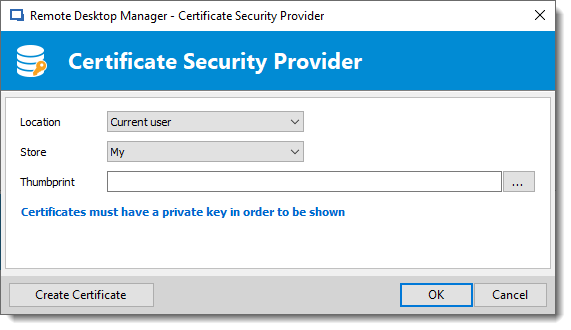
This error seems to be that RDM does not find the certificate. When you set the Security Provider, you might have this window. The configuration of Location andStore are the place where the certificate has to be deployed.
Further information can be found in our Security provider help topic at https://help.remotedesktopmanager.com/administration_securityproviders.htm#certificate .
Best regards,
David Grandolfo
Save_certificate.png
Hello David,
yes I configured the Security Provider from the description of the mentioned help topic.
When deleting the certificate and opening RDM I get another error message.
Everything works fine until I reboot my client.
Hi,
When you reboot the client, is the certificate still in certificate manager?
For further tests, go to Help -- Submit a support ticket and include in the description the URL of this post please.
The ticket contains useful information for our diagnostic.
Best regards,
David Grandolfo
Yes, it's still visible after a reboot and seems to be valid.
Ok I will open a ticket. Thanks.
Hi Daniel,
I see that the database is near empty, is it an option to remove the security provider (set it back to default). And test if users have similar issues.
If everything works fine, reconfigure the security provider, you could use the same certificate.
Best regards,
David Grandolfo
Hello David,
I changed the Security Provider back to default and everything works fine. Now I changed it back to use the certificate. This time I choose the Trusted Publishers for saving the certificate. I can work for hours without problems, but today after a reboot I got the same error message shown at the beginning.
The certificate looks good. I attached you a screenshot of the certificate.
2019-02-01 09_06_32-Remote Desktop Manager.png
Hello Daniel,
If you are available, we sent you a private message to book a remote session.
Best regards,
David Grandolfo