Problems with OpenVPN Automatic authentication. Only some parts of username/password is entered
Problems with OpenVPN Automatic authentication. Only some parts of username/password is entered
I'm trying to implement the OpenVPN addon in our RDM v. 14.1.1.0, so far without luck...
I'm running OpenVPN GUI v. 11.9.0.0.
I've attached screenshots of my configured entry. Those are here: https://www.dropbox.com/sh/61hzl3gc365cfff/AABRsOJb40kFnepapVW9bvp4a?dl=0
When launching the entry it starts the OpenVPN GUI just fine, the GUI then asks for username/password and RDM is sending something to the GUI, the problem is that only some of the characters are entered in the username/password fields, sometimes it enters one character in the username, sometimes four and sometimes all of it. Sometimes the password is left blank or partly filled, and sometimes it enters the password in the username field...
It seems that there's major problems with the "Automatic authentication" settings. Do you have a fix for this ?
I tried to delete the .ovpn file that RDM creates multiple times to clear the cached username etc, but anyway it is struggeling when writing the username/password to the OpenVPN GUI.
It could be because it is sending the characters before the OpenVPN User Authentication window is shown which ends in not all characters passed to the window. Is there a setting to tell RDM to wait for x seconds before trying to paste the credentials of the User Authentication window ?
Thanks in advance
Best regards
Joe
All Comments (33)
Hello Joe,
Thanks for contacting support, I know that many customers solve this issue by updating our OpenVPN Add-on to the latest version.
To update the add-on go to Tools -- Add-on Manager and update OpenVPN to 2.8.0.0.
Then restart RDM as administrator (elevated privileges) and test it again.
Best regards,
David Grandolfo
Hello David
I am already using add-on 2.8.0.0
I am also already running as administrator.
I got my colleague to test it too, he has the same problems as me.
Hello,
I have similar problem. I have a problem with automatic filling of key password in OpenVPN addon. If I enable "automatic key password entry" and fill the password, the password doesn't fill full and the window stays opened. Then if I fill the password manually, the VPN is opened successfully. It's interesting that automatic authentication method by using username and password works fine. The pictures with configuration VPN and VPN login window without complete password are in an attachment. I also use add-on 2.8.0.0 and run RDM as administrator.
agilab_openvpn.JPG
Agilab_openvpn_settings.JPG
Hello,
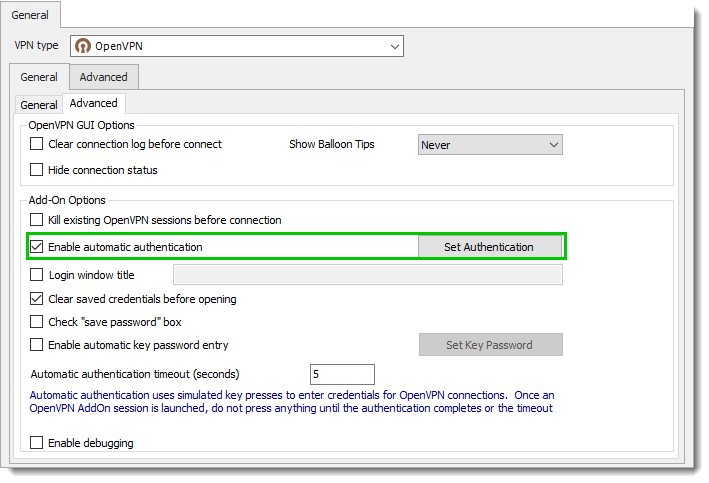
Instead of using the Automatic key password can you test with Enable automatic authentication option if the issue is the same?
Best regards,
David Grandolfo
OpenVPN_User.png
Hello,
thank you for your response. This option (enable automatic authentication) works fine for connection required only username and password. I use this method for another customers. But I have some customers who require authentication using certificate and it's password and it does not work. I cannot use option "enable automatic authentication" for this kind of connection.
Best regards,
Ales
Hi,
Just to be sure as suggested in the warning, have you tested without using a keyboard and mouse in the time the VPN starts?
Also, please run RDM as administrator it works.
Best regards,
David Grandolfo
Hello,
I don't use a keyboard or mouse during the VPN starts. I always run RDM as administrator.
Ales
Hello,
I had a chat with the engineering department and the automatic key password option search for an OpenVPN window base on the title. If OpenVPN language is set back to English, this might work.
I open a feature request ticket to add a Window title box option. After revision they will confirm if the feature request is approved.
Best regards,
David Grandolfo
Hello David,
thank you for your advice. I have tried it on 3 computers with the same configuration (the same version of the OS, VPN and RDM) and I have 3 different behaviours. The first computer works fine. The second computer works only just after start OS (another attemps are unsuccesfull). After restart OS the only first attempt works again. Third computer works as I explained before (it fills only part of the password and login window is stopped). Do you have any idea?
Ales
Hi,
Does every computer have the following configuration?
RDM 14.1.3 or RDMF 5.1.3
Under Tools -- Add-on Manager, the OpenVPN Add-on is version 2.8.0
OpenVPN GUI version is 11.10.0.0 or above
RDM is started as administrator
OpenVPN language is English
Best regards,
David Grandolfo
Hi,
All computers are a virtual machines with the same configuration:
OS - Windows 7 Enterprise SP1 32-bit
RDM 14.1.3.0
OpenVPN add-on 2.8.0.0
OpenVPN 2.4.6-I602 (OpenVPN GUI 11.10.0.0) - OpenVPN language is English
The UAC (User Access Control) is enabled on level 1 (this setting of UAC is the best option for OpenVPN and Cisco AnyConnect).
RDM is started as administrator.
Virtual platform is Virtualbox in actual version (5.x and 6.x).
If I run the virtual machine under windows host, the only part of the password (or no password) fills and login window is stoped.
If I run the same virtual machine under linux host, the password fills well and VPN is connected.
Do you have any explanation for this behaviour?
Hello,
I have seen this issue of half password being entered with Cisco AnyConnect in the past and this was caused by UAC on Windows 7.
Have you tried to completely disable the UAC on your Windows 7 computer?
Do you encounter the same issue on a Windows 10 computer?
Best regards,
Jeff Dagenais
Hi,
I posted a similar issue month ago. Two of my colleagues have the same problem.
Username is entered only partially.
OS is Win10. RDM Enterprise, always newest version.
We use Sophos SSL VPN. It worked for a long time without issues and suddenly the problem occurred.
Worth mentioning: Both colleagues got new SSDs.
If I compare the process between slower clients and faster clients, It works 100% of the time with slower clients/SSDs,
but not with the faster ones. Is it a timing issue? May we get a new field to delay the input?
We use RDM without administrative privileges, as this is standard for most customers/applications and us for security reasons.
Regards
Daniel
Hi ,
After discussion with the engineering department, we are not sure where the issue is coming from. RDM send key to fill Username and Password. We will add an option for setting credentials in a temp file. Our internal ticket number is RDMW-2135.
As soon as the feature is release/tested we will inform you. The engineering department should look at this issue shortly.
Best regards,
David Grandolfo
Hello David
Sorry for my late replies in regards to the support you offered me to troubleshoot this further. Have had some rough weeks.
I would still very much like your help, so if you are still interested in taking a look at this, you're welcome.
Best regards
It definitely seems like a timing issue to me. It's like it isn't waiting long enough for the OpenVPN Credentials window to appear, or isn't registering correctly when it appears. Seems that it is writing out the credentials way too early.
Hi Joe,
Thanks for the details, as soon as the new add-on will be release we will inform you.
Best regards,
David Grandolfo
Hello David
Just noticed that an update to the OpenVPN addon was pushed out yesterday.
Updated it just now.
Got the option to enable "Use authentication file" now, but where should I place this file, and how much information should it contain ?
Nothing is stated in the GUI about this, as far as I see.
Regards
So I played around with it some more, I was too quick in my reply above. I see now that the OpenVPN client is looking for the file vpn.my-domain.dk.pwd, which it states it can't find. I tried to create it manually in the OpenVPN configuration directory filling in my username and pw in the file. Connected through the OpenVPN GUI right away (I see that RDM already modified the .ovpn file to use the .pwd file).
Could not get it to work when starting the VPN connection from RDM.
I deleted the OpenVPN configuration for the entry in RDM, setting it up from scratch again.
I import my .opvn file, ticks the "Enable automatic authentication" --> Enters my credentials in the GUI --> ticks the "Use authentication file" --> ok.
When I start the VPN from my RDM I see that the configuration folder and the .ovpn file just tied to the entry is copied over to the folder "C:\Users\joe\AppData\Local\Devolutions\RemoteDesktopManager\OpenVPN\vpn.my-domain.dk" along with the .pwd file that RDM created. Then the OpenVPN GUI shows, shortly after I see that the .pwd file is removed from the folder, and the OpenVPN GUI states "Error opening 'Auth' auth file: vpn.damgaard-automatik.dk.pwd: No such file or directory (errno=2)"
It seems like the .pwd file is automatically deleted before OpenVPN GUI has read it, or something similar to that. As stated it works perfectly if the VPN is started from the OpenVPN GUI instead of started from RDM.
Regards
Hi Joe,
Thanks for the tests, it's exact we delete the .pwd after 10 seconds of starting the VPN connection. If you test OpenVPN without RDM, just with the OVPN and pwd file directly in your Documents folder. Could you tell me approximately how long the server took for the authentication?
Best regards,
David Grandolfo
Just did some more testing.
My OpenVPN logs states this, when starting the VPN from RDM:
As you can see it first gives an AUTH_FAILED. I took a look at the vpn.my-domain.dk.pwd file that RDM created, the username on first line is right, but the password is wrong, I guess that could be because you encrypt the password in some way? When I tested this, I created my own .pwd file containing the username and password in clear text, and it works with this file just fine.
If I try to start the VPN from OpenVPN GUI using the .pwd file that RDM created, it fails too - I'm guessing that's because that it isn't the right password in the .pwd file - at least not the password written in clear text.
Hope this helps you.
I guess that after it fails at the first try - probably because of the wrong/scrambled password in the .pwd file, it tries again and at this moment RDM deleted the .pwd file, leading to the "Error opening 'Auth' auth file: vpn.my-domain.dk.pwd: No such file or directory (errno=2)"
The password in the pwd file is encrypted, I tested the same scenario with OpenVPN 2.4.6 and 2.4.7 and it works.
You are running the version 2.4.4, could you update OpenVPN and test if the password is still incorrect.
Regarding "No such file or directory" error it's probably because RDM have already delete the file base on the delay (that we will increase)
Best regards,
David Grandolfo
Just tried upgrading my client to 2.4.6 (2.4.6 x86_64-w64-mingw32).
Still having the same problem as above.
I can see that RDM creates the pwd file, but the log still terminates with: AUTH: Received control message: AUTH_FAILED.
Tried to make a copy of the pwd file that rdm creates, before it got deleted. When starting the VPN from the OpenVPN GUI using the copied file, I see the errors above. When I edit the pwd file to contain the password in clear text it works right away.
I wonder if I have to include anything in my .ovpn file to handle the password in your encrypted format, or if I should enable anything at the OpenVPN-server to allow this ?
Hi,
After feedback we found an issue in the Add-on. We overwrite the current Add-on.
DeleteOpenVPNAddOn.dll at %localappdata%\Devolutions\RemoteDesktopManager.
And download the version 2.9.0.0, in this version the password is in clear text and the delay before deleting the pwd file is increase.
Best regards,
David Grandolfo
Hello David
Works now, fantastic!
The only problem now is that it does not always close the VPN connection after a session is closed, even though it is configured. Some times it does, and sometimes it doesn't. Currently running RDM without admin rights.
When running RDM as admin it does always close the VPN connection as supposed. I guess this works by killing the OpenVPN Interactive Service as it has actually rights to do that as admin.
When launching my OpenVPN GUI outside RDM (after having closed a VPN in RDM as admin) I get the error message that: "OpenVPNServiceInteractive" is not started. Which is of course because RDM killed the process when closing the tunnel. I think it would be a good idea if you implement it so that when closing a VPN in RDM it either closes it without killing the OpenVPN Interactive Service, or at least is restarting the service after the VPN is closed so that I won't have problems when opening the OpenVPN GUI afterwards.
It would be nice if RDM could reliably close the VPN every time without needing admin rights, but I don't know if that's possible ?
Thanks
Regards
Hi Joe,
We are currently working on the feature to open multiple OpenVPN. This feature can be followed at https://forum.devolutions.net/messages.aspx?TopicID=29939&MessageID=117607#post117607 and I know that we will change the way we close session.
I will add your note to the ticket and look if we could find a way to do it.
Best regards,
David Grandolfo
Thanks for the link and your update.
Looking forward to see this implemented.
It is usable as it is now, which is great.
Thanks for your time and help!
Regards
Hello,
Thank you for your feedback!
Best regards,
David Grandolfo

Hello,
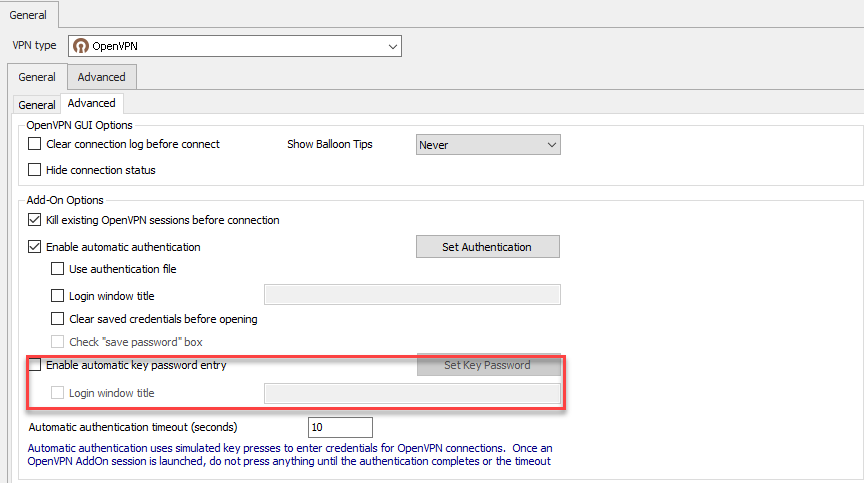
A new "Login window title" setting has been added to the OpenVPN properties in General->Advanced.
It will be included in the next release of RDM.
Best regards,
2019-03-20_16-02-13.png
Hello Carl
What can I achieve by using this new option ?
Regards
Joe
It does almost the same thing as "Enable automatic authentication" but it's for connections that requires only a key password.
Best regards,
Aah okay, thanks for the clarification.