run event before opening RDP session

hi!
I want to start a powershell script before the session starts and wait for it before launching the RDP session.
what are the prerequisites for this to work? must the execution policy be changed/different from the Windows standard?
is it possible at all to not start an RDP session if a script returns $false?
KR
Guenther
All Comments (19)
Hello,
In the Events tab of an entry, there is the Before Connect event. This will execute the script and the RDP session will open no matter the result of the script.
I will check with the engineering department if we can do something about what you are looking for.
Best regards,
Érica Poirier
hi Erica,
any news on this?
KR
Guenther
Hello,
Sorry for that late reply.
After a discussion with an engineer, yes it is possible to start the connection depending on the result of a script. Here is a quite simple example in Events - Before Connect - PowerShell using the $RDM.Cancel property to prevent opening a session. You need to set it to $true to prevent RDM opening the session. Let me know if this will help you to achieve your goal.
Best regards,
Érica Poirier
hi Erica,
thanks! it works ... but only if the machine is reachable/online.
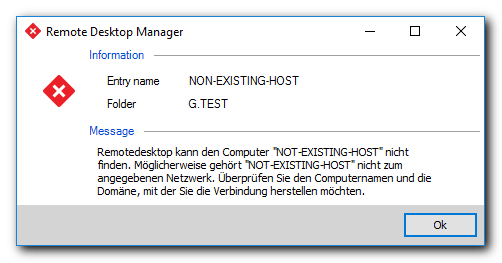
If the machine does not exist or is shutdown I get an error and the script is not executed at all.
The goal is to suppress this check and run the script/try to connect to the host.
I could not find an option to disable this behaviour nor could I find an option why RDM behaves like this.
Please let me know how this can be achieved.
KR
Guenther
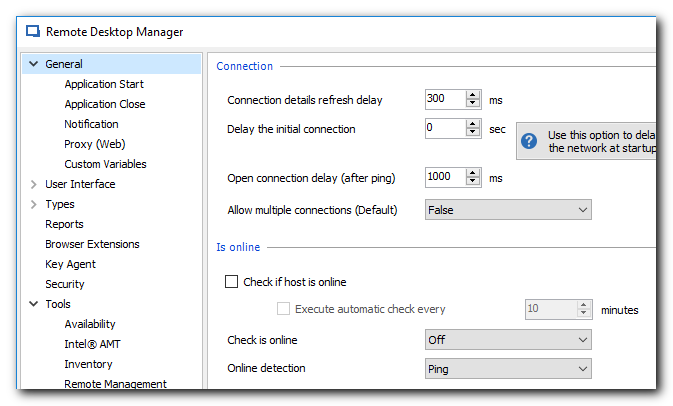
RDM_settings_online_check.png
RDM_not_existin_machine.png
Hello Guenter,
To disable these error messages, please check the Disable embedded RDP error message in File - Options - Types - RDP.
Best regards,
Érica Poirier
Thanks again! now it works as wanted.
One last question: this option "Disable embedded RDP error message" has to be set on every client? or is it possible to set this option on the session/globally somehow?
KR
Guenther
Hello,
Thank you for your feedback and glad that it's working.
This option is a local settings and needs to be applied on every single client application. The method to set this option for all users is to create a Custom Installer Package in which the option is set.
https://help.remotedesktopmanager.com/installation_custominstallerservice.htm
Best regards,
Érica Poirier
When using Launcher and DPS - is there any way to show these entries with PowerShell scripts attached to the Events page to only Windows RDM Clients?
KR
Guenther
Hello,
There is no property that will prevent the DPS web interface to display these entries in the sessions list of the web interface or prevent to launch them using the Launcher. Let me check with the engineering team about this.
Best regards,
Érica Poirier
Hello,
From a discussion with an engineer, we will consider it as a feature request and it has been added on our TODO.
As our next major release is already planned out, the engineering team may not analyze this feature request before March for sure. Maybe later. We are very sorry about that.
Best regards,
Érica Poirier
Thanks! Appreciated!
Hello,
Sorry for that late reply.
After a discussion with an engineer, yes it is possible to start the connection depending on the result of a script. Here is a quite simple example in Events - Before Connect - PowerShell using the $RDM.Cancel property to prevent opening a session. You need to set it to $true to prevent RDM opening the session. Let me know if this will help you to achieve your goal.
Best regards,
Where can I found all functionality available with the variable $RDM?
Hello,
The $RDM variable contains all properties of a given object like a RDP entry.
Sadly there is no documentation available on the properties of all existing objects in RDM. But you can verify the object's current properties in Home - Copy - Preview.
Let me know if that helps.
Best regards,
Érica Poirier
Not sure to understand where we can see preview.
Hello,
The Preview tab is available when you click on the Copy button. Then the Copy Options dialog will be opened.
Let me know if that helps.
Best regards,
Érica Poirier
When I'm doing that, I have this message:
Maybe a forget something.
Hello,
You need to have the View Password permission to be able to use the Copy feature.
Best regards,
Érica Poirier
Ok in my case, the Shared Data Source, hope is the good name, is managed by some others but if I want to see that, I can just create a local one and created each entity possible and try to map functionality available in $RDM object, right?
Hello,
That's correct, you can create a local data source to find out the properties of a any entry.
Best regards,
Érica Poirier
