VNC hidden off bottom right of screen. Not usable

https://www.dropbox.com/s/u3yza05emeyvxbr/Capture.PNG?dl=0
Not sure what to do about this; I've tried scaled/not scaled, which makes no difference. Not a lot of other options to try.
It works OK in the RealVNC viewer so it's not a server-side issue.
All Comments (3)
Hello,
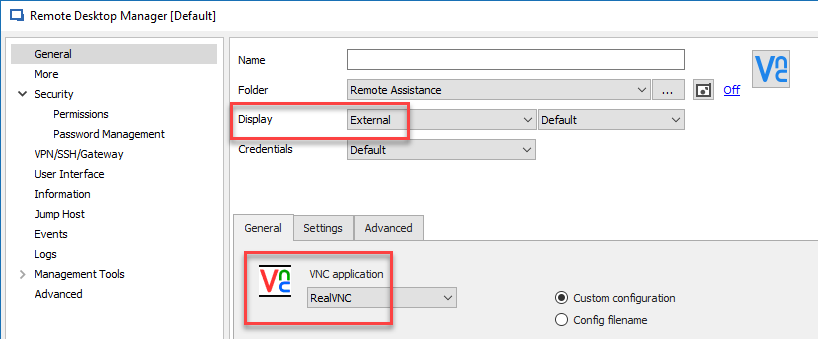
If its's working with RealVNC, I suggest using RealVNC in RDM instead of integration.
To do so, you would need to configure your session like the following
Best regards,
Jeff Dagenais
2019-01-09_19-38-11.png
Do you have a specific VNC server that you connect?
Regards
David Hervieux
Today when I opened up the connection configuration dialog to have another look at it I noticed that the "VNC Application" dropdown had two options, as it did before, "default" and "UltraVNC". But now, when default is selected, it works. Selecting UltraVNC still doesn't.
Odd, as I'm sure I tested this before and the behaviour of both options was the same. Has my using RealVNC somehow changed the default value?
Anyway, it's working so I'm happy. Thanks for the replies.