RDM Integrated security feature questions

Disabled
Hello Devolutions Team,
a few weeks ago we've bought your Remote Desktop Manager for the whole company. Our goal is to manage all connections and passwords in one secure place.
After reading a lot in the manual and in the online help I've a few questions for the infrastructure design.
So first of all we want to use the Active Directory authentication. When I got it right, we need the Devolutions Password Server for full AD Support. But I think the feature "Integrated security" will be enough for us.
I've setup an SQL Server instance for the RDM database. Then I did the basic setup as described in the manual. After this I configured the "Integrated security". There's my first question: When I set it up how it is described in the manual, all domain users are logged in as "sa" (My Database User). So I had to change the login method to "Integrated security" in the data source setup. But I'm missing this step in the manual and in the online help. So is this right oder did I something wrong?
After this the login for the domain users works great. But when I understand this right, the users always need an SQL login? So the users can connect with an SQL Server Management Studio to the database? And when I have to rename a user in the Active Directory I have to rename him in RDM, too?
And now my biggest concern: I need at least one Active Directory user who ist the global admin of RDM, who can create users and manage the permissions. But in this setup every admin in our company, who have access to the Active Directory is able to reset the password of this user and can get full access to everything. Is this correct?
I hope you can bring us a little bit clarity in this setup, so that we can start to use RDM in our company.
Greets
Daniel
All Comments (5)
Hello Daniel,
Thanks for contacting support, the issue describe above could be due to multiple configurations.
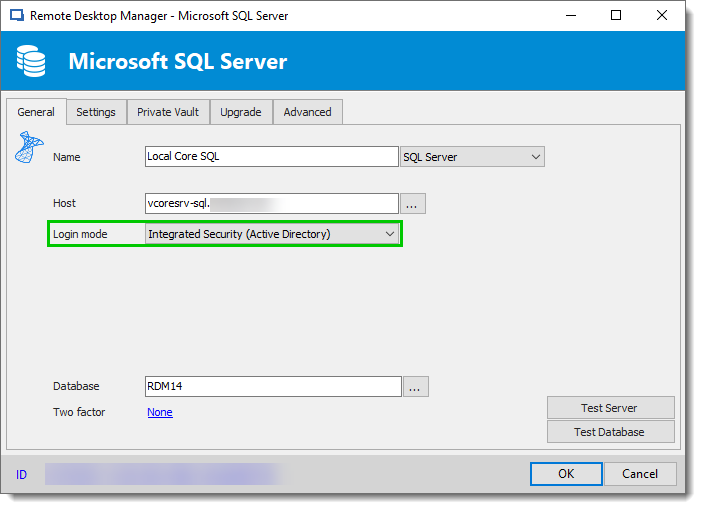
Let's start with the configuration of RDM. In the Data Source configuration, could you confirm that users do not use Database Login but use Integrated Security like my print screen below:
If so, RDM Data Source configuration is good. Otherwise, please have a look at this help topic for how to configure the AD Integration with an SQL data source.
https://help.remotedesktopmanager.com/datasource_sqlserver.htm
If RDM configuration is correct, the second verification is to confirm that you manually create the user with the Integrated security (Active Directory) check box.
It's important to never create users by using any AD Groups in the database, this could cause security issues.
Base on your concern, if a user is not sysadmins nor RDM Administrator. He should be able to have access in RDM to what his account is limited to. Of course we are not able to block this user to reset another AD user password and use other user's account.
We recommend for theses reasons to use Custom Login account with SQL Server data source. It's not AD integration, but it adds a level of security.
That being said, you could protect the database by adding a Security Provider, this prevents administrators without this key to use a copy of the database directly.
Best regards,
David Grandolfo
SQL_IS_Configuration.png
Disabled
Hello David,
thanks for the quick reply.
Yes I set the Login mode to "Integrated Security" like in your screenshot. But I think it's missing in the documentation. I didn't find that information in the manual and in the online help, so I wasn't sure if I did this right.
Ok based on this information I understand that I've to create for every user in our company a RDM Account and an SQL Server Account (Yes I know I can check the automatic creation). And you told me that we shouldn't use AD Groups. When I have to rename a user in the AD, I have to rename it in RDM and in den SQL Server, too?
One another question:
I've configured the Security Provider with an certificate. What happend when the certificate expired? I think then I don't have access to the database and can't upload a renewed certificate? Or is there an emergency access for this scenarios?
Hello,
By renaming an AD account, RDM will not be able to recognize it. The user has to be recreated in RDM. Private vaults and user-specific settings also have to be export and import for the new user.
Regarding the security provider question, with Certificate as Security Provider, entry configuration data is encrypted using a mix of a key stored in RDM and the private key contained in the certificate. The expiration is not used. So you will still be able to connect to the database.
For information, Devolutions Password Server as a layer between RDM and the database could link RDM and AD Groups for security purpose. Devolutions Password Server which is an IIS server also support the usage of Certificate as security providers and to connect to the server itself.
Best regards,
David Grandolfo
Disabled
Hello David,
thanks for the answers.
Ok, after talking with my team leader, I think we want to use the custom login, because of security concerns.
It is possible to link an password template or a password policy to the local user accounts?
Hello Daniel,
Under Data Source Settings --> Applications, RDM could be forced to use Windows Credentials or Google Authenticator with the options check.
That being said, under Data Source Settings -- General -- Security, we could alsoforce users to configure a 2FA before their RDM application (all platforms) could connect.
Best regards,
David Grandolfo