Support TLS 1.2 & TLS 1.1 for built in FTP Client
0 vote

Right now the only allowed protocols are TLS 1.0 and SSL 3.0. Support for TLS 1.1 and 1.2 would allow me to connect to servers using the built-in clients securely. Thank you!
All Comments (9)
Hello,
I will assign this to one of our developers. He will be able to answer when he gets back from the Holiday.
Regards
David Hervieux
Hi,
Our SSL/TLS connectivity is implemented using mbedTLS, which supports TLS 1.1 as well as 1.2. The option "TLS 1.0" includes those 2 TLS versions. So you should try connecting and let me know if it does not work.
Regards!
Denis Vincent
Hi there. Doesn't seem like it worked. I can confirm I can connect using WinSCP. Does your FTP client require a verified certificate?
--
13:10:27.495 Info Command: AUTH TLS
13:10:27.550 Info Response: 234 AUTH TLS OK.
13:10:27.552 Info TLS: State StateChange:Negotiating
13:10:27.608 Info TLS: Alert Alert:Alert was sent.
13:10:27.609 Info TLS: State StateChange:Closed
13:10:27.612 Error Info: Rebex.Net.TlsException: Connection was closed by the remote connection end. ---> Rebex.Net.TlsException: Connection was closed by the remote connection end. ---> System.Net.Sockets.SocketException: An existing connection was forcibly closed by the remote host
at System.Net.Sockets.Socket.Receive(Byte[] buffer, Int32 offset, Int32 size, SocketFlags socketFlags)
at Rebex.Net.JPD.Receive(Byte[] buffer, Int32 offset, Int32 count, SocketFlags socketFlags)
at Rebex.Net.ProxySocket.Receive(Byte[] buffer, Int32 offset, Int32 count, SocketFlags socketFlags)
at Rebex.Net.YZD.BT(Int32 D)
at Rebex.Net.YZD.ST()
at Rebex.Net.YZD.RT()
--- End of inner exception stack trace ---
at Rebex.Net.YZD.RT()
at Rebex.Net.YZD.AT()
at Rebex.Net.OLD.OV(TlsParameters D)
at Rebex.Net.Ftp.VI(TlsParameters D, FtpSecureUpgradeType J)
at Rebex.Net.Ftp.NH(String D, Int32 J, TlsParameters L, SslMode C, FtpSecureUpgradeType Q)
--- End of inner exception stack trace ---
at Rebex.Net.Ftp.NH(String D, Int32 J, TlsParameters L, SslMode C, FtpSecureUpgradeType Q)
Hello,
As per the logs above, you are using a Rebex FTP session type, which is a third party that we have integrated in RDM.
It's not the session type that we have build internally.
Could you create a new entry using this FTP session type instead and give it a try?
Best regards,
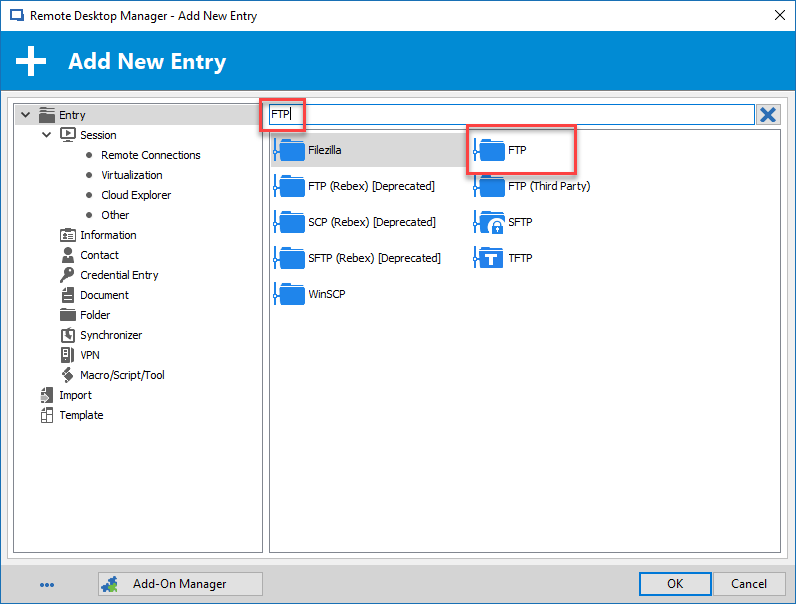
Jeff Dagenais
2019-01-03_14-19-40.png
Hi,
And to answer your question about certificates: they are validated against the system's certificate store. But a self signed certificate will make RDM ask if you want to accept it or not. Depending on your answer, the certificate may be added to a RDM specific store to be accepted automatically afterwards.
Regards.
Denis Vincent
I just keep getting "Error: Unable to establish the connection. Please make sure your connection settings are valid."
Can confirm that "No Security" FTP mode works but when "Explicit TLS or SSL" is checked with TLS 1.0 / SSL 3.0 I get an error. I have tried with both "Clear command channel" and "Secure Transfers" checked.
Here is the server and protocol information.
Remote system = UNIX Type: L8
File transfer protocol = FTP
Cryptographic protocol = TLS/SSL Explicit encryption, TLSv1.2
Encryption algorithm = TLSv1/SSLv3: ECDHE-RSA-AES256-GCM-SHA384, 2048 bit RSA, ECDHE-RSA-AES256-GCM-SHA384 TLSv1.2 Kx=ECDH Au=RSA Enc=AESGCM(256) Mac=AEAD
Compression = No
------------------------------------------------------------
Certificate fingerprint
42:36:11:40:6c:3c:82:ca:28:1d:0d:93:49:7e:56:af:1f:d2:da:12
------------------------------------------------------------
Can change permissions = Yes
Can change owner/group = No
Can execute arbitrary command = Protocol commands only
Can create symbolic/hard link = No/No
Can lookup user groups = No
Can duplicate remote files = No
Can check available space = No
Can calculate file checksum = No
Native text (ASCII) mode transfers = No
------------------------------------------------------------
Additional information
The server supports these FTP additional features:
EPRT
IDLE
MDTM
SIZE
MFMT
REST STREAM
MLST type*;size*;sizd*;modify*;UNIX.mode*;UNIX.uid*;UNIX.gid*;unique*;
MLSD
AUTH TLS
PBSZ
PROT
UTF8
TVFS
ESTA
PASV
EPSV
SPSV
ESTP
WideSillySkua241[1].png
Hello,
I had a quick chat with Denis and it seems that there's an issue regarding this in RDM.
Our engineering department will work on a fix.
Thank you for your post.
Jeff Dagenais
Any news on this? After 4 years the problem still exists.
Hi,
I will check that shortly. To my knowledge it was supposed to work but apparently it is not the case. I will keep you informed.
Regards.
Denis Vincent