Duplicate entries when using variables

Remoted Desktop Manager is great. I'd like to be able to standardise a list of Workstations and Servers (Group Folders) by having all the folders have the name "$COMPUTER_HOST$ - $COMPUTER_IP$". This resolves to each of the folders actual host and IP address so they are unique after being resolved, but aren't unique as a name. The only way I can do this currently is but adding a random character to the name. Would it be possible to allow a duplicate name if after variable substitution that they resolve to a unique name?
I'm currently using 14.1.0.0 64bit on Windows 10 Pro. I have an Enterprise Edition license.
All Comments (6)
Hello,
Could you post a few screenshots of you configuration so that we can understand your structure and see what can be done in RDM to get what you want.
Best regards,
Jeff Dagenais
Hello Jeff
Sure. I want multiple instances of the following in the same folder. The values in IP address and Host for each are unique, so the resultant names are unique after variable substitution, but not before.
RemoteDesktopManager64_hi6OnQy2cn.png
Hello,
As we understand, as example, you have 3 different folders, but the host and IP address are the same in the 3 folders. Then, you would like to have a character inserted automatically at the end (of beginning) inside the name field to differentiate them. If it's the case, unfortunately, there's no option or feature to accomplish this in RDM. You would need to edit your folder(s) manually and update the name field.
Best regards,
Jeff Dagenais
Hello Jeff
Thank you for trying to help, but there is a misunderstanding.
3 folders with unique (different from any other instance in the entire database) host and unique IP address. Lets pretend that these are the following:
Host: A
IP Address: 192.168.2.2
Host: B
IP Address: 192.168.2.3
Host: C
IP Address: 192.168.2.4
The name using the variables in the above attached image is the same across all 3 folder and all have the exact same parent folder.
Folder Name: $COMPUTER_HOST$ - $COMPUTER_IP$
Folder Parent: Site A
Host: A
IP Address: 192.168.2.2
Folder Name: $COMPUTER_HOST$ - $COMPUTER_IP$
Folder Parent: Site A
Host: B
IP Address: 192.168.2.3
Folder Name: $COMPUTER_HOST$ - $COMPUTER_IP$
Folder Parent: Site A
Host: C
IP Address: 192.168.2.4
Once the variables resolve (display to the user), it will look like the following:
Actual Folder Name: $COMPUTER_HOST$ - $COMPUTER_IP$
Displayed Folder Name: A - 192.168.2.2
Folder Parent: Site A
Host: A
IP Address: 192.168.2.2
Actual Folder Name: $COMPUTER_HOST$ - $COMPUTER_IP$
Displayed Folder Name: B - 192.168.2.3
Folder Parent: Site A
Host: B
IP Address: 192.168.2.3
Actual Folder Name: $COMPUTER_HOST$ - $COMPUTER_IP$
Displayed Folder Name: C - 192.168.2.4
Folder Parent: Site A
Host: C
IP Address: 192.168.2.4
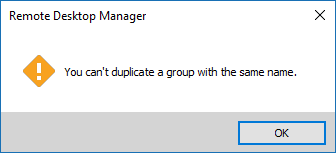
Hopefully this better explain what I'm saying. Remote Desktop Manager doesn't support the actual folder name being the same, even though the displayed folder name is unique. This makes variables less useful, as they can't be used for standarising names.
Hello,
I have recreated the folders structure as described in your post above and I was able to see what you mean.
I have also received an error message
I have opened a ticket to our engineering department so that they can have a look at this.
The ticket number is DEVO-1392.
Best regards,
Jeff Dagenais
2018-12-21_09-47-10.png
Hello,
After analysis, we currently don't have a solution. The reason for that is because of how groups are handled, which is by name instead of ID. This isn't something we can change easily, but we'll stay on the lookout for a solution or workaround that could fix your issue.
Regards,
Hubert Mireault