Error msg when opening RDP sessions???

Ive started getting an error popup when opening RDP sessions recently although it still connects ok id like to resolve it as its anoying having to click ok all the time.
the error i get is this :
System.IO.IOException: The specified registry key does not exist.
at Microsoft.Win32.RegistryKey.Win32Error(Int32 errorCode, String str)
at Microsoft.Win32.RegistryKey.GetValueKind(String name)
at Devolutions.RemoteDesktopManager.Managers.PolicyManager.get_IsRDPRestrictedAdminModePolicyEnabled()
I can see its got something to do with Restricted Admin Mode but i dont use that on any sessions and ive checked my local group policies and its not set there? The error does go away when i enable Restricted Admin Mode on a session though so i assume that points to a reg setting problem perhaps?
Any ideas?
Thanks
JK
JK
Devolutions Force Member (and Long time Devolutions Fan)
All Comments (4)
Hello,
We will take care of this.
Regards
David Hervieux
Hello,
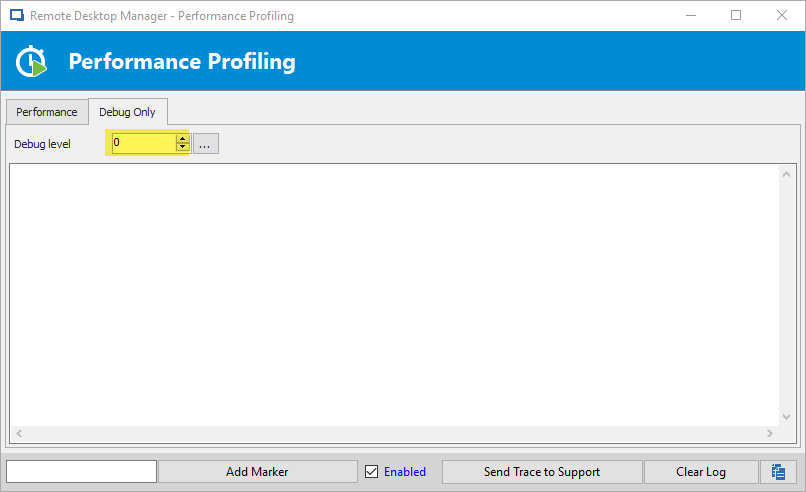
Could you take a look to see if the profiler is enabled? You can check by going in the "Help" tab of the ribbon then clicking on the profiler. In the debug tab, could you make sure the value is set to 0?
Regards,
Hubert Mireault
Profiler is on, but how do i disable it i tried unticking Enabled but it just comes on again?
JK
JK
Devolutions Force Member (and Long time Devolutions Fan)
You need to make the debug level be 0 like so:
Please let us know if this works.
Regards,
Hubert Mireault
2018-12-18_10-21-12.png