Cyberark Privileged Access Solution
Current integration
We offer two credential entry types to get passwords that are stored in a Cyberark vault.
The first one is named Cyberark AIM and, as the name implies, it gets the passwords in a AIM server that typically resides in your own infrastructure. That being said, authorization is still performed against your PAS server, that means that this integration is not available offline.
The second one is simply Named Cyberark, it performs authorization, and also gets the credentials directly from the PAS. It reflects more closely the usage pattern of entry level customers of the PAS solution.
Our current limitation is that we cannot list credentials that one has access to in order to offer a list to pick from. This means that all credentials that you need to access, need to have a corresponding entry in RDM. We can work around that limitation by using the PACLI to extract a csv, which can then be imported in RDM.
Coming features
We are currently working on integrating the PSM, which would reduce the workload of sysadmins that have to handle creation and management of alternate shell commands in tens of entries. We will offer a mechanism, much like a gateway, which will create a single PSM server to a great number of sessions.
We recommend that you subscribe to new replies to this topic, as we will publish a notice when the feature can be tested. Please be advised that Cyberark must approve any integration before we can render it available to our community.
Best regards,
Maurice
All Comments (68)
Thanks for the update, any indication on how far we are away from the PSM/GW solution.
As a organization that uses both methods it would be great if there was a way to choose between methods (PSM vs GW) or give them a priority order?
Hello,
It turns out that another integration had been prioritized before this one, luckily it has just been completed. Engineering should start on this in the coming days.
Its a few days work, but intertwined with bug fixes and the daily whirlwind, it should be done in a release or two.
Sorry about that.
Maurice
We're also evaluating CyberArk PSM, and are using a RDM Enterprise version, so we're really keen on testing these new features as soon as they're coming out, please keep us posted.
Please also note that we are using different multifactor tools to access CyberArk PSM, including RSA tokens, so it would be great if we can combine those features. I'll post a separate feature request to create a credential type of RSA for that.
Hello,
we are almost ready to showcase our integration to Cyberark’s team. if they accept it as is, it should be a matter of weeks before the feature is delivered in a beta. I cannot say for sure when it will be available in a General Availability release though.
For RSA, we are at the initial phases of being able to work with them, and i mean just at signing their non-disclosure agreement. The whole process could takes months, can’t says for sure before we get access to their documents and platform.
Best regards,
Maurice
Thank you for the continued status updates! Look forward to that Beta more than you can imagine!
Has there been any progress in regards to the CyberArk PSM integration?
Hello,
The feature is currently going through the testing phase internally with the QA departement.
best regards,
Alexandre Roy
I can see that the Beta have got some of this work now, Do we have some documentation on how to setup and use it?
@Anders Anderson,
The PSM feature is not available yet. We are still in the improvement process and the approval process from CyberArk.
We will post it here when it will be available and in which version of RDM.
Best regards,
Jeff Dagenais
Well I am running with version: 2019.1.3.0 and I have access to "CyberArk PSM Connection" and "CyberArk PSM Server".
Is this not the features your are working on?
or have it been released into the beta to soon?
Hello,
we need to get reviewed by Cyberark with production ready code, but we cannot call the feature as complete until it’s vetted by them.
i realize that our mistake was including it in the release notes, ill see what we can do about fixing that.
best regards
Maurice
Sorry looking for some clarification, does that mean the beta code is running in 2019.1.3.0? Or is the Feature still completely unavailable until the production ready code is released?
Hello,
You see the feature, it is there.
It's not in Devolutions' DNA to withhold features only for our major releases. We typically have two major releases per year, which contain new features that require a lot of testing, or change the DB schema.
Throughout our minor releases, we do publish new features that have limited impact on the operations of our products.
The PSM integration, having never been published, therefore not being used by anyone, also not impacting the data access layer, nor the security system, fits that bill.
It will appear in our release notes when the business process has taken its course.
Best regards,
Maurice
Greetings,
I am being asked by management to get a date when the PSM feature may be available in a major release. Do you have a roadmap that I can share with them?
Hello,
The PSM integration has not being approved by CyberArk so it's not possible for us to release this integration in an official release.
Unfortunately, I cannot provide you any timeline regarding this.
Best regards,
Jeff Dagenais
Is there a new version that will have an updated integration in the works or something? Basically what does this mean?
Hello,
When RDM 2019 will became an official release and when the CyberArk PSM feature will be officially included, I will post in this thread with an available download link.
Unfortunately, I don't have an exact release date for the moment.
Best regards,
Jeff Dagenais
Hello,
Just a quick update to inform you that we are still working with Cyberark on getting approval. It turns out that we've had to initiate a process to switch from a virtualized environment provided by CyberArk, to an on-premises environment integrated with our Domain.
Setting up that environment is planned for next week.
Best regards,
Maurice

Disabled
Hello, are there any updates? I used RDM in the past and I'd like to suggest to use this product in our company, but we would need CyberArk PSM integration including RSA authentication
thanks
Jan
@j17,
CyberArk PSM is integrated in RDM, however, if I remember correctly, the API/SDK provided by them doesn't support the RSA authentication feature.
I would need to very with our business architect, but this could take a few days because because of the summer vacation.
Best regards,
Jeff Dagenais
What version is CyberArk PSM in? I would like to test this out.
Hi Andrea,
Base on the discussion we had with CyberArk our integration works fine with the latest version of CyberArk PSM.
For information, you need to configure CyberArk PSM Server first and then CyberArk PSM Connection.
CyberArk PSM can be tested with RDM 2019.1.41.0.
Best regards,
David Grandolfo
Is there documentation on how to set it up? We have had CyberArk fully implemented for the last 6 years.
Hello,
The documentation is on our todo list, but we tried to build them easy to configure.
CyberArk PSM needs to be configured, if you need help for this, please contact CyberArk.
Looking at CyberArkPSM Server, it requires the CyberArk Server (the PSM Server) then a Username, Domain, and Password. We add the requirement of an RDP Template.
Create an RDP template on your team data source by following the help topic https://help.remotedesktopmanager.com/file_templates.htm .
The latest parts are which Connection components are enabled on your PSM server. You have to look with your PSM expert.
Once the PSM Server is configured, you create as many PSM Connection you want. For then, you need the information:
Best regards,
David Grandolfo
Disabled
I have found the PSM server & PSM connection additions (As a vault admin this makes me very excited), but I need to know, what information is required in the RDP Template to make it work. I just tried one I have lying around and PSM didn't accept it. While I know documentation is coming, it would be great to get an example of the RDP template.
Hi,
The connection components are related to the session type you start. As an example, I set it to PSM-RDP for an RDP connection.
My CyberArk Server configuration looks like this:
Best regards,
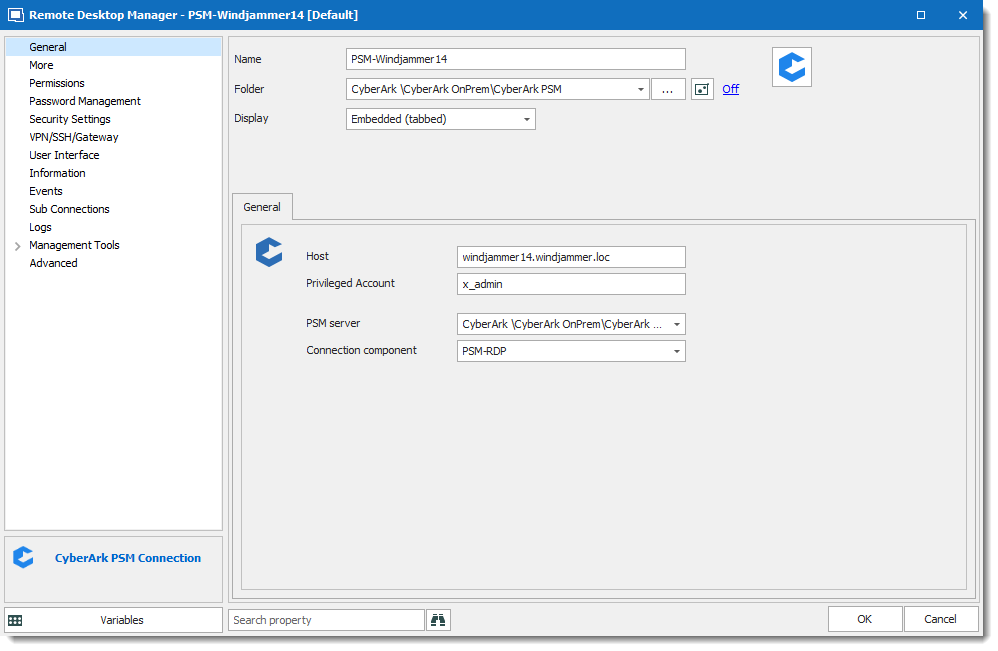
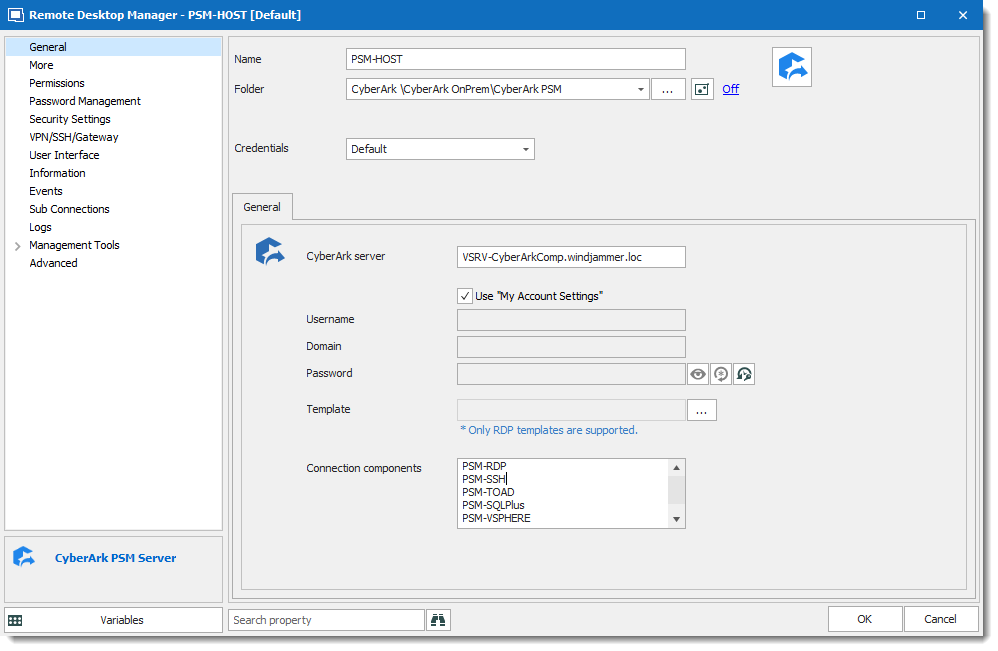
David Grandolfo
CyberArk_PSM_Server.png
CyberArk_PSM_Connection.png
When I attempt to create a PSM Server Entry I am prompted for Template. Where can I find information on how to create said template?
psm.png
Hello,
The templates can be accessed and created from File -> Templates -> Templates.
The RDP Template can be very basic (default values), or adapted to your preferences.
I hope this helps!
Best regards,
Alex Belisle
Why is a template necessary though?
PSM Server just really acts as a gateway for the end point server. I expected RDM to use it in a similar manner as they would a Remote desktop gateway Server.
I am not understanding what settings I would need to apply in a template for a PSM Connection.
UPDATE
FYI to anyone else, I just created a blank template with no settings and applied it to this PSM Server entry and they subsequent PSM Session entries started working. I would still like some information on why you would put in this template or what purpose it is to serve though.
Thank you for continuing to update us on the CyberArk Developments, I have it working but came up against a huge stumbling block, it seems to have been developed with the Expectation that everyone using it would use the same Privileged Account!
I would like to see the ability to tie this Private vault search item as a feature request. However the inability to edit user settings in the current state is a bug imho
dev_CA_Bug.png
Hello,
You are indeed free to call this a bug, but we are driven by community requests and have gone in line with feature requests of our user community, while being subject to approval of architectural decisions by the CyberArk team.
As this stage, we are working on adding "Prompt with list", which is a huge advancement in our integration.
After that release, we very well could implement having a CyberArk PAS entry in your private vault, this would be better then a private vault search because their API has now moved to using accountIds, which allows us to add that hard link to a specific safe/account combination. Their textual search returns a list of entries when there is a partial match and it would prevent us from being able to use an entry in this case.
Best regards,
Maurice
What would be required to allow users to use the Edit "User Specific Settings" here so that people could specify the "Privileged account" they should be using?
the PSM integration is working great, with the exception of this option.
Hello,
I have a call with the CyberArk team on thursday to get approval on our newest iteration of our integration. I'll ask them to pre-approve the feature before we start thinking about it.
I'll get back to you next monday.
Best regards,
Maurice
Hi all,
@Maurice if you're driven by community request, then please add my name to the request list.
@Vincent03 : For CyberArk PSM Connection types we've followed the following feature from a tip I also got on this forum (don't know the link by heart):
If you now start the connection, it will give a popup listing all accounts from the folder created, lets you select one and the 'username' field is used !
CyberArkPSMConnection.3.png
CyberArkPSMConnection.2.png
CyberArkPSMConnection.1.png
@Ben05, thank you for sharing that information. It gets us closer but still doesn't exactly meet our needs.
@Maurice can you share any updates with us, or did you mean Monday the 24th?
Disabled
@vincent03
Agree that the inclusion of a template seems pointless.
Thank you so much for this! Just one less hurdle to get this working with SSH connections.
Hello,
Best regards,
Maurice
I don't think we reject it with the strength you think we do. My problem with the template was it was not intuitive as to what was needed. If it was documented that 'just create a blank template because of architecture" I'd of been fine! When I had to create it, it just added confusion in my roll out.
Also "User Specific Settings and Inheritance" are currently broken for Cyberark PSM entries. So not sure what you mean there, unless you mean it without the template it would break it for all other non-Cyberark related entries? Then Gotcha, that qualifies as "Because Architecture" for me!
I love RDM I really do! The frustration for us is that CyberArk is being forced upon us and we can't use our favorite tools with it. We are "This close" but it seems the timeline to get a few key things resolved is TBD which does not inspire hope.
There are 3 solutions that could resolve these current issues.
1. Enable User Specific Settings - I can imagine how difficult that would be and imagine it would take time
2. Enable Per User Custom Variables - I wouldn't think this would be too difficult and would be a great feature in adding flexibility to a great tool.
3. Programmatic Access to ALL OS Environment Variables - I am surprised this feature doesn't already exist. I'd think it would be more difficult to limit access to the specified Variables (%username%, %appdata%,etc) rather than just all Variables. This way I could create the Variable for PrivAcct in my OS then in RDM use %PrivAcct% in the Connection.
All said as a NON Developer, so I am very likely over simplifying.
Regardless I appreciate the responses and updates immensely!
Update, I figured out a work around this limitation.
- Create a normal session in Remote Desktop Manager with the following:
- Name: Server name / Label
- On the information Option fill out
- Host: FQDN of the target Server
- Back on the General tab|
- Host put in the name/IP of your PSM Server
- On the programs Tab Check "Start this Program on Connection:
- Program path and filename
- psm /u $CUSTOM_FIELD1$ /a $INFORMATION_MACHINE_NAME$ /c PSM-RDP
- Program path and filename
- Have your users right click on the folder to which you want to specify the Desired User account:
- right click it and navigate to Edit/Batch Edit/Edit Entries (user Specific Settings)
- On the Custom Fields tab on Custom#1 (or whatever you reference in your PSM Connection URL) list the desired Cyberark Account
The downside to this method is every time you create a new host entry your user either needs to batch edit again or edit their user specific setting for the new entries ah inheritance doesn't seem to work.
Is there any update on the CyberArk Integration?
Hello,
As of now, the integration of PSM has not yet evolved towards this, But it has been reported more than once, and that it would be a very interesting addition to the PSM component.
Let me see if something is blocking us from this.
Thanks for your interest, sorry for the delay for this answer.
Best regards,
Alex Belisle
Where can we get the PSM add-on? I don't see it as a option in RDM Version 2021.2.15.0
@sfriday,
Are you in trial or you are a current customer?
In the New entry window, if you type cyberark in the search field, what are you seeing?
Best regards,
Jeff Dagenais
just trial. I guess its not in the free version.
@sfriday,
Our sales department should have contacted you already to provide you the proper trial license to test out RDM as well as the CyberArk integration.
Best regards,
Jeff Dagenais
Goodmorning, I hope to write on correct forum
We are using RDM through Cyberark enviroment and we launch connection throught PSMP as show belove
but fhe utility "comand post login" doesn't work ( I suppose i launched on login on PSMP)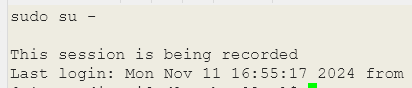
I've try to set an higher delay with out succes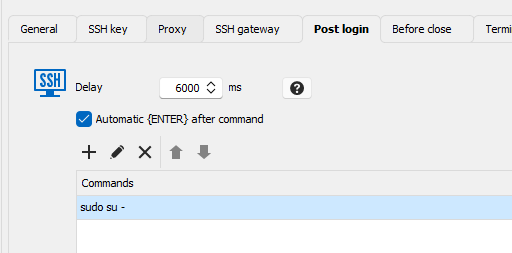
thanks in advance
e2c72307-8fdd-4550-a00b-abc470806ce6.png
696ca63e-380b-45be-9d50-5120a069300e.png
b45d6ce9-d724-4b8c-9cdc-0a3312d5682b.png
Hello!
Thanks for reaching out.
As you can see, your "sudo su -" command was indeed sent, but the PSMP prompt was not there yet.
The best way to achieve this would be to leverage the "expected prompt." In my example, I copied the prompt RDM has to wait for to send the "ls" command.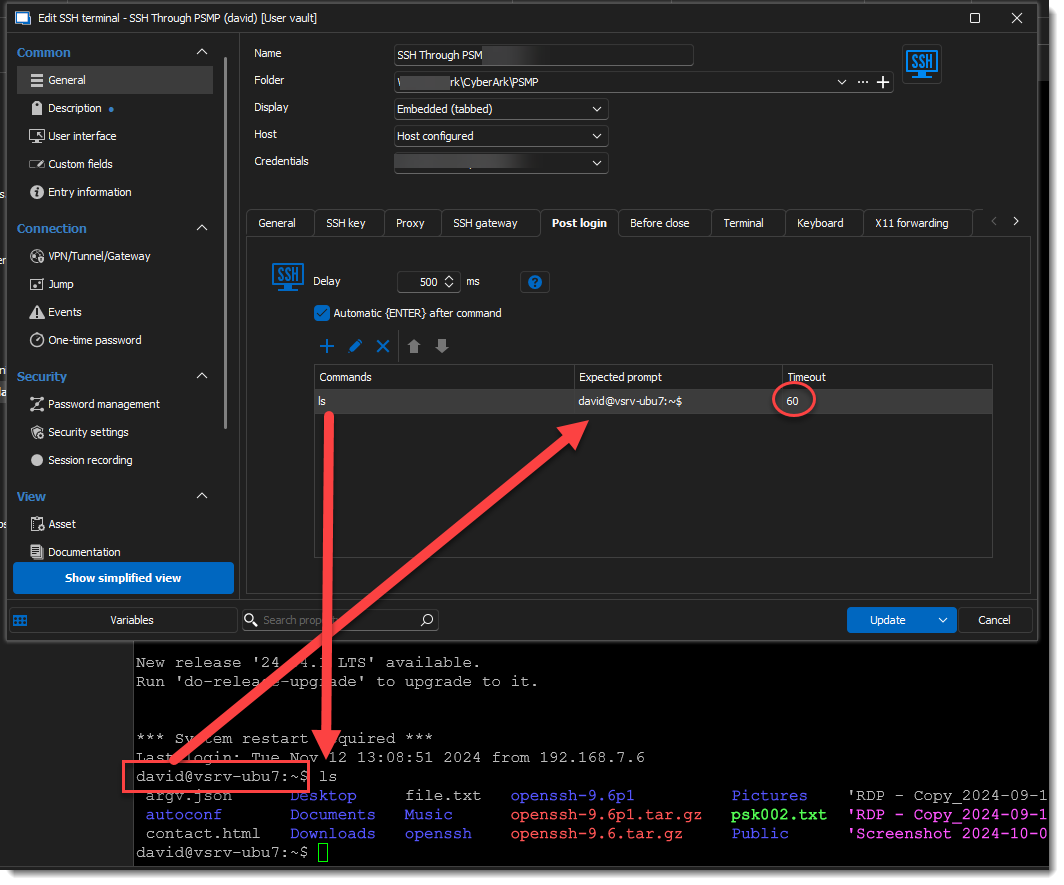
Let us know if this helps.
Best regards,
Alex Belisle
c9f6f90e-5264-4c26-9a1b-7a310b6cdf75.png
Is it possible to configure it with variables (I have to configure shared bookmarks for team usage) ?
7e0f42b5-24c5-464d-866e-81d3b32935e0.png
Seems this is another Case for Variables in Private vault. In the connection string you can create %CustomVariable1% then in each user's Private vault they could set their %CustomVariable1%="user specific Variable".
A feature like this could completely relace the need for "Editing user specific values"
Solved, thanks for help
Solved, thanks for help
What was your solution? My post referenced a feature that I have been asking for, however it hasn't been implemented yet (that I am aware of).
Hello Vincent,
To give an idea, I set a Custom Field for the expected value : 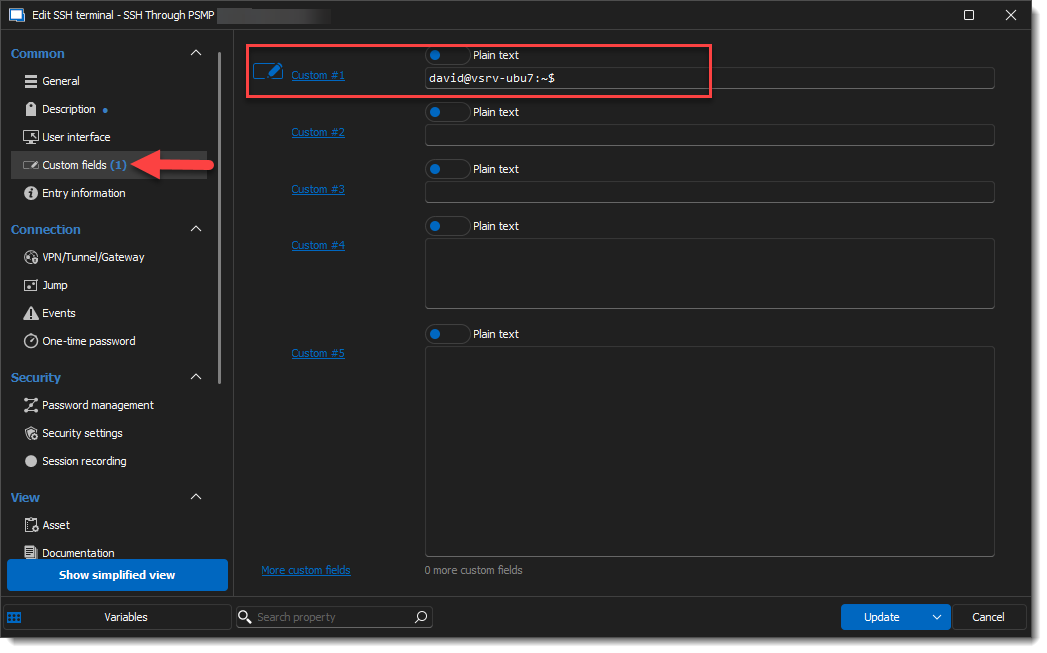
The Expected Prompt supports Variables.
See also the possible Default Variables.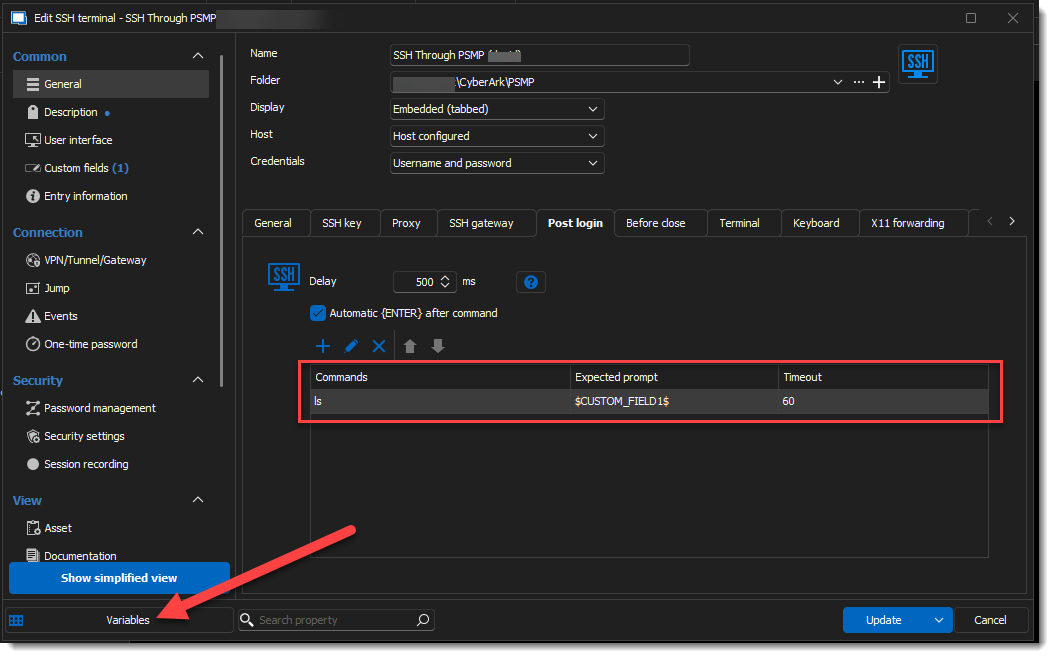
Other Custom variables are likely also supported (Although I haven't tested).
More information about custom variables here: https://docs.devolutions.net/rdm/kb/knowledge-base/manage-custom-variables/
Let us know if this helps!
Best regards,
Alex Belisle
23f61860-00cb-4d4c-ad3b-753b79ffae0b.png
fa0812fb-8371-4c20-b56f-6f9aa6d5b5b9.png
We do use that Alex for some stuff. Where it breaks down every user then has to "Edit user specific" values which greatly slows down RDM. also inheritecene doesn't work so when a new session is added to a folder you have to go in adn "Edit user specific" settings for that new session and it is not alway obvious that it's a new session to another user.
Hello Vincent,
Thanks for your patience.
Unless I'm missing something, I think you could make it very generic using the Custom Variables (https://docs.devolutions.net/rdm/kb/knowledge-base/manage-custom-variables/)
These are set at the RDM Local application level, and I believe it would react as you'd ask...
Thanks for letting us know.
Best regards,
Alex Belisle
Problem is we have to use "Edit userspecific settings" to make that work which for some reason makes the database very inefficent when you have 1000's of servers and 50 users all with their specific setting. Additionally inheritance doesn't work in this configuration so every time a new Session is added all our users need to know to edit their user specific settting which is never a smooth process.
I'd prefer the ability to create variables in the private vaults, that we can use in session objects. So we can use %prv-agency1-admin% and each user set that value to their account in their private vaults, then on the shared sesssion object that variable would be used.
Hello Vincent,
The Custom Variables I'm referring to are per user - in my opinion, that would serve the exact same purpose.
If you give it a try, can you send me screen captures of the behavior you are experiencing with the Custom variables?
Thanks for your cooperation.
Best regards,
Alex Belisle
Oh wow, when did they add this feature?
This was my request, I had no Idea it had been intergrated. Bless you! THank you!
Hi Vincent,
Not gonna lie; it has been there for as long as I can remember. I think this was just misunderstood...
I'm glad I could help!
Best regards,
Alex Belisle
We do use that Alex for some stuff. Where it breaks down every user then has to "Edit user specific" values which greatly slows down RDM. also inheritecene doesn't work so when a new session is added to a folder you have to go in adn "Edit user specific" settings for that new session and it is not alway obvious that it's a new session to another user.
Sorry, I've read late your answer
I've solved adjust your suggestion copying the shell output and changing the username with my variable pay attention to upper/lower care (If the variable $NAME$ respect the exact upper/lower case entry of hostname, you can use it)
2569faf7-2f84-4dbf-861f-2e5251d765c6.png
Excellent!
Thanks for the feedback.
We're glad we could help.
Best regards,
Alex Belisle
Goodmorning, I'm back again... with 2 question... sorry....
QUESTION 1
When I launch a session from Cyberak dashboard, I can use the function "Reconnect" from contestual menù on right clik on remote server connection's tab but, if I configure a RDP connection to use the same Cyberark credential saved as personal credentials 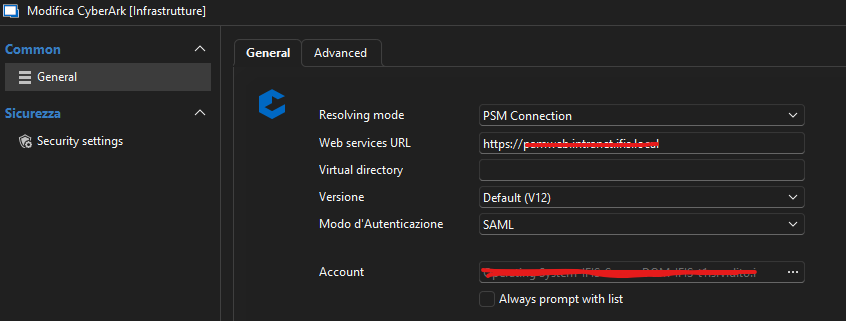
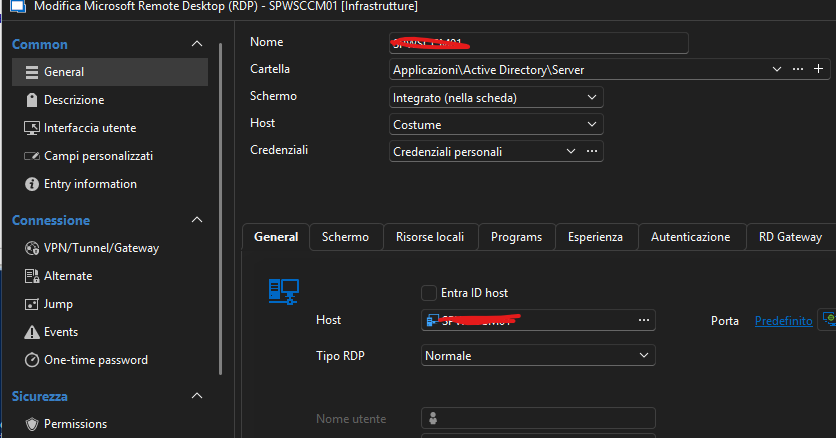
it fails on reconnect command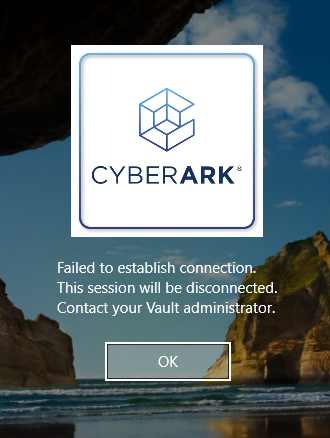
Where is the differents ?
QUESTION 2
I can't save the bookmark using variable name $NAME$ on host because when I launch the session, on the Cyberak system the variable is not translate on his value
c39a12c4-6de2-4fb9-9a31-cb25a68155e4.png
6e89cdbb-903d-4ce7-8be8-53afe94420a0.png
610dd1df-8cde-4b2c-89e8-f838ea93d91f.png
Hello!
Thank you for your intervention.
You are right, the dashboard is able to reconnect a session, and currently, the credential entry does not have this ability.
A ticket is open on the subject for the developers to address this challenge.
It seems easy to do, but the credential entry (with RDP) does not have a "place" to store the information needed to re-query CyberArk PVWA, unlike the Dashboard.
We will think of an elegant way to implement this and will update this thread.
Regarding the Bookmark with the variable, I need a bit more information; could you please show me what you are referring to?
Thank you for your cooperation.
Best regards,
Alex Belisle
If I create a bookmark so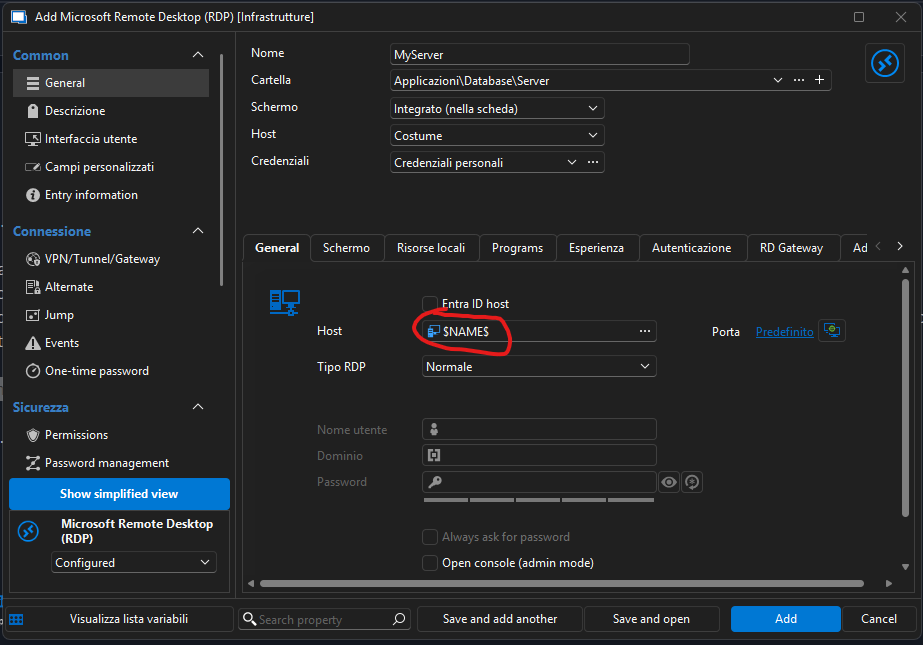
and my personal credential is a cyberark vault credential, cyberark system try to connect to $NAME$ instead of MyServer
910f2911-c806-4501-af83-9aaf41d1ca78.png
Hello,
Thanks for the details. I did not think a bookmark was an actual session - all good now.
I replicated the issue; we'll see what can be done.
We'll be in touch!
Best regards,
Alex Belisle
I would like to discuss RDM integration with CyberArk. Please reach out to me.
Scott Wright
@scottwwright ,
I took the liberty of opening a case (00131032) in our ticketing system so that a member of my team reach out to you for discussion on CyberArk integration.
Best regards,
Jeff Dagenais
Hello,
We are currently testing the CyberArk integration in (RDM) and have observed different behavior between PSM and SIA connections.
For CyberArk PSM connections:
- A User Vault Account can be referenced at the folder level.
- Individual connections only require a name and hostname; all other settings are inherited from the parent folder.
- Users can add their own PVWA credential with the same name as the folder-level User Vault Account, allowing them to use all connections within that folder without additional per-connection configuration.
Issue with CyberArk SIA
For CyberArk SIA connections:
- VPN/Tunnel/Gateway settings configured at the folder level are not inherited by individual entries.
- As a result, each SIA connection must be configured with its own VPN/Tunnel/Gateway settings.
Questions
Is this the expected behavior for SIA entries?
We are currently referencing the user's PVWA credential from the User Vault using "Find by Name". Is there a reason that selecting specific account from the user vault is not possible?
Hello Mr. Blue,
The reason we cannot make a "direct" link to the user vault is that it's linked to an entry's ID (GUID). Each object in the database has a different ID.
That's why User Vault Search is the best way to keep the share vaults generic and customizable.
On my end, I can make SIA inheritable on the folder to the sessions. Can you send screenshots of your configuration so I can understand?
On my end: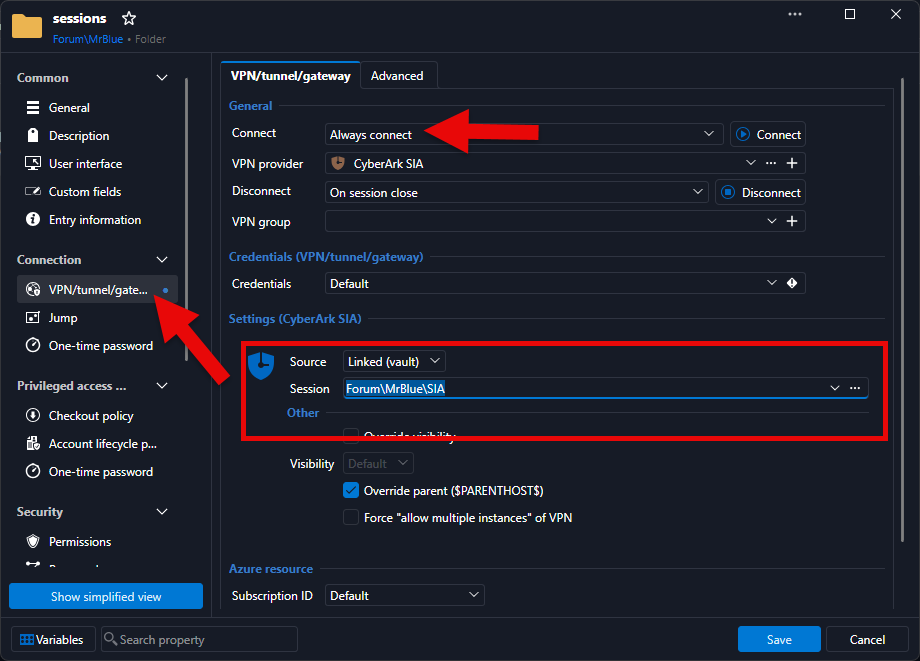
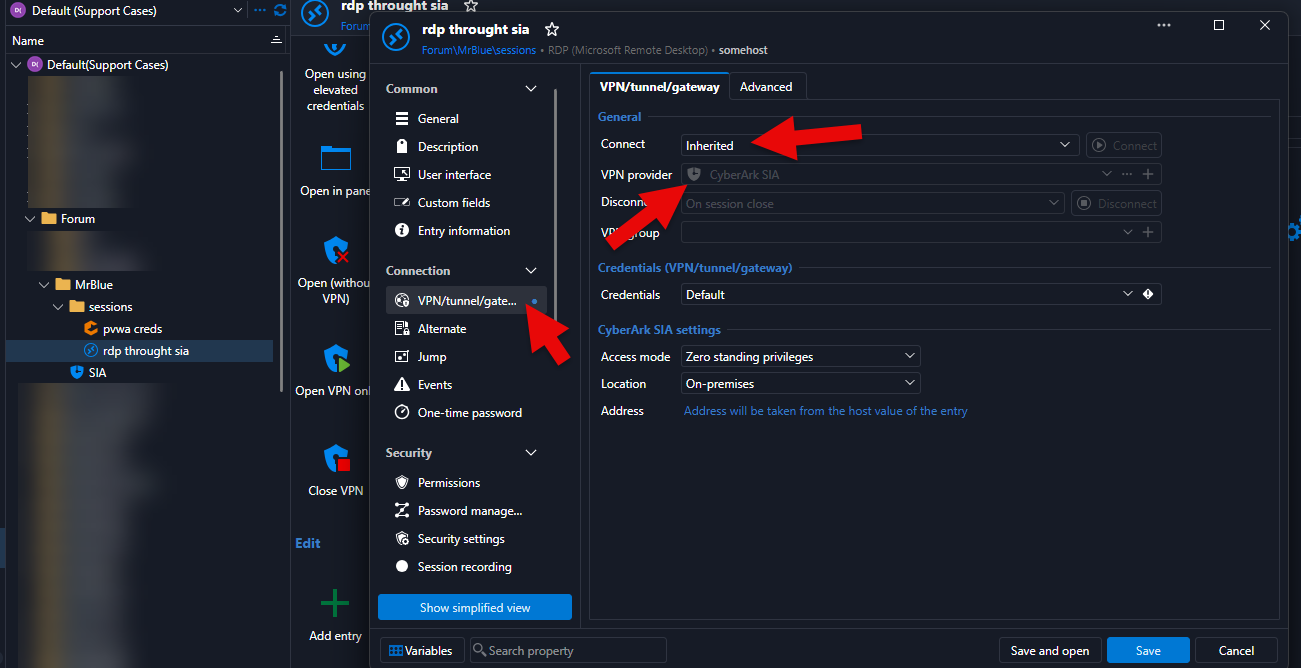
Best regards,
Alex Belisle
ea6d7fea-7950-42c5-a0a8-1a5fdeba8e17.png
13532189-2cfb-4f43-80e1-14630c4aeb56.png