Enforce secure passwords in RDM

Hello,
how can I enforce secure passwords in RDM for all users?
Thank you
Best Regards
Jonas
All Comments (7)
Hello,
Which version of RDM and what type of Data Source are you currently using?
Which authentication method are you using on your Data Source?
Best regards,
James Lafleur
Hello James,
we are using RDM 13.6.7 but will soon migrate to 14. Backend ist Mariadb.
Is there any option to put this data in the user profile? I feel like I have written these details around 20 times in this forum.
Thank you
Best Regards
Jonas
Hello,
I will separate my answer in two posts. In the first one, I will show you how to add your RDM version and the type of Data source that you are using in your signature. This way, you won't have to write these details again.
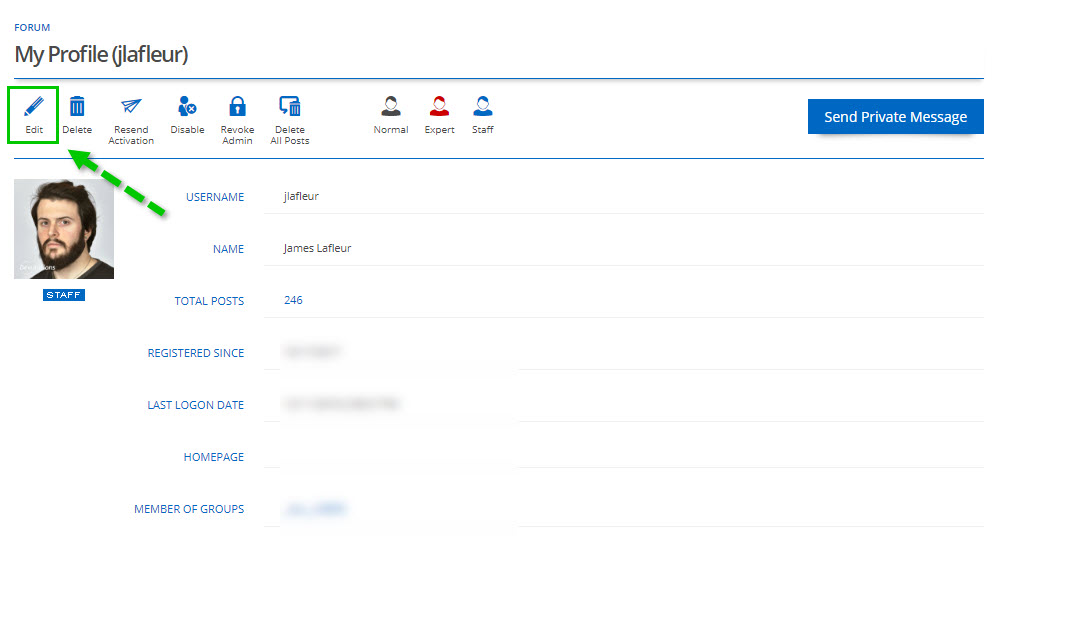
1- Click on your User -> Manage
2- In the "My Profile" section, click on "Edit"
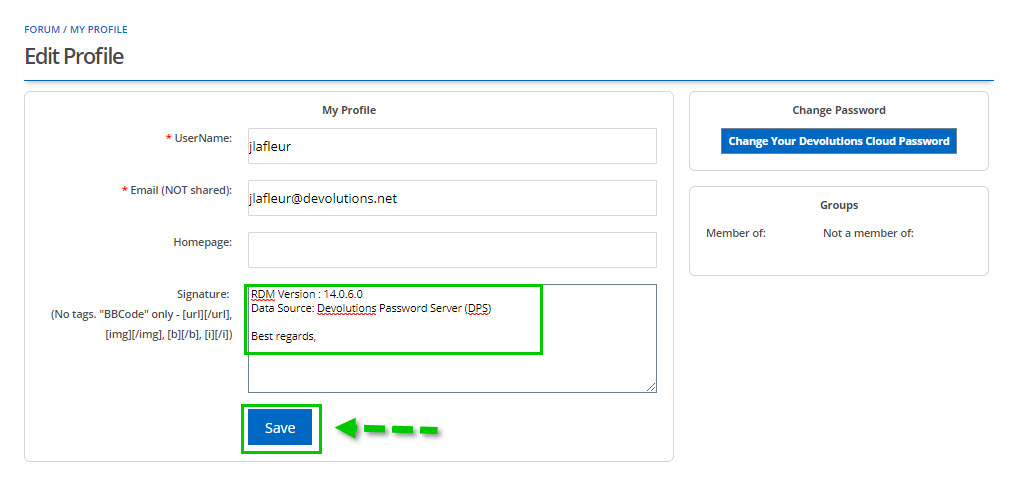
3- In "Edit Profile", under "Signature" type in your RDM version and the type of Data Source you are using.
4- Click on "Save" to get these changes.
Best regards,
James Lafleur
Step2.jpg
Step1.jpg
Hello again,
Regarding your first question. You can enforce secure password for all of your users on your MariaDB instance and this will need to be done outside of RDM.
As mentioned in the link below ; “Password validation” means ensuring that user passwords meet certain minimal security requirements. A dedicated plugin API allows the creation of password validation plugins that will check user passwords as they are set (in SET PASSWORDand GRANTstatements) and either allow or reject them.
For more information on that matter, please refer to the following external link:
https://mariadb.com/kb/en/library/password-validation/
Best regards,
James Lafleur
Hi James,
sorry, I could have come to that myself...
Thank you!
Best Regards
Jonas
Hi,
Thanks for that, I'm sorry, yesterday was tough.
I wanted to ask for forcing my users to use secure passwords when creating an credential entry in RDM.
At the moment they can use 1234 as password, it's rated unsecure, but it is possible to use.
Thank you
Best Regards
Jonas
Hello,
No problem, I completely understand.
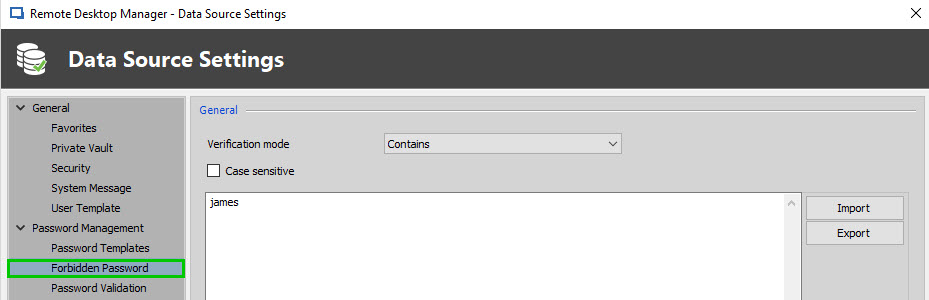
What you are trying to achieve could be done using the "forbidden password" feature. It would allow you to create or import a list of password that your users won't be able to use.
This option is located in Administration -> Data Source Setting -> Password Management -> Forbidden Password
For more information on that matter, please refer to the following link:
https://help.remotedesktopmanager.com/passwordpolicy_forbiddenpassword.htm
Best regards,
James Lafleur
ForbiddenPassword.jpg