Devolutions Web Login for Chrome
Hello
i'm using RDM Enterprise with SqlAzure datasource. I have installed also the chrome extension for web login but it can't connect to RDM with message "Failed while sending request. Please verify if your RDM is open". It's configured with default port, but i try to change in the extension and RDM but unsuccessfully.
Any ideas?
thanks
2018-11-29_23-38-18.jpg
All Comments (5)
Hi Michele,
I cannot reproduce you're issue.
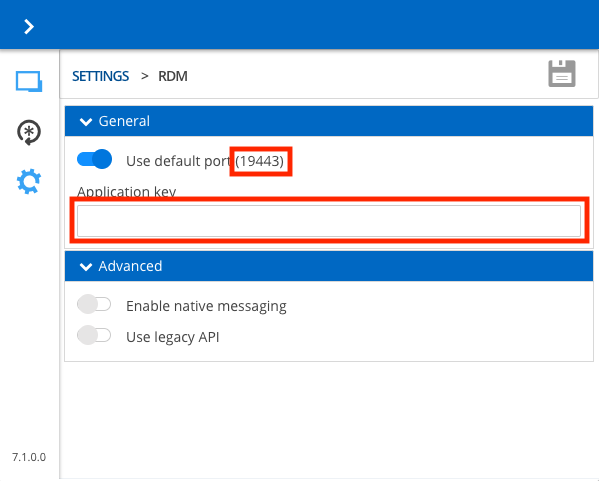
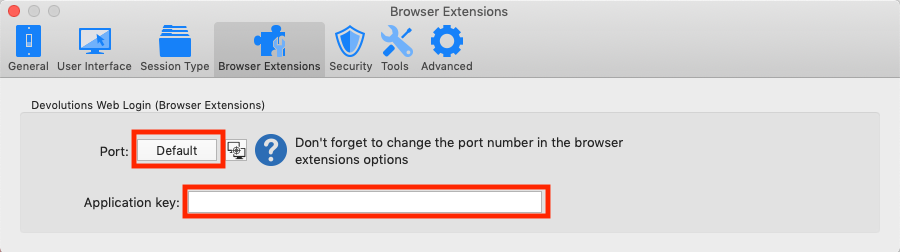
Have you made sure that both the Port and Application Key settings are the same in both the browser extension and RDM?
See following screenshots for location of those settings:
Best regards,
Xavier Fortin
RDMSettings.png
ExtensionsSettings.png

Hello Xavier
port and application key are the first settings I checked and they are as yours print screen.
I try also to change the port from default to 20000 but unsuccessfully.
In a windows 10 VM (parallels) it works.
Any other ideas?
I enable the maximum level of logging of RDM and opening the application now I get this error related the socket binding:
ERROR SILENT: System.Net.Sockets.SocketException (0x80004005): The requested address is not valid in this context
at System.Net.Sockets.Socket.Bind (System.Net.EndPoint localEP) [0x00043] in <f42b4794d2144ed486b60bd0221e24d2>:0
at System.Net.EndPointListener..ctor (System.Net.HttpListener listener, System.Net.IPAddress addr, System.Int32 port, System.Boolean secure) [0x00047] in <f42b4794d2144ed486b60bd0221e24d2>:0
at System.Net.EndPointManager.GetEPListener (System.String host, System.Int32 port, System.Net.HttpListener listener, System.Boolean secure) [0x0009d] in <f42b4794d2144ed486b60bd0221e24d2>:0
at System.Net.EndPointManager.AddPrefixInternal (System.String p, System.Net.HttpListener listener) [0x0005e] in <f42b4794d2144ed486b60bd0221e24d2>:0
at System.Net.EndPointManager.AddListener (System.Net.HttpListener listener) [0x0009c] in <f42b4794d2144ed486b60bd0221e24d2>:0
at System.Net.HttpListener.Start () [0x0000f] in <f42b4794d2144ed486b60bd0221e24d2>:0
at A.c67cd6c452842e19da4be63312931eec9.ccc246f5e7c85bac4ff469fd21592fa27 () [0x001ef] in <92f03c560f28412a99b5b99b6db96a2b>:0
Hello Xavier
I resolved myself checking hosts file on my Mac that did don't have the entry for localhost at 127.0.0.1.
I think that Acronis True Image installer delete all entries because the only one present was 127.0.0.1 AcronisDriveSearchPlugin.
Now it's all OK!
Hi,
Glad to hear you've resolved you issue!
Don't hesitate if you need help with something else.
Best regards,
Xavier Fortin