AWS RDS ad datasource - error inizialing the RDS database

Hi!
I'm trying to use an RDS (AWS) database as datasource.
The connection to host is OK
The test schema is OK, but RDM can't inizialize the DB, due to some missing privileges on DB.
Anyway the user I'm using for connection is the owner of the RDS instance...
THis is the error:
MySql.Data.MySqlClient.MySqlException (0x80004005): You do not have the SUPER privilege and binary logging is enabled (you *might* want to use the less safe log_bin_trust_function_creators variable)
at MySql.Data.MySqlClient.MySqlStream.ReadPacket()
at MySql.Data.MySqlClient.NativeDriver.GetResult(Int32& affectedRow, Int64& insertedId)
at MySql.Data.MySqlClient.Driver.NextResult(Int32 statementId, Boolean force)
at MySql.Data.MySqlClient.MySqlDataReader.NextResult()
at MySql.Data.MySqlClient.MySqlCommand.ExecuteReader(CommandBehavior behavior)
at MySql.Data.MySqlClient.MySqlCommand.ExecuteNonQuery()
at MySql.Data.MySqlClient.MySqlScript.Execute()
at Devolutions.RemoteDesktopManager.Business.DataSources.MySQLConnectionDataSource.ExecuteScript(String script, IDbConnection dbConnection)
at Devolutions.RemoteDesktopManager.Business.DatabaseUpgradeAction.Execute(DatabaseConnectionDataSource dataSource)
at Devolutions.RemoteDesktopManager.Business.DataSources.DatabaseConnectionDataSource.Upgrade(Boolean silent, LogMessageDelegate logMessage)
Any idea ?
P.
All Comments (20)
Follow the steps outline in the link below to set log_bin_trust_function_creators=1 make sure you reboot the instance (after step 7)
https://aws.amazon.com/premiumsupport/knowledge-center/rds-mysql-functions/[color=rgb(51, 51, 51)][font=AmazonEmber, "Helvetica Neue", Helvetica, Arial, sans-serif]The parameter group name is changed immediately, but the parameter group changes aren't applied until you reboot the instance without failover. For more information, see [/font][/color][url=https://docs.aws.amazon.com/AmazonRDS/latest/UserGuide/USER_RebootInstance.html]Rebooting a DB Instance[/url][color=rgb(51, 51, 51)][font=AmazonEmber, "Helvetica Neue", Helvetica, Arial, sans-serif].[/font][/color]
More information can be found here:
https://forum.devolutions.net/topic30396-rdm-and-aws-free-rdm-mysql-as-a-source.aspx?MessageID=120148#post120148
Stéfane Lavergne
OK. THX!
I also found this DOC and solved this issue.
But now I have another one related to my RDM DB is very big (Mothantha 2600 sessions for a .rdm size of 9Mb)
When I try to IMPORT this FILE into a RDS DB.... I have an error always at 61% of the import process.
THe error reports to max_allowed_packet... I have increased this DB parameter until 70000 (defailt is 1024) BUt I still have the error...
How can I outline which session are so big in order to cause this error ?
Is there a way to check\analyse the RDM db and find out which session are so big ?
REgards
P,
Your best bet is to increase the size of max_allowed_packet to something "very big" say 100MB, let the import succeed then us RDM to analyze the size of each session.
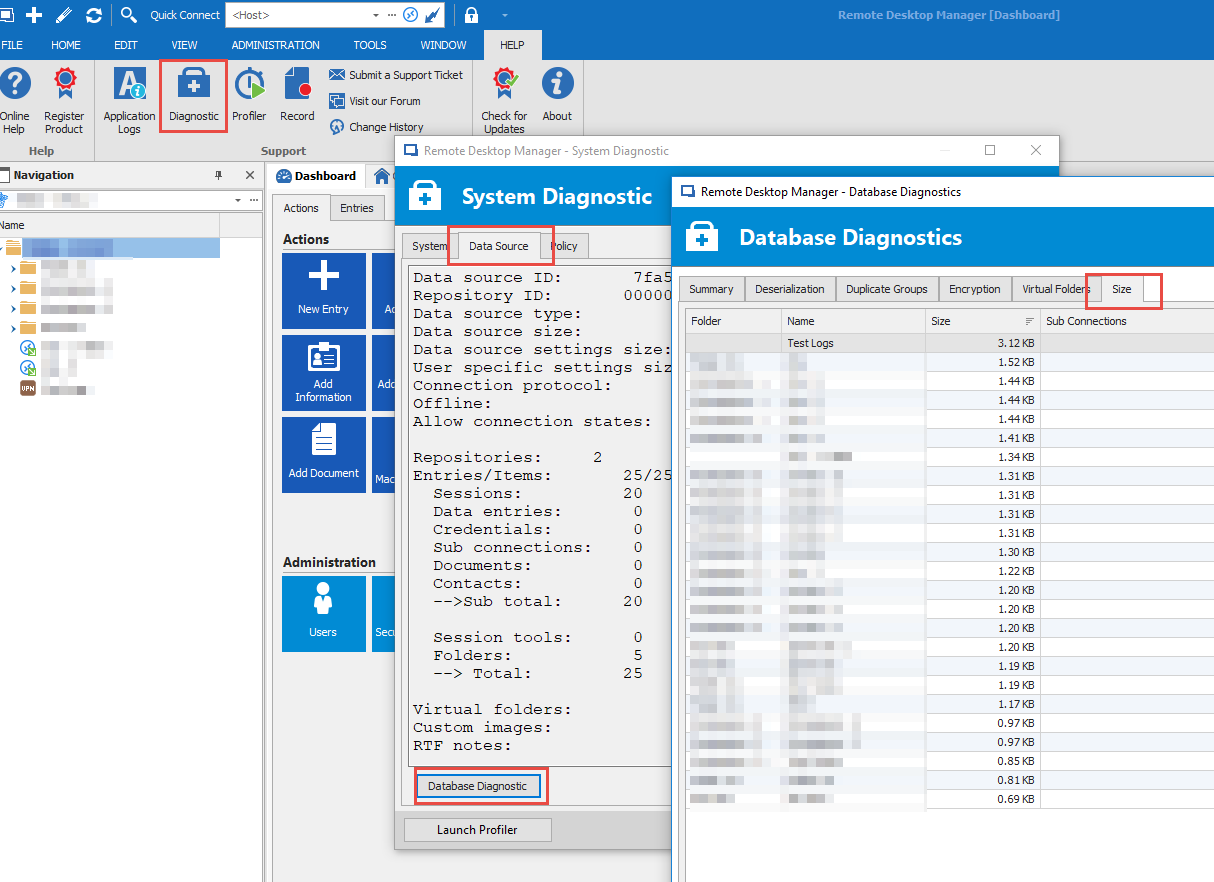
The issue with this approach is that the size analysis of RDM is not yet available with the MySQL/MariaDB data source. I will add it to our to-do list. Should be relatively easy to add.
Example on SQL Server data source:
Stéfane Lavergne
2018-11-22_11-50-10.png
I'm Struggling with the import of this DB on RDS from this morning...
I will try to increase to 150M and cross finger !
I can see that I have a table "ConnectionLog" that is quite big ( 11,5 Mb...) What is the content of this table ?
I tried to empty, but is not possible because of a CONSTRAINT...
You can clean them using RDM > Administrator (tab) > Clean up > Cleanup activity logs
Stéfane Lavergne
I have tried to IMPORT with max_allowed_packet = 150000 and even with 250000 but still have same error.
In the meantime I 'm trying to clean some data as per your suggestion:
RDM > Administrator (tab) > Clean up > Cleanup activity logs
But I'm seeing from "phpmyadmin" is that the table "ConnectionLog is becoming bigger....after the cleanup process - from 11 Mb to 15 Mb !!
???
P.
How are you importing your data?
The ConnectionLog table contains logs of open/close/edit/delete/create of connections. If you have 15MB of data you must have been running for a long time. My guess is you exported your data from another MySQL and are trying to re-import this on an AWS instance, chances are the export has exported all your old logs.
Also note max_allowed_packet is in bytes so 250000 (0.25MB) is actually smaller than the default of 1048576 (1MB)max_allowed_packet[table][tr]PropertyValue[tr][td]Command-Line Format[td]--max-allowed-packet=#[tr][td]System Variable[td][url=https://dev.mysql.com/doc/refman/5.5/en/server-system-variables.html#sysvar_max_allowed_packet]max_allowed_packet[/url][tr][td]Scope[td]Global, Session[tr][td]Dynamic[td]Yes[tr][td]Type[td]Integer[tr][td]Default Value[td]1048576[tr][td]Minimum Value[td]1024[tr][td]Maximum Value[td]1073741824[/table]The maximum size of one packet or any generated/intermediate string.The packet message buffer is initialized to net_buffer_length bytes, but can grow up to max_allowed_packet bytes when needed. This value by default is small, to catch large (possibly incorrect) packets.You must increase this value if you are using large BLOB columns or long strings. It should be as big as the largest BLOB you want to use. The protocol limit formax_allowed_packet is 1GB. The value should be a multiple of 1024; nonmultiples are rounded down to the nearest multiple.When you change the message buffer size by changing the value of the max_allowed_packet variable, you should also change the buffer size on the client side if your client program permits it. The default max_allowed_packet value built in to the client library is 1GB, but individual client programs might override this. For example,[url=https://dev.mysql.com/doc/refman/5.5/en/mysql.html][b]mysql[/b][/url] and [url=https://dev.mysql.com/doc/refman/5.5/en/mysqldump.html][b]mysqldump[/b][/url] have defaults of 16MB and 24MB, respectively. They also enable you to change the client-side value by setting max_allowed_packet on the command line or in an option file.[color=rgb(85, 85, 85)][font="Open Sans", Arial, Helvetica, sans-serif]The session value of this variable is read only. The client can receive up to as many bytes as the session value. However, the server will not send to the client more bytes than the current global[/font][/color][color=rgb(85, 85, 85)][font="Open Sans", Arial, Helvetica, sans-serif] [/font][/color]max_allowed_packet[color=rgb(85, 85, 85)][font="Open Sans", Arial, Helvetica, sans-serif] [/font][/color][color=rgb(85, 85, 85)][font="Open Sans", Arial, Helvetica, sans-serif]value. (The global value could be less than the session value if the global value is changed after the client connects.)[/font][/color]
Stéfane Lavergne
Now I'm trying with 104857600 that is 100M. I will let you know...
Anyway the problem ob the big table "ConnectionLog" is not gone..
Is there a way to remove the COSTRAINT so that I can TRUNCATE the table from phpmyadmin ?
REgards
P.
The CLEANUP procedure you told me - do not WORK. I have tried more than one times. But Data are not deleted, and this is confirmed also from PHPMYADMIN, where I can see table:
ConnectionHistory
ConnectionLog
[/table]still full of data !
What date filter did you put? By default we keep 1 month of logs.
You can always delete the rows using SQL.DELETE FROM ConnectionHistory;DELETE FROM ConnectionLog;
Stéfane Lavergne
From RDM, by default it suggest the date of tomorrow 23.11.2018. But it do not work.
I have user SQL commend you suggest and entry was deleted now
THX
Anyway the RDM feature do not work, even with latest RDM version.
THX
P.
Will investigate, thanks
Stéfane Lavergne
Is there a way to investigate into the sessions (without diagnostic) ?
I'm quite sure that I have dirty sessions with some big data (attachments or something else that make DB bigger)
It's very strange that this DB with 2600 session is more tha 26MB (on DB) and another one I have , with 600 session is only 2,5 Mb!
I'm quite sure that this DB have something strange data inside... but I do not know which session!
P.
We have a diagnostic form that would identify the issue unfortunately it is not yet available with MySQL. I will see if I can add the functionality to MySQL in the next release.
Stéfane Lavergne
The Database Diagnostic has been enabled in MySQL, MariaDB, SQLite & Access data sources. Will be in next release.
Best regards,
Stéfane Lavergne
Thx a lot for the news!
In the meantime I have also test my big DB with MSSQL. Yust to find out the "dirty" session.
The diagnostic found a couple of sessions very big. These session was full of dirty chars in the session description (see attached image).
I have removed these sessions and after that the DB size war 50% (from 8.8Mb to 4,5Mb)
At this point I have exported again my "clead DB" but in the middle of IMPORT I have this strange SQL error (MSSQL):
System.Data.SqlClient.SqlException (0x80131904): String or binary data would be truncated.
The statement has been terminated.
at System.Data.SqlClient.SqlConnection.OnError(SqlException exception, Boolean breakConnection, Action`1 wrapCloseInAction)
at System.Data.SqlClient.SqlInternalConnection.OnError(SqlException exception, Boolean breakConnection, Action`1 wrapCloseInAction)
at System.Data.SqlClient.TdsParser.ThrowExceptionAndWarning(TdsParserStateObject stateObj, Boolean callerHasConnectionLock, Boolean asyncClose)
at System.Data.SqlClient.TdsParser.TryRun(RunBehavior runBehavior, SqlCommand cmdHandler, SqlDataReader dataStream, BulkCopySimpleResultSet bulkCopyHandler, TdsParserStateObject stateObj, Boolean& dataReady)
at System.Data.SqlClient.SqlCommand.FinishExecuteReader(SqlDataReader ds, RunBehavior runBehavior, String resetOptionsString, Boolean isInternal, Boolean forDescribeParameterEncryption, Boolean shouldCacheForAlwaysEncrypted)
at System.Data.SqlClient.SqlCommand.RunExecuteReaderTds(CommandBehavior cmdBehavior, RunBehavior runBehavior, Boolean returnStream, Boolean async, Int32 timeout, Task& task, Boolean asyncWrite, Boolean inRetry, SqlDataReader ds, Boolean describeParameterEncryptionRequest)
at System.Data.SqlClient.SqlCommand.RunExecuteReader(CommandBehavior cmdBehavior, RunBehavior runBehavior, Boolean returnStream, String method, TaskCompletionSource`1 completion, Int32 timeout, Task& task, Boolean& usedCache, Boolean asyncWrite, Boolean inRetry)
at System.Data.SqlClient.SqlCommand.InternalExecuteNonQuery(TaskCompletionSource`1 completion, String methodName, Boolean sendToPipe, Int32 timeout, Boolean& usedCache, Boolean asyncWrite, Boolean inRetry)
at System.Data.SqlClient.SqlCommand.ExecuteNonQuery()
at Devolutions.RemoteDesktopManager.Business.DataSources.DatabaseConnectionDataSource.ExecuteNonQuery(String sql, IDbTransaction dbTransaction, IDbDataParameter[] parameters, Int32 commandTimeout)
at Devolutions.RemoteDesktopManager.Business.DataSources.DatabaseConnectionDataSource.InsertConnection(Connection connection, IDbTransaction dbTransaction, ISecurityProvider provider, Nullable`1 repositoryID)
at Devolutions.RemoteDesktopManager.Business.DataSources.DatabaseConnectionDataSource.SaveConnections(IEnumerable`1 connections, IDbTransaction dbTransaction, ISecurityProvider provider, Nullable`1 repositoryID)
at Devolutions.RemoteDesktopManager.Business.DataSources.DatabaseConnectionDataSource.SaveConnection(Connection connection)
ClientConnectionId:dc14d79d-f379-4a23-88f8-816ee893ba03
Error Number:8152,State:13,Class:16
After this.. the import seems to finish correctly, but I have no idea of what sessions was truncated, as per log message.
Any help on this ?
THX
P.
Screenshot_70.png
Unfortunately for the "System.Data.SqlClient.SqlException (0x80131904): String or binary data would be truncated." error MSSQL doesn't give us the name of the field that is causing the issue. The only option remaining is trial and error. Maybe have a look at the .rdm file in a text editor to see if you have "odd-looking" data.
What I don't get is why an exported .rdm file fails on a reimport. I would love to get my hands on your file to analyze what is going on but doing so would be a security risk...
Stéfane Lavergne
Probably I solved.
I write here what I found and what I did , in case can be helpfull for somebody else.
As I told you, this DB come from a very long time in the past. Maybe 10 years ago.
During this period we have exporte and reimported several time.
I have noticed that i most cases the session description (we use description to notice some info related to the session itself) there are "dirty" chars, coming from a wrong encoding.
For example chars like è, ò, à, ù or ' - was exchanged with a symbol, causing the fact that the space dedicated to description was full of these dirty chars. See the attached image in the previus message (Screenshot_70.png).
What I did it was to clean an sanify these session - unfortunately I do not found a way to perform this operation automatically, because the editor do not recognize the dirty symbols.
After the cleaning was finished, I was able to IMPORT the same DB (using .rdm file) both on MySQL, Aurora and MSSQL.
P.
Thank you for the update, we will try to reproduce the issue here and figure out how to better handle these chars while exporting/importing.
Best regards,
Stéfane Lavergne