Parent FOLDER variable

I know that from a sub-connection you can access parent information of the root node (connection/entry/session, etc). However why can't you do this for a the parent folder of a connection?? I'm wanting to setup it up so that the 'Tab Title' of a given node is a reflection of the folder it's in dash '-' the name of the connection. The idea is the folder will be a representative of the client, and sub nodes will be simple connection terms of that clients infrastructure (ie. DB, RDP, Config, Rpt; resulting in tab titles like 'Client A - DB', 'Client A - RDP', 'Client A - Config', 'Client A - Rpt'.
One way I tried to do this was executing a local powershell script on the event before connecting, which would look up the connecting session, and perform some logic to determine and set this information. However the execution time is slow AND it doesn't seem to actually finish execution before the connection is started and also doesn't seem to 'Actively' set the 'Tab Title' even though the properties shows it has been updated. Closing and reconnecting will not show the new tab title, it also seems to prevent the application from loading other needed connection information such as username and password since the session will now start to prompt you for that info. However, if you go back into the connection properties and reset/clear that field, then save, all is fine. It's like an app/property activation is missing (update-rdmui doesn't help).
Oh well, I really don't want to do it the powershell route, I'd just like access to parent FOLDER variables, which would solve all my problems.
HB
P.S. Is there another more appropriate way to give a connection an alias, rather than using Tags. The idea is the alias/Tag will be a shorter nick name for the connection which can be used for searching via the filter (Tags work in this case) or tab titles, to conserve valuable space on the tab bar. Does this make sense? So far the Tags are working for this purpose, however that's not really the intention of a tag. I'd also like something that could be selected as a column for the Navigation pane, and currently tags are not available to choose from.
All Comments (8)
Hello,
Our folders are of various sub-types: Company, Site, Computer, etc.
Our variables are organized in a few sections, one of which being named "Folder", under which you see these same sub-types.
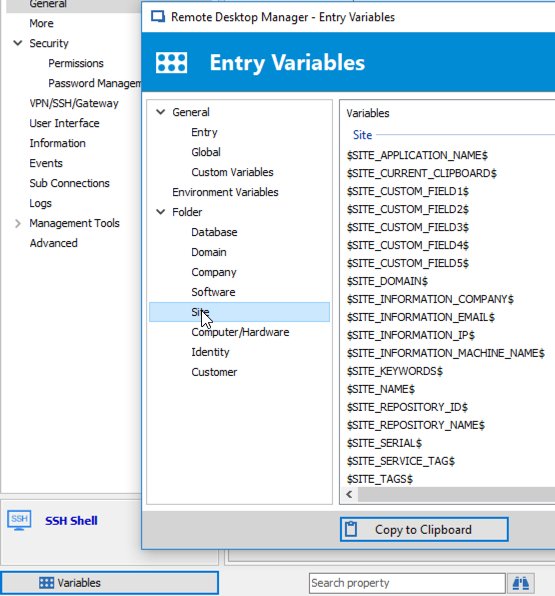
Using a variable named following the pattern SITE_XXXX means that RDM will climb up the tree structure until if finds a folder of that same sub-type. It will then grab the corresponding field and replace the variable in your expression by the value of that field.
So, for your scenario, you would typically use a folder of the CUSTOMER type for each of your customers, you can have sub folders of any type to reflect the infrastructure of that customer, whatever depth you need...
In the sessions tab title field, you would use something like $CUSTOMER_NAME$ - $NAME$
For a large customer with multiple sites, you could even have $CUSTOMER_NAME$ - $SITE_NAME$ - $NAME$
Could you give that a try?
Best regards,
PS : response coming in another reply shortly
Maurice
OOOHHHH, I was wondering how those were used!! I'll check it out.
HB
That worked perfectly and makes SOOO much more sense. I think what confused me is that in the available list you shared, just plain old 'Folder' doesn't even seem to be an option. Probably wouldn't be too bad of an idea to just make it an option. I don't really see why not.
Is there a functional difference between Customer, Site, or Company? Kind of seem to operate the same.
HB