Undock session resolution set to work area screen
0 vote

When I RDP to a server, the session runs as an embedded session. Sometimes, I need to undock the session to another monitor and compare 2 sessions on 2 separate monitors.
When an embedded session is undocked, it retains the resolution and that's normal. However, there's a lot of gray area space padding that is unused. I would like it so that when an embedded session is undocked, it will readjust the resolution and maximize to fit on the monitor (Work Area Screen). This can be fixed easily by right clicking on the title bar and select "Reconnect", however I don't want to do this manually every time. Is it possible to automate this process?
--------------------------------------------------------------------------------------------------------------------
I'm always using the latest beta RDM x64 version.
Local data source.
All Comments (16)
Hello,
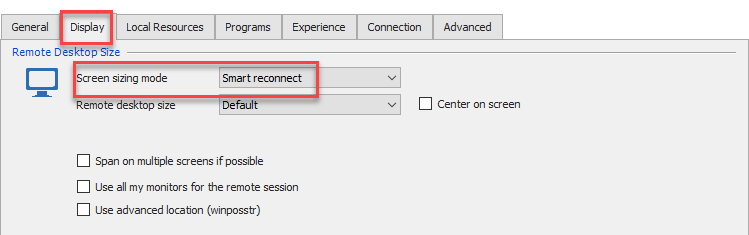
In the properties of your RDP session, in the Display tab, could try to select Smart Reconnect in the screen sizing mode field to see if that help
Best regards,
Jeff Dagenais
2018-11-12_11-20-53.png
Thanks Jeff. I've tried that in the past and always found it to be buggy and impacts performance. Tried it just now and looks to be OK.
Previously, I was using Smart Sizing. Is there any major difference between the 2?
--------------------------------------------------------------------------------------------------------------------
I'm always using the latest beta RDM x64 version.
Local data source.
Hello,
Smart Sizing will stretch the remote display to fit in the tab.
Smart reconnect will reconnect the session when the window size changes.
This is the difference between the 2 options.
Best regards,
Jeff Dagenais
Hi Jeff,
The solution you've suggested works when you undock an embedded session. However, as mentioned previously, I've been experiencing this weird bug with Smart Reconnect since several versions ago and looks like it is still here in the latest version.
Basically, let's say you have a bunch of embedded sessions. In my case, I have 2 rows of tabs:
If you open more entries, it'll create a 3rd row, and a 4th row, and so on. So whenever you open or close a session, a new tab row either gets created or removed. When the tab row gets created or removed, it affects the session's work area screen resolution. If those sessions use smart reconnect, then they will constantly refresh themselves whenever the screen area changes.
The problem is that when they refresh, you'll get a blackscreen for about 2~3 seconds and they only refresh when you click on the session entry. They do not refresh automatically in the background. Is it possible to add a "smart reconnect" option when a screen is undocked?
--------------------------------------------------------------------------------------------------------------------
I'm always using the latest beta RDM x64 version.
Local data source.
Hello Ricky,
Not sure to understand what you mean by is it possible to add a smart reconnect option when a screen is undocked?
Could you elaborate please?
Best regards,
Jeff Dagenais
It's pretty much what it sounds like...
When a screen is undocked, fill the window to the entire screen. When it is docked (embedded), use smart sizing instead.
As per my previous post, when you have too many sessions, a new tab row is created. This then forces all the sessions to refresh, as they need to fit the screen to the new resolution. I don't want the smart reconnect refresh to apply to embedded sessions, I only want it to be applied to an undocked session.
--------------------------------------------------------------------------------------------------------------------
I'm always using the latest beta RDM x64 version.
Local data source.
Hello,
Not applying the smart reconnect to embedded mode is not possible.
What I can propose, is to the put all your opened RDP sessions on the same line instead of having 3-4 rows of opened sessions.
If you want to give it a try, go in File -> Options -> User Interface and enable the Use tab strip overflow option.
Best regards,
Jeff Dagenais
That will just make it harder for me to locate 20+ sessions. Sure, I can view the navigation tree pane in the left, but I prefer viewing the tabs directly in the rows in addition to using the navigation pane.
All I'm requesting is when a session gets undocked, re-adjust the resolution or "Reconnect" automatically, so that it will fit the screen to the new resolution.
--------------------------------------------------------------------------------------------------------------------
I'm always using the latest beta RDM x64 version.
Local data source.
Hello Ricky,
It's an interesting idea. I think we could add this as an option.
Regards
David Hervieux
Thanks David.
My main point is, when you undock a session to a monitor, you'd obviously want the session to maximize its screen resolution to fit the entire monitor.
--------------------------------------------------------------------------------------------------------------------
I'm always using the latest beta RDM x64 version.
Local data source.
Hi Team,
Any chance we can have a look at this for the next beta release?
--------------------------------------------------------------------------------------------------------------------
I'm always using the latest beta RDM x64 version.
Local data source.
Hi team,
Any update on this one? Has been 4 months...
--------------------------------------------------------------------------------------------------------------------
I'm always using the latest beta RDM x64 version.
Local data source.
This is still an opened issue.
David Hervieux
Bump
--------------------------------------------------------------------------------------------------------------------
I'm always using the latest beta RDM x64 version.
Local data source.
Hello,
We're augmenting the priority on this ticket. We'll let you know once we have something done.
Regards,
Hubert Mireault
Hello,
As of version 2019.2.21, you will have the option to force a reconnect when undocking an RDP session.
You will find this option in File -> Options -> Types -> RDP : "Force reconnect when undocking".
Regards
Jonathan Del Signore