Run remote script after connect and on disconnect

How can i run a vbs script on the remote system after connecting and a script after disconnecting?
All Comments (7)
Hello,
Are you running RDM Free or RDM Enterprise?
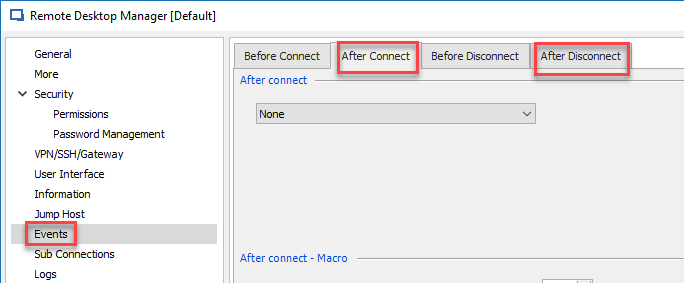
If you are using the Enterprise edition of RDM, edit your entry and click on Events on your left. Inside that area, you will find a After Connect and After Disconnect tab.
Best regards,
Jeff Dagenais
2018-11-08_10-43-35.png
I saw that, but when i choose script it only gives me local browsing to the script. I want to run a script on the remote system.
Although i've worked around this problem, i'm still curious how to accomplish it via RDM.
Hello,
Not sure that it's possible to run a script on a remote computer via RDP without being connected.
What is your workaround looks like?
Best regards,
Jeff Dagenais
I'm not trying to run the script (on the connected system) before i connect, but after and just before disconnect. After connecting via RDP, run a script on the remote system, on pre-disconnect run another script then disconnect.
I tried the After Connect Event above but it runs locally (the machine with RDM), not remotely.
FYI, it's a .bat file.
My work around was a completely different approach.
Hello Scott,
Thanks for the explanation and I'm sorry I think we create a confusion. The events section of a RDP session could run remote script. But to perform this you have to use the Macro/Script/tools integration with PSExec or PowerShell (Remote) entry. By default the Command line or any other Macro Script tool will run the script locally.
Could you please confirm your configuration and if you do not have any private information, please send us an export of the entries at ticket@devolutions.net
Best regards,
David Grandolfo
Hello everyone,
I have roughly the same problem. I wanted to run a batch script before logging out and before closing my session
for /f "skip=1 tokens=3" %%s in ('query user %USERNAME%') do (
%windir%\System32\tscon.exe %%s /dest:console
)
In order to allow my tests to work when another person runs the tests.
I want to do it via task scheduler but I'm having trouble.
All will be welcome.
Thank you beforehand.
Hello,
Thank you for contacting us on that matter!
Would it be possible for you to provide me a screenshot of the configuration of the "Before Close" tab of your entry? This is the new name of the "Before Disconnect" option that has been mentioned in this older thread. For more information on this feature, please consult this link: https://kb.devolutions.net/rdm_entry_types_events_settings.html
Once you are under this section, use the first dropdown to select "Script" and then use the ellipsis button to link your script file:
Best regards,
James Lafleur