Weird problem: "Unable to send the credentials." (VPN)

Hi,
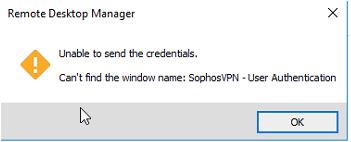
one of my colleagues needed a fresh windows installation. Since then, RDM has an issue while opening a ssl-vpn connection:
We use sophos ssl-vpn on all clients. All settings are the same (english ssl-vpn interface language).
The connection works, but the message in the screenshot appears in about 10 seconds after successful connection.
I am aware of this message, when RDM does not find the destination openvpn window, but this is not the case.
Credentials are transfered correctly, connection is fine.
Even though it is a cosmetically issue, I am interested in fixing it.
Help appreciated.
Best regards
Daniel
rdmerror.JPG
All Comments (9)
Hello,
Thank you for reporting the issue. We received a few reports of something similar with the Sophos VPN add-on, we're currently taking a look at it.
We'll let you know once we have something.
Regards,
Hubert Mireault
Hello,
We released a new version of Sophos VPN Add-on. The issue should be corrected in the version 1.2.0.0.
Could you test it in your infrastructure please, to download it go to Tools -- Add-on Manager-- then select Sophos VPN and click Install Add-on Update.
Further details can also be found at this help topic.
Best regards,
David Grandolfo
Hi David,
my colleague installed the new RDM(!) Version this morning (he was faster than me, to tell him not to do so) and the VPN-Addon was updated automatically.
Since then he has another issue: The VPN-Dialogue (User/PW) appears, but filling in the credentials results
in only partially entering the strings.
... as if the dialogue appears to late, so the last 50% of the username are pasted into the box. F.e.:
Username: admin_specialname
Username filled in: ecialname
The authentication fails then (as awaited). So it got worse.
Regards
Daniel
Hey,
i do have the same problem with multiple Sessions.
With the new 1.2.0.0 Update of the SophosVPN-AddOn i even got another problem:
While authenticating and connecting the Auto-Type is doing "Tab-Enter", after entering the credentials etc.. - in the VPN Console this leads to it, that the Connection is getting disconnected while it tries to establish the connection.
My Workaround for this:
1) Enable the checkbox "Hide connection status"
2) Install the SophosVPN-AddOn v1.0.0.0 - then it all works flawless again. But then i always receive the "old addon update" notification
I hope you guys find a way to fix this, because i need the SophosVPN very often
Best Regards
Kevin
Hi Guys,
I had a call with a customer who has the same issue as Kevin and we found that our keyboard input cause the issue (probably).
We are currently looking at this internally.
Best regards,
David Grandolfo
I'm in the same boat. It is missing the first character of the username when doing the automatic login.
Hi,
We just release a new Sophos VPN Add-on, our internal test have shown that the new add-on version Sophos Vpn 1.3.0.0 solves the disconnect issue.
Add-ons could be upgraded with the Add-on Manager under tools section of RDM.
If you could test in your infrastructure this would be appreciated.
As an additional information we test with RDM 14.0.7.
Best regards,
David Grandolfo
Hey David,
i just tested it multiple different connections in my RDM - none of them showed the errormessage again.
Thanks for your work! :)
BR
Kevin
Hi Kevin,
I'm glad that the add-on solve the issue.
Thanks for the feedback.
David Grandolfo