Window to Fullscreen (sorry again)

I've been using Microsoft's Remote Desktop Connection Manager but had to look for something else because I was constantly fighting the resolution. I found your program and it looks impressive. I am having an issue with the getting the resolution correct and I am sure I must be doing something wrong.
I want to set the resolution so I can work in the normal tabbed Window mode but if I'm going to work on something for an extended period I'll go into Full Screen Mode. So if I set the resolution to fit in the default window size, it fits perfectly (default tabbed window). If I go full screen it doesn't fill the full screen which defeats the purpose of going full screen :) So then I set the Remote Desktop Size to Full screen with the Screen sizing mode to Smart Sizing but in doing that I get the full screen like I want but when I want to run in tab mode the text is too small/squished that I can barely read it.
So, is there anyway to set the resolution to the size that will fit in the tabbed window mode and then when I switch to full screen to have it switch to full screen resolution? I have fooled with Smart Reconnect as well but that doesn't appear to do what I thought it would do :)
Any help would be appreciated.
Thank you.
All Comments (3)
Hello,
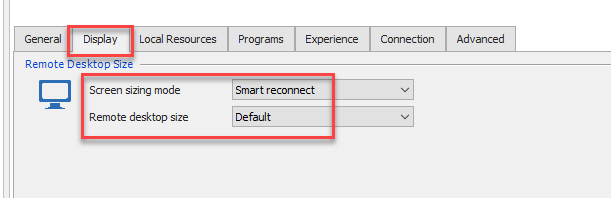
On my side, my RDP session is configured like the following:
When I launch my session in embedded mode, there's no scrollbars or grey area.
Then, I do a right-click on the tab of the session and select Full Screen. My session is reconnecting and now in full screen.
Please note that I was using RDM 14.0.2.0 to accomplish this.
Best regards,
Jeff Dagenais
2018-10-26_11-04-59.png
Thanks for the reply Jeff. Unfortunately this did not resolve the issue. Using the settings suggested my resolution, in Embedded (tabbed) mode, is set at 1116 x 766. When I switch to full screen mode by choosing Actions -> Full Screen or using the Full Screen shortcut key the resolution is still at 1116 x 766. This is a 1280 x 1024 monitor so since the resolution is not being stretched/adjusted from 1116 x 766 to 1280 x1024 I am getting a ~ 2 inch black border around the perimeter of the screen. I don't know if it matters but I am using the free version (5.0.0.0).
Thanks again.
Hello,
We use the same ActiveX that Microsoft use in RDC Manager to establish the RDP connection in embedded mode.
Could you verify if you encounter the same issue using this application?
https://www.microsoft.com/en-ca/download/details.aspx?id=44989
Best regards,
Jeff Dagenais