Why is the 2-factor authentication disabled in the Windows 10 version?
Why is the 2-factor authentication disabled in the Windows 10 version?

In the Mac version this work Google Authenticator 2-factor authentication works fine but the same setting is grayed out in the Windows 10 version. Any reason why?
2-factor-authentication.png
All Comments (19)
Hello,
This feature is available in the Enterprise of RDM Windows. I think you are using the Free version on Windows right?
On Mac, are you using the Free edition as well?
Best regards,
Jeff Dagenais
Yes, both free version on Mac and Windows but the Mac version it's enabled/working.
I will ask our team to enable it for RDM Free. It should be available soon.
Regards
David Hervieux
Awesome! Thank you, David! Even if it's the free version, I can see 2-factor authentication is crucial to RDM.
Hello,
I wanted to let you know that we've made the changes internally and this should be available in the next RDM Free build. :)
Regards,
Hubert Mireault
Okay, so I've downloaded the latest version and the 2-factor authentication option in the Windows version is enabled. However, the Google 2-factor authentication popup window does not show up for me to type in the code. As soon as I clicked on the icon at the task bar at the bottom, it disappeared. If I do a Windows+Tab, it shows the window but when I clicked on it, the Google Authentication Validation also disappeared. One additional issue, since I have a Mac and a Windows version both using Google authentication, now when I type in the google authentication validation code from the app to my Mac RDM it's no longer working or accepting the code.
rdm-google-auth.png
Hello @Charlie,
Can you tell me if you are using the application in mode *Always on top* for windows.
And for your additional issue, to make sure, the two factor you set on Mac can't be the same as the one you are using on windows as they are set locally on the computer.
Regards,
Alexandre Roy
Where do I find this "Always on top" mode in Windows version?
How do I set the two factor authentication on the Mac to be different from the Windows?
All I do to setup the two factor authentication is go into preferences/Security and click the Configure button. Then the QR code showed up. I scan it with my iPhone and that's it. How else should I setup the two factor authentication different in the Mac or Windows differently?
In the Windows version, after I typed in the validation code, why is it still prompting me to type in my remote VMs server password? Attached is my security settings. Do I need to check the radio button "Use Windows credential as application password"? In the Mac version, I didn't check the "Use computer credentials as application password" option and it works fine. All I need to do every time I launch the RDM-Free is enter in the 2-factor authentication code and that's it I'm in.
rdm-free-security.png
Hello,
The Always on top option is located in File -> Options -> User Interface.
Your steps to configure Google Authenticator on your application are the proper steps.
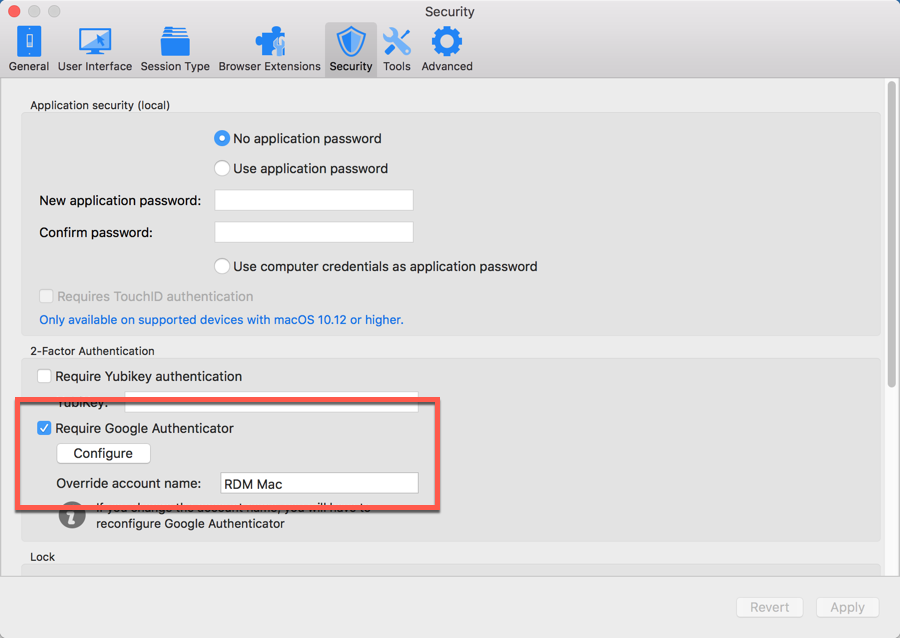
On my side, I have enabled the override account name option, as you can see below.
By doing this, the name entered in that field will be the same on your phone, so it would be easier for you to enter the proper code at the opening of RDM.
Best regards,
Jeff Dagenais
2018-10-30_14-50-55.png
Okay, this is frustrating. I exit out of the RDMFree after I put in a custom name in the "Override account name". So, when I re-launch RDM-free, it prompts for the Google 2-factor authentication. I typed in it's no longer working. I can't get in. RDM-Free will not accept the code. How do I re-configure the 2-factor authentication again?
By the way, it will not even let me quit...this is the Mac RDM-free version.
Hello,
Is it telling you invalid code?
If yes, make sure that the time on your phone and your computer are properly synchronized.
If you want to remove the 2FA inside RDM, please consult this article
https://help.remotedesktopmanager.com/troubleshooting_2-factor.htm
Best regards,
Jeff Dagenais
I believed the article you point to is for Windows. Do you want one for the Mac?
Hello,
Here's how to retrieve the configuration file on Mac
https://helpmac.remotedesktopmanager.com/installation_configurationfilelocation.htm
Inside the RemoteDesktopManager.cfg file, remove the information's between the EncryptedDataSources tags.
Best regards,
Jeff Dagenais
Okay, I already removed it but when I launch RMD-free it still asked for the 2 factor authentication.
<EncryptedDataSources>
</EncryptedDataSources>
Hello,
Have you tried to rename the entire RemoteDesktopManager.cfg file into RemoteDesktopManager.old and restart RDM Mac?
Best regards,
Jeff Dagenais
Okay, everything seems to work now. Thanks!