Prompted for credentials when using Remote Desktop Gateway
In our setup users are prompted for credentials even when they have pre-selected the credentials to be used. We use Secret Server as our credential repository. Users make User Specific overrides to specify the credentials to be used for the session.
The issue is seen when opening a session which makes use of a Remote Desktop Gateway server. When a user opens such a new sessions he is prompted to select his credentials from the Secret Server list and User Specific settings seem to be ignored. When the user selects the exact same credential as specified on the RDP Gateway Credentials window the session is opened normally. Please see attached screenshots for User Specific settings.
Did anyone experience the same and found a solution for it?
Thanks, Roland
Devolutions - RDG - Secret Server - Credentials 2.png
Devolutions - RDG - Secret Server - Credentials 1.png
All Comments (28)
Hello,
What version of RDM are you running?
Are you launching your session in embedded or external mode?
Best regards,
Jeff Dagenais
Hi Jeff,
We running RDM 13.6.7.0 with embedded sessions (just tried external but it did not make a difference).
Best regards,
Roland.
Hello,
We are currently working on setting up the environment to recreate your issue, we apologize for the delay.
Best Regards,
Etienne Lord
Hello,
Sorry for the delayed answer, we had some issue setting up the environment. Unfortunately, I was not able to reproduce your issue on my side, everything seems to be working correctly. I will continue to investigate on that. Do you happen to get any error message?
Best Regards,
Etienne Lord
Hello,
We were able to reproduce the issue internally, I will keep you updated on when the issue is fixed.
Best Regards,
Etienne Lord
Hi Etienne,
Ok, great! And sorry for not responding to your previous message... (The answer to your question was: no, there is no error message displayed to the user.)
Best regards,

I am getting this two i can connect on two computers but on another i cannot access via the SAME settings using the SAME RDM online database connection.
so , conencing to a rdm connection, in an rdm online database. on two different computers and one works and the other one comes up INVALID Credentials when using embedded. the same settings work manualy on the computer using mstsc
Hello,
The issue should be fixed within the next beta version of Remote Desktop Manager (14.0.10.0) I will let you know once it's out. From there you will be able to test it and tell us if the issue still occurs.
Best Regards,
Etienne Lord
Hello,
The new version is now out if you would like to try it yourself! (14.0.11.0)
Best Regards,
Etienne Lord
Hi Etienne,
Just tested out the 14.0.11.0 version, but unfortunately the issue is still there. Although both credentials are explicitly set the credentials selection window still pops up.
Best regards,
still not working,
using 14.0.11 and credentials are not passed to the rdm sessions from one computer (azure domain joined) when my desktop (not domain joined) works fine. using the same credentials, rdm entry, database.
credentials copied to an mstsc session work fine.
we are using 14.0.11 now, and rdm online as a database source.
@Paul Sexstone,
If you import your working .rdp file into RDM and launch it from RDM, is it working?
If not, what is the message that you receive?
Best regards,
Jeff Dagenais
Hi Jeff,
Imported the working .rdp file into RDM as requested. Same errors as before, as per screenshot.
Same error also appears when opening any other .rdp within our directory.
Thanks,
Paul
Capture.PNG
Any progression on this issue?
any suggestions on what can be done to isolate further
@Paul Sexstone,
Do you encounter the same issue in RDC Manager from Microsoft? I am asking this because RDM use the same ActiveX when you open a RDP session in embedded mode. Here's the download link for this application - https://www.microsoft.com/en-ca/download/details.aspx?id=44989
On the other hand, how is your credentials are saved regarding the Gateway in the RDP session? Could you post a screenshot of your Connection tab?
Best regards,
Jeff Dagenais
my original message had the screen shots.
the rdg connection tab is linked to the credential repository entry
the rdm connection tab is linked to the credential repository entry
if I use mstsc and copy/paste to the an rdp session it WORKS
if I use RDM and copy/paste to the connection (prompt for credentials) it does not work
- copy paste to a rdm connection to the rdg server as a connection not as a gateway (prompt for credentials) also fails
I have factory reset the laptop and it still fails.
from another machine using RDM it works fine
@support22,
I have looked at all your posts and I don't see any screenshot of your connection tab inside RDM. I only see a screenshot of the error message that you have.
That being said, do you encounter the same issue in RDC Manager? You didn't mentioned it in your previous post.
Best regards,
Jeff Dagenais
@support22,
I forgot something in my previous post.
Since it's working on your second computer, but not on your first computer using the same online database, this is very strange.
This is why I would like you to try RDC Manager to see if it's something related to the ActiveX on your first computer.
Best regards,
Jeff Dagenais
Jumping in on this old thread.
I have experienced this same issue.
I have a working rdp profile configured to use an RDGateway. When I connect using the rdp profile, I enter my initial password and that is passed to the gateway transparently.
If I then import that same rdp profile in to Remote Desktop Manager, I am prompted for initial login AND on the gateway.
If I manually create the entry in RDM, I am not prompted to enter gateway credentials.
I am on version: 5.0.5.0 64-Bit Free Edition
@wayneg,
Do you encounter the same issue using RDM Free 2019.1.36.0?
https://remotedesktopmanager.com/home/download
Best regards,
Jeff Dagenais
I think I may have found an interesting bit.
By default an rdp file does not contain the following setting:
If that is set correctly in the profile to be imported, the issue does not appear in RDM. The problem is that I cannot seem to find an adjustment from within the RDM property sheets to resolve the issue. Which option in the GUI is the toggle for the above setting? Or, is it possible to see the settings at a text level like it is with an rdp profile?
I think it would be an insane amount of work to have to export each affected profile, add the directive, and re-import. I have hundreds of these.
Thanks
I believe I have this working now. The silly part is that in the GUI the checkbox for the setting appears to be checked but not honored:
However, once I toggled back and forth a bit, it seems to start working. Not sure what is up with that.
I verified by exporting and reviewing text after having gotten it to work.
Scratch what I said.
I attempted to get another entry to work and failed.
The goofy thing is that when I exported the connection entry from RDM it does include the appropriate setting:
However, when I connect using the entry in rdm:
Accepts first credential, then prompts again:
If I export the *same* entry and use the rdp profile generated by rdm:
Accepts credentials and I get a desktop.
Hello,
Thank you for your feedback.
Which version of RDM are you currently running?
Best regards,
Jeff Dagenais

Hello,
I tried to reproduce the issue, without success. I get a single prompt with my gateway and the target computer listed. Have you a similar window with the two servers?
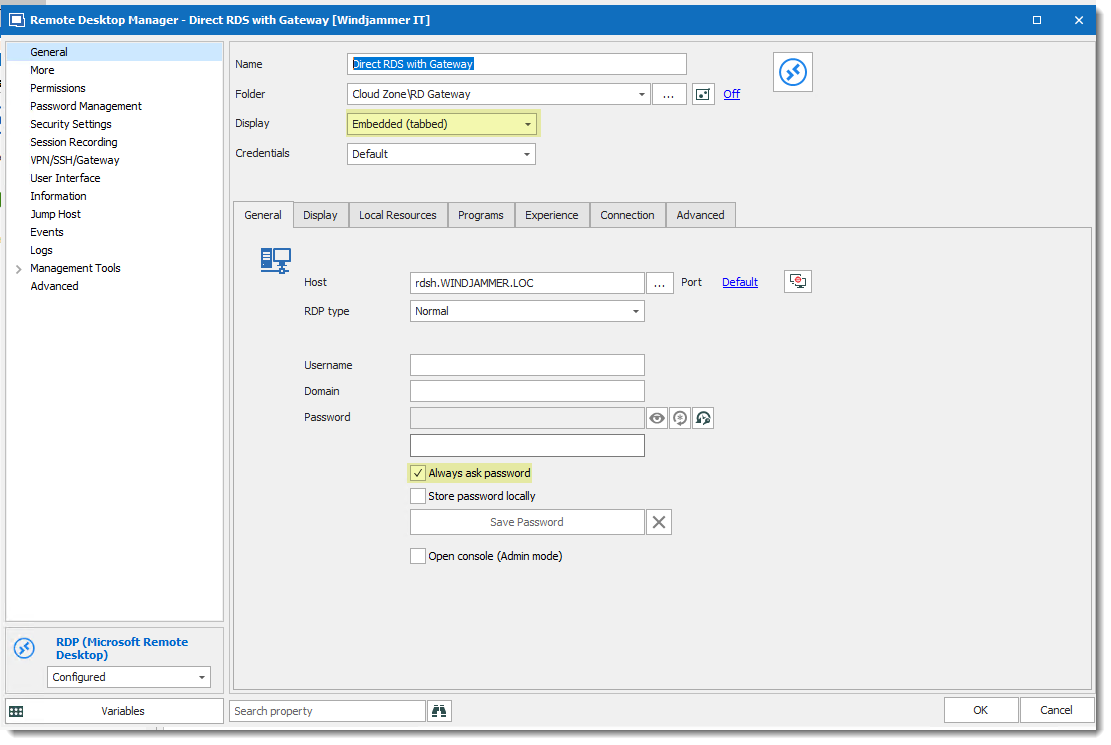
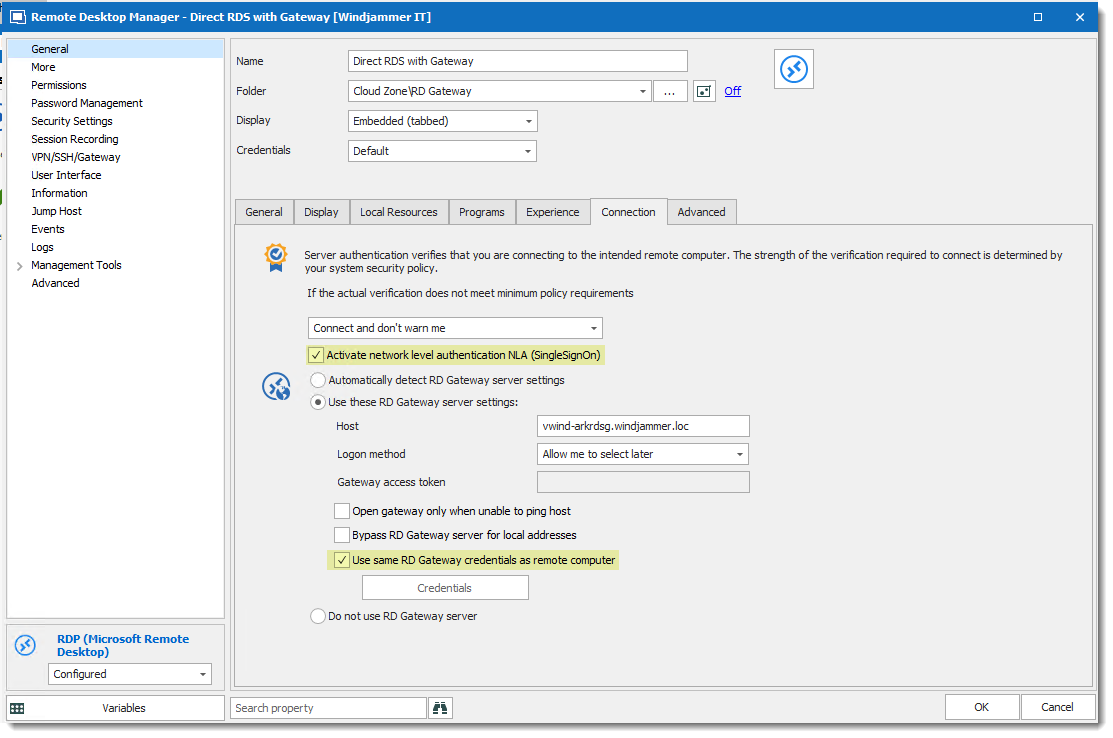
Also, if this could help please see my session configuration and tell me if something is different on your side.
The general configurations are:
Display mode as Embedded
Always ask for password check
The connection tab configurations are:
NLA check
Use same RD Gateway check
And also to be sure we have the same .rdp export file mine is:
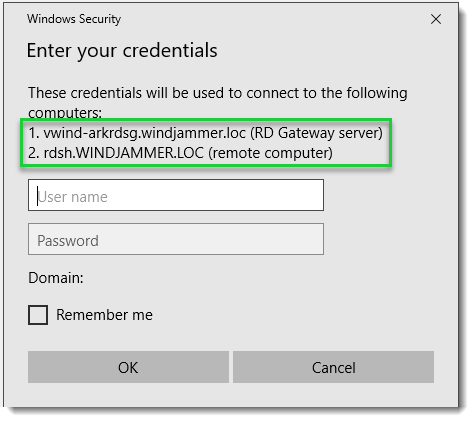
Best regards,
David Grandolfo
GW_Connection.png
GW_general.png
Prompt_GW_RDP.png
Although this thread is already 12 months old, and other users with other problems are running through it, I can tell you that the original problem does not occur any more with the 2019.1.41.0 version of RDM. So for us the issue has been resolved!
Hi Roland,
Thanks for the follow-up, it's always a pleasure to get feedback.
David Grandolfo