Remote access to Server Core does not work

Any attempt to connect to Server 2016 Core with RDP reports that the graphics mode is not supported. This is not the case with other, similar, products.
VNC is useless on Server Core since you can't send the CTL-ALT-DEL sequence to it so RDP is the only method that consistantly works, except in RDM.
All Comments (10)
Could you post the message you get? Does it work with RDM but in External mode?
Regards
David Hervieux
It flashes up quickly & goes away "Graphics mode not supported".
Happens regardless of mode, does not happen with competitor's products that utilize free RDP
The WaykNow team has a server core test bed yo may want to try it against.
Have you tried FreeRDP in RDM? Does it work with RDCMan?
Regards
David Hervieux
I'm on a Mac and I'm sorry but I don't see any option to change any of the types or add/remove any plugins or engines as there is on the Windows version.
I will assign this to our mac dev. RDM Mac already use FreeRDP by default but something must be missing.
Regards
David Hervieux
Hi Pedro,
Could you export (Session Menu -> Export Selection) the faulty session (make sure the "Include credentials" is not checked) and send it to me (xfortin@devolutions.net).
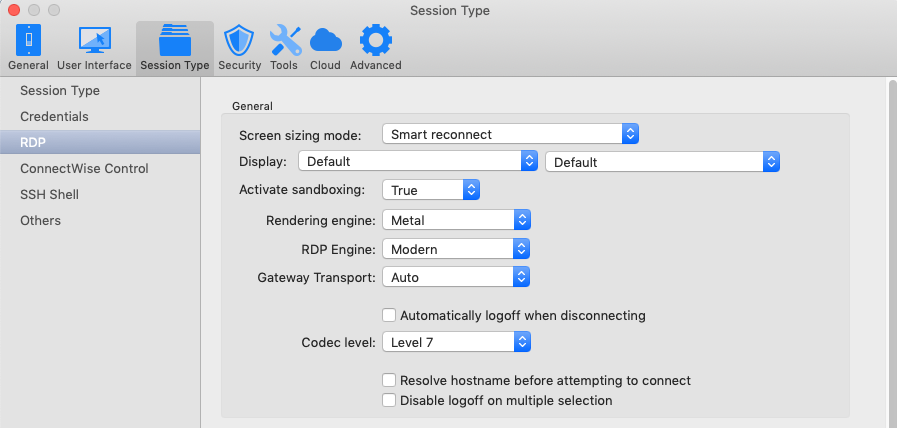
We'd like to test with the closest configuration possible. Could you also post a screenshot of the Preferences window with the Session Type -> RDP tab selected?
Best regards,
Xavier Fortin

Here's the exported session
TEISHU (Domain Admin).rdm
Hi,
Thanks for the file. One thing though, the view I'd like to see is this one:
Which shows the default values.
Best regards,
Xavier Fortin
Preferences_Session_Type_RDP.png
Hi Pedro,
I couldn't reproduce your issue using our Server Core instance.
Would it be possible for you to send us your RDP logs?
You can enable logging in the Session Logs dialog, located in the help menu.
Make sure your Server Core has sandboxing turn on as this will generate a log only for the this particular session.
Also, are you aware if any settings in link with display or graphic modes was changed on the server?
Regards
Jonathan Lafontaine