'Always ask password' checkbox on Session configurations

I'm a little confused as to what this is supposed to be doing?
Consider an RDP Session:
If I configure the RDP session to use a stored credential entry, then the Always ask password is disabled. This makes sense to me.
However, if my RDP session is setup with a Username and Password specified on the General tab and the Always ask password checkbox is checked, I can still open the session and connect without being asked for the password. The only thing I notice is that I can't edit the password.
If I uncheck the Always ask password checkbox the session behavior is unchanged, but now I can edit the password.
What is the use case for the Always ask password checkbox?
Thanks.
Jamie
All Comments (4)
Hello,
The "Always ask for password" feature is used to prompt any user that launch this entry with a window requesting the password in order to be able to open the session.
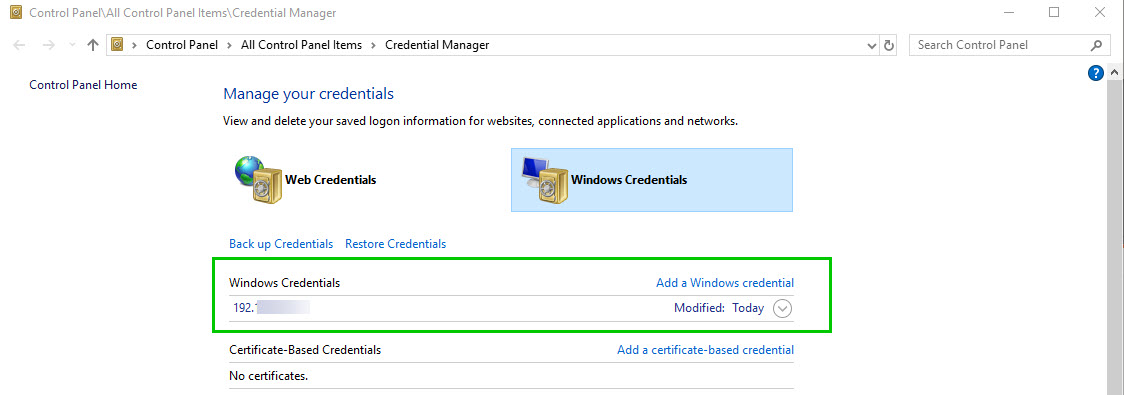
I think that the reason why this is not your case is because a Credentials for this connection might be stored in your Windows "Credential Manager"
Could you please delete any credentials that might by tied to this connection and try this feature once more in order to see if it solve this issue?
Best regards,
James Lafleur
WindowsCredentials.jpg
OK, I can see where that could be the case. Although, I've checked my Windows Credential Manager and I cannot find an entry that is associated to this session entry.
Regardless of my current example, if I want to prevent my users from being asked for the password, we should make sure that the 'Always ask password' remains unchecked. Correct?
Jamie
Hello,
Exactly! If you want to prevent your users from being asked for the password, the "Always Ask password" option need to be unchecked.
Best regards,
James Lafleur
Thanks for the clarification. Even better that it's exactly how I expected it SHOULD work... I was just confused by my experience with the feature. I will investigate further the possibility of something in my Credential Manager, but for now, I know how this should be set.
Thanks James!