Windows Key - After Connect Event

v13.6.7.0
I am unable to get the remote RDP session to hit the Start button with an After Connect Typing Macro - here is what I have tried:
{ALT}{HOME}
{LWIN}
{RWIN}
{CTRL}{ESC}
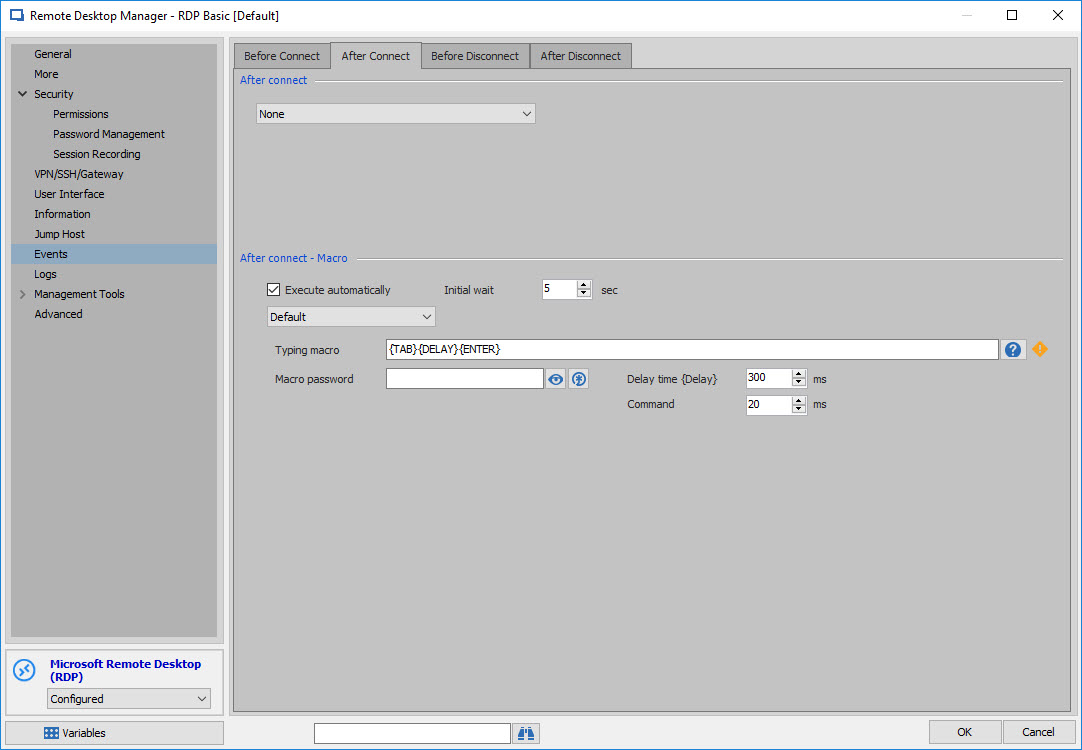
{TAB}{DELAY}{ENTER} - default delay of 300ms on this one
None of these are working, with or without focus on the session.
The thing I can get to work every time is clicking the "Start Screen" button under the Actions menu.
Is there a way to send that action from the Typing Macro?
All Comments (3)
Hello,
I have been able to achieve what you are trying to do by using the following typing macro:
{TAB}{DELAY}{ENTER}
Best regards,
James Lafleur
EventMacro.jpg
Thanks, James - ended up going another way.
My goal was to automagically open an IE window. Got it to do so by using the Programs tab on the RDP session properties.
Hello,
That is great news!
Thank you for your feedback.
Best regards,
James Lafleur