Quick Connect - login automatically upon template selection
Quick Connect - login automatically upon template selection
0 vote

Hi team,
I have a few templates configured with different sets of credentials. Under Quick Connect, I'd simply type in the name of a server that I want to RDP to, select the template with the credentials that I want to use and press enter and off we go. It's quick and it's simple, much better than creating multiple entries and find it in the tree.
As I'm lazy and would like to make this process even more efficient, I would like to request that upon selecting a template, RDM will load the session straight away without the need for user to press enter. Is this possible?
--------------------------------------------------------------------------------------------------------------------
I'm always using the latest beta RDM x64 version.
Local data source.
All Comments (27)
I don't think that we will be able to add this in our roadmap for the next version (we are about to release the RC) but I will add this to our todo list.
Regards
David Hervieux
Hi David,
With the release of v14, would this be something you could look into implement in the next version or so? I imagine if it's just adding an "execute enter button" step upon a Quick Connect template selection, it should be pretty relatively straightfoward?
--------------------------------------------------------------------------------------------------------------------
I'm always using the latest beta RDM x64 version.
Local data source.
Could you post a print screen of where you see the Execute Enter button?
Regards
David Hervieux
Hmm, not sure why I didn't get any notifications for this topic (and some other topics on this forum) and I haven't unsubscribed or changed any forum settings or profile settings. No changes on my email account either. Hasn't been an issue before.....
Anyway, there's no "execute enter button". What I meant was, if you can simulate an "enter button" press upon a Quick Entry template selection, then it'll achieve the goal.
--------------------------------------------------------------------------------------------------------------------
I'm always using the latest beta RDM x64 version.
Local data source.
I thought I was understanding but I think that I miss something. Could you post a print screen of the Select Template dialog?
Regards
David Hervieux
I hae multiple Quick Connect templates. Each template has a different set of RDP credential settings.
E.g.
Template1:
Username = Test
Password = Test
Template2:
Username = Test2
Password = Test2
I would then type in a server that I would like to RDP to, select a template, then press ENTER on my keyboard. If I need to access the same server under 2 separate accounts, I would then select another template and press ENTER.
Basically, it's a 3 step process (type in server, select template, press ENTER). I would like to NOT press ENTER at the last step and simply click on a template to load the session, making it a 2 step process.
--------------------------------------------------------------------------------------------------------------------
I'm always using the latest beta RDM x64 version.
Local data source.
Now I understand. I will could add a setting to open the connection when the quick connect field is not empty?
Regards
David Hervieux
Yup that will work. I was thinking that when you select a template, it'll just connect. Or simulate an "enter" keypress event (which is what I was talking about earlier), upon clicking on a template entry. Whichever method is the easiest for you to implement, as long as the end result is the same :)
BTW, I'm still not getting any email notifications and I am definitely subscribed to this topic. Also, this is ticked:
Email isn't blocked or in my spam folder either. Is there something wrong with the forum's email notification?
--------------------------------------------------------------------------------------------------------------------
I'm always using the latest beta RDM x64 version.
Local data source.
Hi Team,
Just bumping this thread posted 3 months ago. Any chance we can see this in the next beta release?
--------------------------------------------------------------------------------------------------------------------
I'm always using the latest beta RDM x64 version.
Local data source.
I'm still assigned to it but I haven't worked on it. Sorry for the delay
Regards
David Hervieux
Working on it. This will be in RDM 2019.1
Regards
David Hervieux
Thanks for the update, works well!
--------------------------------------------------------------------------------------------------------------------
I'm always using the latest beta RDM x64 version.
Local data source.
Sorry, re-opening this one. Just found a bug.
If you have a Citrix Netscaler session open and it is in focus, then when you try to select a Quick Connect template, the template won't be selected.
The fix is to click on a different session that isn't Citrix Netscaler, then you can select the Quick Connect template like normal.
--------------------------------------------------------------------------------------------------------------------
I'm always using the latest beta RDM x64 version.
Local data source.
Just FYI, the issue raised in my last post is still not fixed in the latest release.
--------------------------------------------------------------------------------------------------------------------
I'm always using the latest beta RDM x64 version.
Local data source.
Does it happen only with Netscaler? I'm asking the question because it will be difficult for me to reproduce it (we don't have Netscaler at the office). Perhaps I'm missing something and a video could help me reproduce it without it.
Regards
David Hervieux
As far as I can tell, only happening with a Netscaler. You can try setting up a Netscaler entry to point to e.g. desktop.finsys.co.nz and you don't need any creds. Just open the Netscaler entry and then in the Quick Connect field, type in a server name and then select a template. You will find that you cannot RDP to the server while the focus is on the Netscaler session.
--------------------------------------------------------------------------------------------------------------------
I'm always using the latest beta RDM x64 version.
Local data source.
Hello,
With a quick test we haven't been able to reproduce on RDM 2019.2.19.0. I think it would help us if you could send us a video of the issue through our secure link https://devolutions.sharefile.com/share/filedrop
Otherwise, we will also ask our QA team to try and reproduce. There might be a setting affecting this behavior.
Regards,
Hubert Mireault
Have shared the file with you, using the builtin RDM record feature. Video is titled "netscaler".
--------------------------------------------------------------------------------------------------------------------
I'm always using the latest beta RDM x64 version.
Local data source.
Hello,
Thank you for sending the recording. Nothing seems out of the ordinary, but we will investigate. I have sent the video to our QA team.
Regards,
Hubert Mireault
Hi,
I've been trying to reproduce the issue as close to your setup as I could. I am still not able to reproduce the issue see gif below.
I will probably need your RemoteDesktopManager.cfg file in order to see if I can reproduce with the correct application settings.
Follow these procedure. https://help.remotedesktopmanager.com/index.html?howto_configurationfile.htm.
Name the cfg file *toAroy.cfg*.
Also, are you running RDM through with Citrix app ?
Best regards,
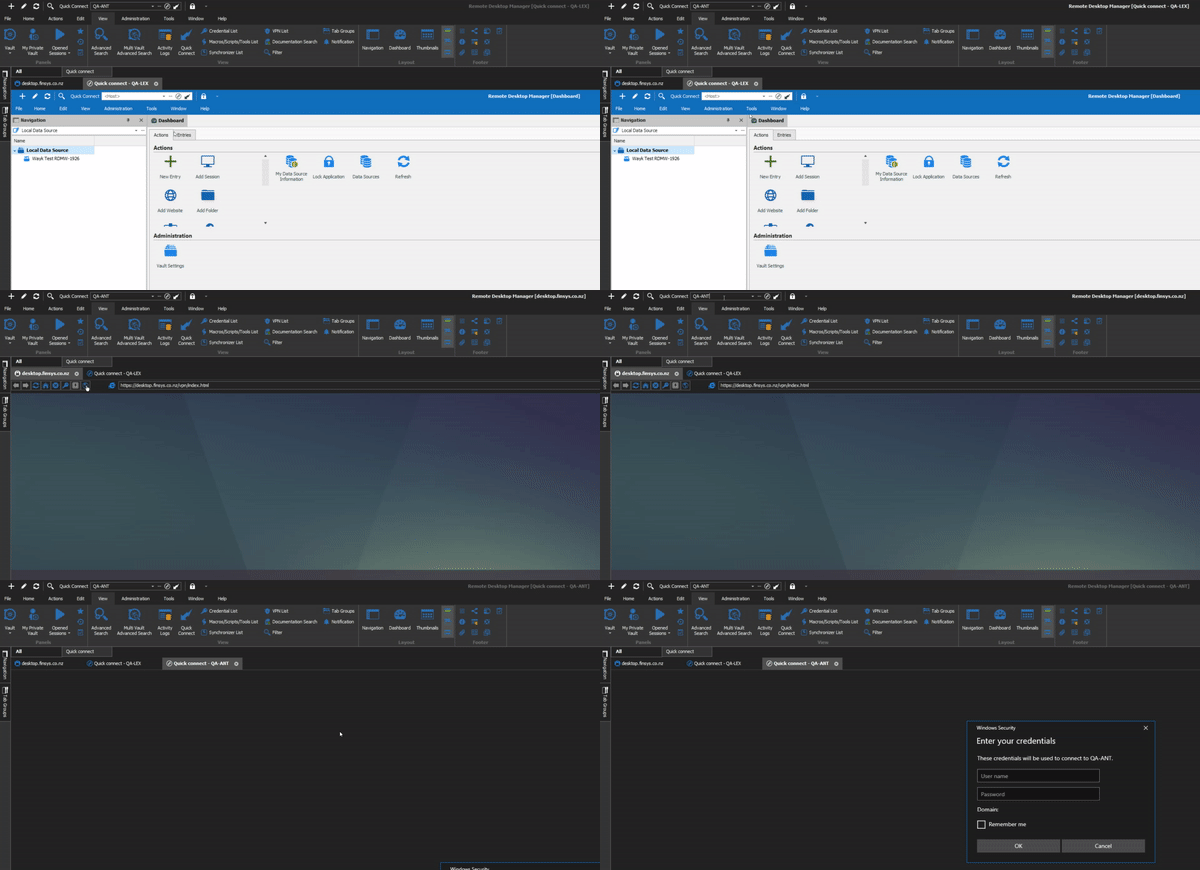
Alexandre Roy
ezgif-6-d8a4e11925c9.gif
Hi Alexandre,
I have sent you an email with the .cfg file requested.
To answer your other questions, no I am not running RDM as a Citrix app. I'm running RDM locally on my laptop.
The credentials for the RDP sessions are not saved locally on my machine. I'm saving the credentials directly in RDM as password entries, and then parsing the password entries into the quick connect templates.
--------------------------------------------------------------------------------------------------------------------
I'm always using the latest beta RDM x64 version.
Local data source.
@Chaoscreater
Thanks, for all those info and for providing me with this cfg file.
I'll be working on this today.
Best regards,
Alexandre Roy
Sorry for reposting this quickly to the thread,
Is the template not launching only when you press enter in the field or also when you click on the quick connect button to launch it ?
Regards,
EDIT: After further test and investigation from your other post, I've realised that you are right clicking and selecting a template, and the options to "Automatically Launch on template select" is true.
Knowing this I would still need to know if clicking on quick connect would result in the same behavior. That would tell me which feature is broken.
I've been testing with your method on my side and I'm still not able to reproduce the issue, even with your cfg file :/.
Regards,
Alexandre Roy
Hi,
Good news,
I was able to find what caused the issue and reproduced it. With your info + video and method. I was able to recreate.
The recording tool isint perfect so when you were right clicking in the field it wasn't showing the dropdown and selection of a template, so we assumed you were pressing enter.
Now we're good.
The workaround for now is to uncheck the options *Force 32-bit* in your Citrix-Netscaler entry properties in the advance tab.
We'll see what we can do.
Regards,
Alexandre Roy
Hi Alexandre,
Thanks for your quick replies!
Yes, I was right clicking and selecting a template. I can verify that if I select a template and then press enter in the Quick Connect field, it works fine. However, most of the time I'm simply just selecting a template and it'll launch the RDP session for me.
The force 32-bit option in the Netscaler entry is required. From memory, this is required to allow auto-refresh to work. This is another option that you can find in the Netscaler entry. Either this, or focing 32-bit is for allowing the Private incognito mode to work. Again, this is another option that you can enable in the Netscaler entry. The force 32-bit option is actually a suggestion made by one of your colleagues for an issue I raised a long time ago.
--------------------------------------------------------------------------------------------------------------------
I'm always using the latest beta RDM x64 version.
Local data source.
Hello,
This issue is now fixed and will be available with version 2019.2.23.0.
Regards
Jonathan Del Signore
Nice! Thanks team!
--------------------------------------------------------------------------------------------------------------------
I'm always using the latest beta RDM x64 version.
Local data source.