hyper-v with failover cluster
0 vote

vmconnect is used for a hyper-v virtual machine in a failover cluster, however the host can be any of the cluster members. In RDM you need to specify the hypervisor host for a hyper-v console connection.
The following lines of powershell can determine which host a vm is running on. Is there any way to have this run first and then kick off the vmconnect command?
$prc_vm = "MyVirtualMachine"
$clustername = "FailoverClusterName"
$vmresource = "Virtual Machine " + $prc_vm
$node = ((get-clusterresource -cluster $clustername -name $vmresource).ownernode).name
"$prc_vm is running on $node"
All Comments (28)
Hello Jeff,
I transfer this forum under Feature Request section, but prior to go further I would like to confirm are you looking to support Hyper-V cluster in the Hyper-V Console or the RDP session with Hyper-V mode?
Best regards,
David Grandolfo
just the hyper-v console. RDP is not affected.
I will have a touch with the engineering department and we will update you soon.
David Grandolfo
Hi,
We had the idea of a feature that I believe could meet your needs. We would like to have your opinion on this one.
The above script can be run automatically before the session starts. So the host and other fields can be set before it launches.
Basically we integrate PowerShell scripts before session start.
Thanks for your feedback.
David Grandolfo
where's the script?
what is the status of this? Your last message says there's a script, but I don't see one.
Hi Jeff
First of all, I would like to apologize for not answering you in your last message.
Clarify my last post. We are currently looking to enable a new feature in the Hyper-V console entry. This function will allow you to run a PowerShell script before the connection.
Thus, by adding the functionality to run scripts before a connection, you will be able to use your own PowerShell script (as indicated in the initial request) before opening the console.
We are waiting your feedback to know if that could be a good solution.
Best regards,
David Grandolfo
ah. i had the same idea that you might just be asking if running a script before the connect. Intially I looked for a way to run a script before the connect, but did not find anything. I think running a script before the connection would be perfect.
Hi Jeff,
Good news in our latest beta RDM 14.0.9 we already integrate the PowerShell script option before a RDP Hyper-V or on the Hyper-V Console.
If you could test this beta which can be downloaded here and inform us if the script work fine.
Best regards,
David Grandolfo
care to pass out a hint on how to configure the entry? relative newbie here.
Hello,
Unfortunately, David is on sick leave for a week, but my team will have a look at this topic and provide you the needed information later this week.
Sorry for the delay.
Best regards,
Jeff Dagenais
Hello,
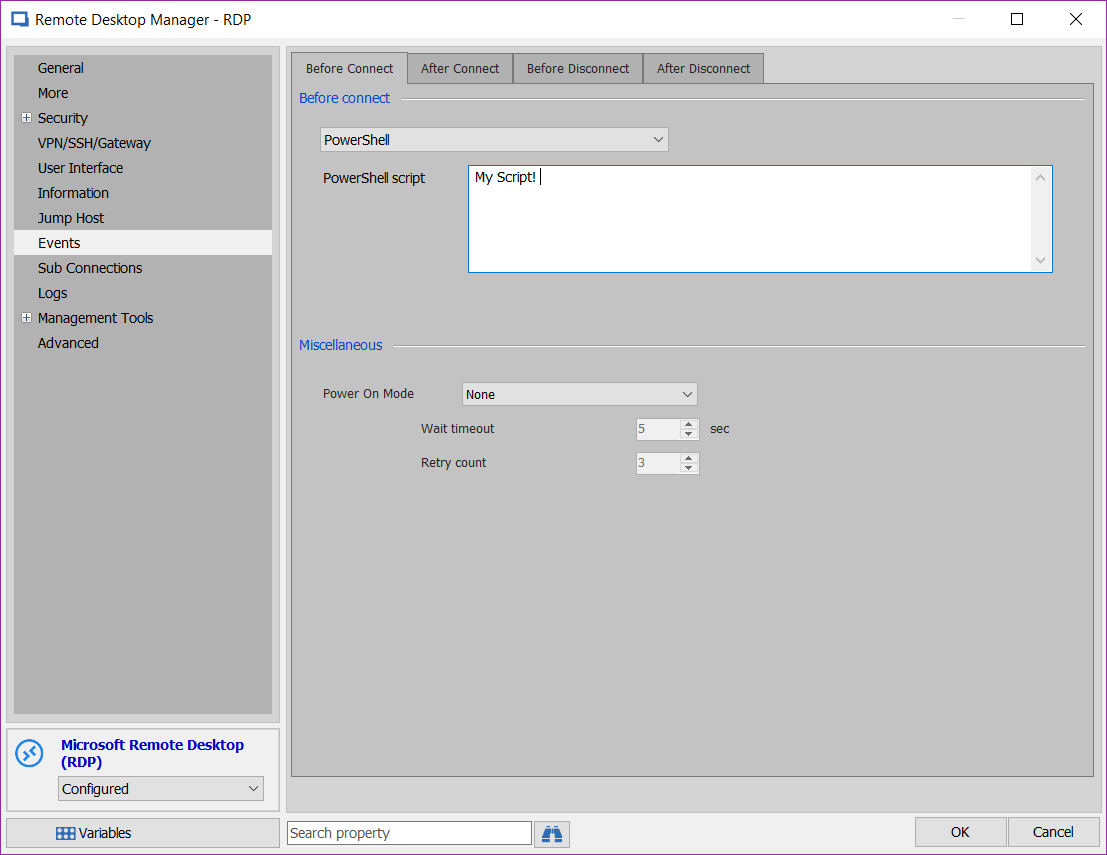
The feature that was added can be located in the Event tab of an RDP session, in the Before Connect drop down, simply select Powershell and you will able to launch a script before the connection itself.
Best Regards,
Etienne Lord
2018-12-04_14-14-42.png
I found that, what i don't know is what are the variables I can manipulate in the script. For example, I need retrieve the vm name from the settings and set the host name in the settings after i figure out which host i want to connect to. I assume there's some variable with all of the connection information in it?
Hi Jeff,
I'm afraid that we are not Hyper-V expert. That being said, as soon as you found proper Hyper-V variables we could help you to assign them.
You could also look at this link which contains RDM session variables.
Best regards,
David Grandolfo
the only way this will work is if in my powershell script "before connect" i determine the hyper-v host to connect to. I can get that information. how do i pass that information to the RDM connection so it uses this host?
Hi,
I will have to look with my colleague, which has better PowerShell knowledge than me. And at the beginning of next week I create the PowerShell script to overwrite the host before the connection.
Best regards,
David Grandolfo
Thanks for your patience, the script to add under Events -- Before Connect should look like that. "$prc_vm is running on $node"$RDM.Connection.HyperV.Host = $node;$RDM.Save();
You have to add your script before the "$prc_vm..." line. Then when the Hyper-V Console will be executing it will rewrite the Host field with the one found by the PowerShell.
Best regards,
David Grandolfo
That was the information I needed. I got the script to work:
$clustername = "failover5"
$vmresource = "Virtual Machine " + $RDM.Connection.HyperV.machinename
$node = ((get-clusterresource -cluster $clustername -name $vmresource).ownernode).name
$RDM.Connection.HyperV.Host = $node;
$RDM.Save();
This runs the hyper-v console correctly.
However, I need to pass a username and password as arguments to the vmconnect.exe command. There is no place for that in the UI that I can see.
Suggestions on how to do that?
I will have to test the Management tools section which can store username, password and domain information. I will test the variables: $TOOL_USERNAME$, $TOOL_PASSWORD$ and $TOOL_DOMAIN$.
I should be able to test it tomorrow.
David Grandolfo
Base on vmconnect.exe help page, you can add /user and /password as values.
If you are looking to use the same credentials as the session please try:/user $DOMAIN$\$USERNAME$ /password $PASSWORD$
If different credentials are required, you can user Management_tools section. Then try the following variable:/user $TOOL_DOMAIN$\$TOOL_USERNAME$ /password $TOOL_PASSWORD$
Regards,
David Grandolfo
where in the UI do i put the /user $TOOL_DOMAIN$\$TOOL_USERNAME$ /password $TOOL_PASSWORD$ line?
should I be using a command line entry, or a hyper-v console entry?
In the hyper-v console entry, i don't see a place to put the options line.
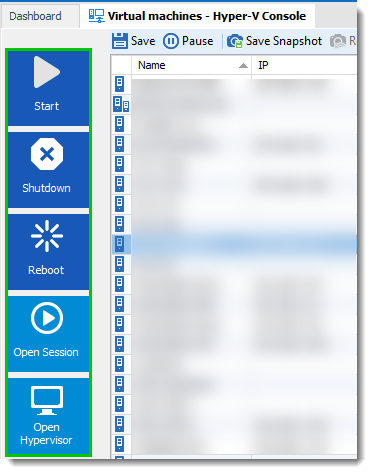
I think I misunderstood the last request. So you are not looking to add the /user line in the PowerShell script, are you trying to use these value for one of the options below?
Regards,
David Grandolfo
Hyperv_option.png
Hi David,
I'm stuck at passing the /user $DOMAIN$\$USERNAME$ /password $PASSWORD$ parameters. Where can I do this?
Thank You so much,
Nikolas
Hi,
Can you post the script you tested? and which line doesn't work?
That said, which version of RDM are you using?
Regards,
David Grandolfo
Hi,
I'm using Version 2019.2.12.0 (still the free one, if this works I will switch to the paid version).
The PowerShell script is:
$clustername = "cluster"
$vmresource = "Virtual Machine " + $RDM.Connection.HyperV.machinename
$node = ((get-clusterresource -cluster $clustername -name $vmresource).ownernode).name
$RDM.Connection.HyperV.Host = $node;
$RDM.Save();
It works fine when I run RDM from an account with rights to manage the cluster. I would like to pass the username and password to be able to also use it on accounts without that right.
Best,
Nik
Hi,
After reviewing the exchange I had previously on this ticket, I think I misexplain something. When I was talking about /user and /password it's the option available when starting vmconnect.exe in Powershell. So not usable as is in the current PowerShell. Unfortunatelly, I don't know how to test it.
Further details on vmconnect.exe on https://docs.microsoft.com/en-us/windows-server/virtualization/hyper-v/learn-more/hyper-v-virtual-machine-connect
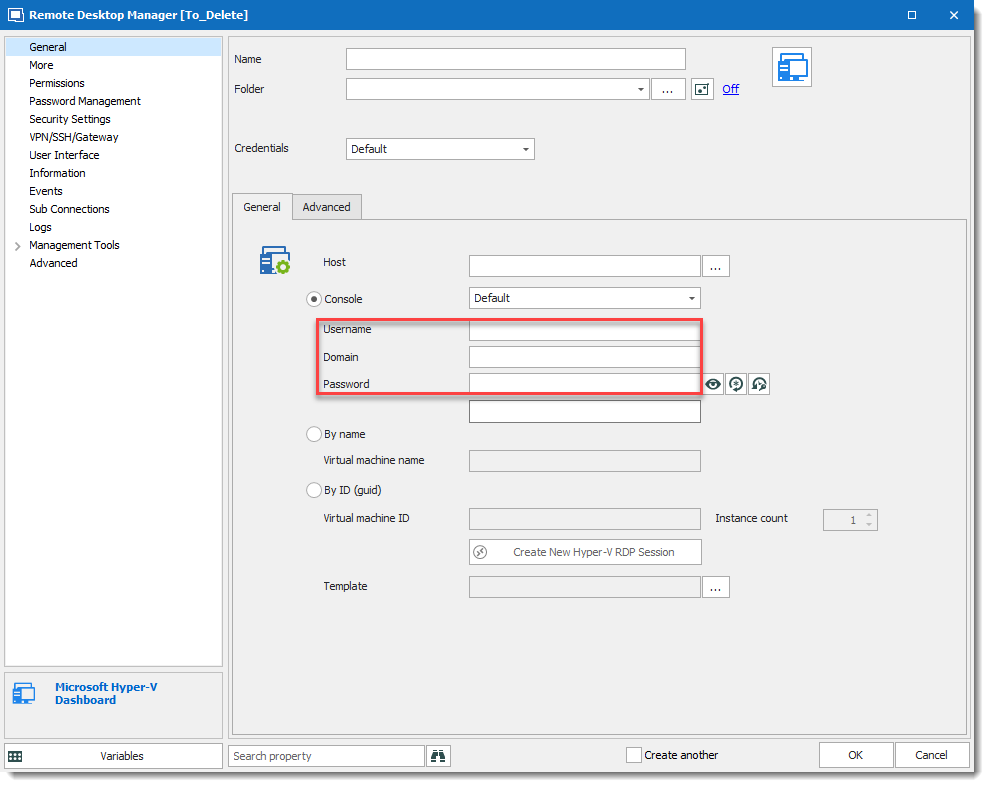
That said, if you change the credentials in the Hyper-V Console does it work? and if not could you detail why it doesn't work.
Best regards,
David Grandolfo
Hyper-V-Username.png
Hi
Is it possible to run this script on the Hyper-V Host before connecting to the console, without using remote Powershell access?
My computer is not in the same network as the Hyper-V cluster, so it can't get the clusterresource.
Hi,
We don't have any mechanism in RDM that could do that, I'm even not sure if Microsoft has a method of doing this without using Remote Power shell.
If you find any way of doing it please feel free to guide us with the documentation and we could look if it's a feature we can integrate.
Regards,
David Grandolfo