favicon to https sessions

how is the feature "Assign Favicon to session" supposed to work? A click on it does nothing. I basically would like to have the favicons of https connections in the connection list..
All Comments (7)
Hello,
Indeed, the Assign Favicon button should add the favicon into the session, however, it's not impossible that RDM doesn't find the favicon.
Is this a public URL? Could you provide it to me please.
Best regards,
Jeff Dagenais
it leads to a login page which is public: https://ninite.com/pro-interface/
Hello,
I have done some tests and indeed, RDM is not able to retrieve the favicon for this website and this behavior occur even if you change the browser type.
The workaround would be to save a custom image manually.
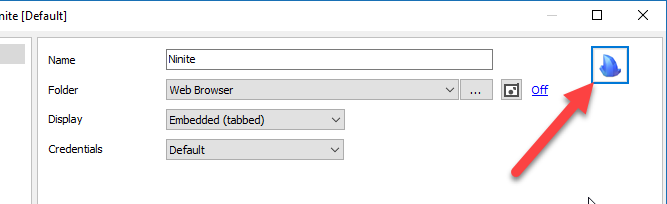
In the properties of your web entry, click on the icon located at the top right and load an image saved on your local drive like in my screenshot.
If you want to use the same image as me, I've attached it to the post at the bottom :)
Best regards,
Jeff Dagenais
Ninite.jpg
2018-09-28_13-56-55.png
ok this is a workaround, but is not being able to retrieve a favicon more kind of a bug? I mean, every browser can do this.. ;) - also, can we have the favicon as the default icon for all https connections - this would make the connection list so much more usable..
Hello,
We use third party libraries for the integration of Firefox and Google Chrome in the Embedded Display Mode.
For IE, we use the Microsoft ActiveX that is installed at the same time as the browser.
It's not the external webpage this is resize to fit into the tab.
That being said, I would need to verify with our engineering department if something can be done regarding this.
Best regards,
Jeff Dagenais
Hello,
I had a chat with our engineering department and this type of issue has been resolved in RDM 14.
I think you are already using this version, so could you confirm that the favicon issue is resolved?
Best regards,
Jeff Dagenais
yes, looks good. A bulk setting would be nice to change it on all connections where it didn't work until now..