VPN Name when using Microsoft VPN

Disabled
Hi
Each of our team members are setting the Microsoft VPN name differently on their local PC. The issue is if I configure the VPN name in RDM to be the name I used on my PC, other members wouldn't get VPN automatically connected using RDM as on their PC the VPN Name is set to another name.
Is there a way to overcome this issue or workaround to this?
Thank you,
Tong.
All Comments (9)
Hello Tong,
you can use the phonebook feature to create and configure the required entries and link it to the RDM sessions. In this case no user have to create their own VPN connections.
Regards,
Min
Disabled
Hello Min,
Thank you for your suggestion. I'll try that one.
Regards,
Tong
Disabled
Hello Min
I just tried the phonebook one, the issue I'm having is that the RDM is trying to connect to the server before the VPN successfully connected. How can I set the RDM to wait until the VPN successfully connected before it starts connecting to the server?
I already set the 'VPN default pause' to 30 sec but it still doesn't seem to help. Any suggestion, I would really appreciate it.
Thank you.
Tong
Hello,
The Microsoft VPN takes over 30 seconds to connect?
Could you post a few screenshots of the VPN configuration and the RDP session configuration please?
This may help finding the culprit of the issue.
Best regards,
Jeff Dagenais
Disabled
Hello Jeff,
Yes, it took longer than 30 seconds, I always get error that RDM cannot connect to server before the VPN got connected.
Attachments are screenshots of RDP and VPN.
Thank you,
VPN03.jpg
VPN02.jpg
VPN01.jpg
RDP01.jpg
Hello,
Could you create a standalone Microsoft VPN session and evaluate how many time it's taking to this session to establish the connection
https://help.remotedesktopmanager.com/vpn_microsoftvpn.htm
Then, use this session inside your RDP session and adjust the Default VPN delay so that the VPN connection could be establish prior to the RDP session.
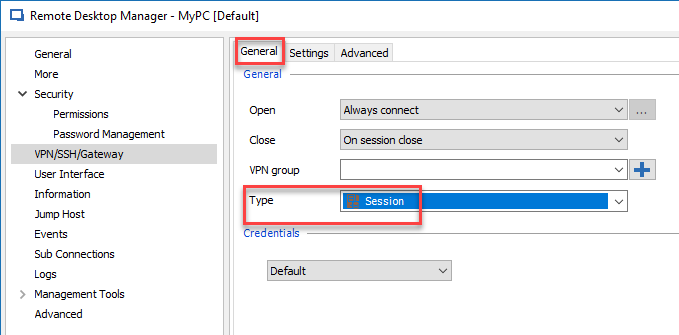
To use the VPN session inside the RDP session, in the VPN section, select Session
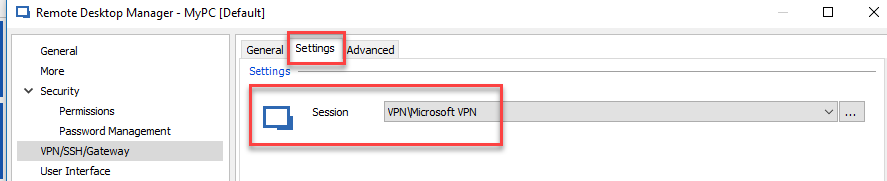
In the Settings tab, select the Microsoft VPN session
Best regards,
Jeff Dagenais
2018-09-05_08-11-42.png
2018-09-05_08-10-32.png
Disabled
Hi,
It is perfectly working now. Thank you.
Regards,
Tong
Hi devolution team, the links is broken. There some updated url?
https://help.remotedesktopmanager.com/vpn_microsoftvpn.html
@rodrigorobeiro,
Are you trying to create a simple Microsoft VPN entry or a L2TP Microsoft VPN?
If it's L2TP, please refer to this link https://kb.devolutions.net/kb_rdm_create_microsoft_l2tp_vpn_entry.html
Best regards,
Jeff Dagenais