Using PowerShell to update RDP Session Host IP

I'm accessing an AWS EC2 instance that has a dynamic IP.
I retrieve the current IP address and store it in $PublicIpAddress
$PublicIpAddress = ((Get-EC2Instance -InstanceID $InstanceId -Region $Region -ProfileName $ProfileName).Instances).PublicIpAddress
Then I'm retrieving the relevant RDM session in $session, updating $session.Host to = $PublicIpAddress, saving $session and calling Update-RDMUI
$session = Get-RDMSession -Name 'AWS Instance Name Here'
$session.Host = $PublicIpAddress
Set-RDMSession $session
Update-RDMUI
While this seems to work, I'm not seeing the new IP address until after I manually do a FILE > REFRESH via the RDM desktop client. Then the RDM session uses the newly acquired IP address. I thought that Update-RDMUI would have updated the session?
What am I missing? :(
Thanks.
All Comments (14)
Hello,
This should work normally without having to refresh RDM after running the PowerShell script.
What version or RDM are you using?
What data source type are you connected to?
If the data source is Devolutions Password Server, what version are you using?
Best regards,
Érica Poirier
Hi Erica,
We're running Remote Desktop Manager Enterprise Edition version 13.6.7.0 64-bit using a Devolutions Cloud online database.
Jamie
Hello Jamie,
I am still unable to reproduce your issue using the same RDM version and same data source.
Which PowerShell entry type are you using to modify the host?
Best regards,
Érica Poirier
I tried running the script from PowerShell ISE 64 and I also tried creating a Macro/Script/Tool entry of Script Type PowerShell (Local). The entry is saved with the Embedded Script option.
I've executed the Script by hand from the RDM client and also tried it set as a Before Connect Event on the RDP Session. The results in each case were similar. The script appears to complete without error. But if I execute the RDP Session it tries to connect to the old IP address. If I then manually refresh the RDM desktop... the IP is updated and the RDP session will work as expected.
I think I just got it to work.
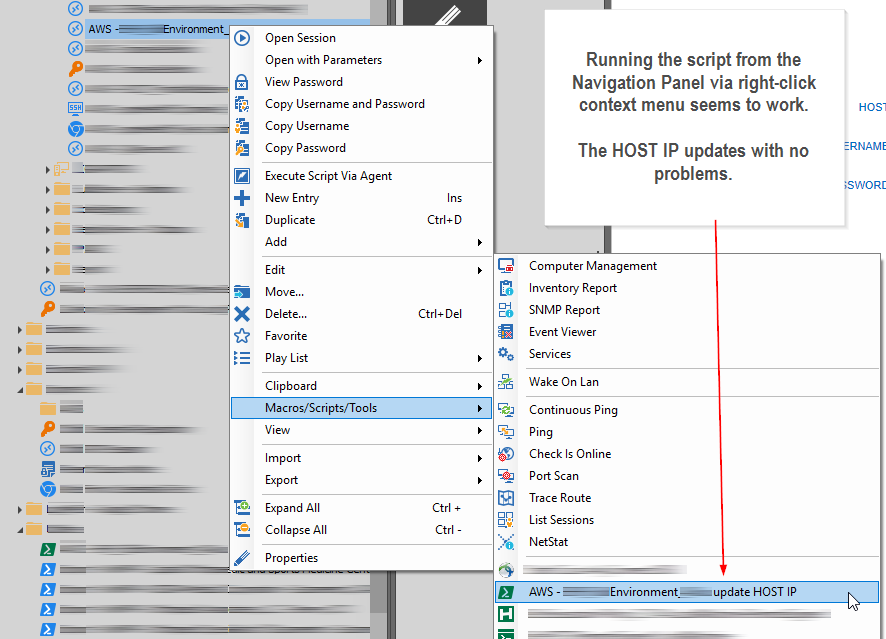
If I right-click on my RDP session entry in the Navigation panel, scroll down to Macros.Scripts/Tools and select my PowerShell script from there, the script executes and I see the RDM interface update. The HOST IP address is updated with no further action required!
If I execute the script from the Macros/Scripts/Tools tab in the main window, the session doesn't update properly.
If the script executes as a Before Connect Event on the RDP Session the session doesn't update properly.
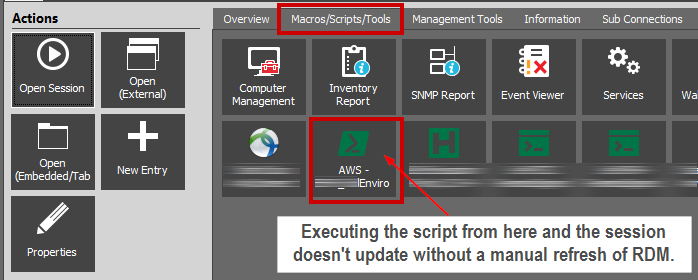
RDM-ScriptViaRightMacrosScriptsToolsTab.png
RDM-ScriptViaRightClickContextMenu.png
Hello,
Thank you very much for these detailed steps.
I only tried running the script using the context menu (right-click). I will test the other methods and will get back to you about it.
Best regards,
Érica Poirier
Hello,
So running the script from the Macros/Scripts/Tools tab work perfectly on my environment. After running the script, I click on the Overview tab and the Host information is up to date.
But no luck with the Before Connect event. RDM opens the RDP session before the script is completed so still connect on the old host. Unfortunately there is no Wait parameter for the Macro/Script/Tool option.
Are you using the following configuration for the Before Connect event?
Best regards,
Érica Poirier
Érica, Thanks for the update.
Yes, when I tried using the Before Connect Event it was configured similar to your example. I agree... it seems that it doesn't wait for the script to complete before attempting the connection. I even tried setting the 'Wait for application to exit' checkbox on the Advanced tab for the Script entry. That didn't help.
Last night running the script from the context menu was working... I tested it 3 or 4 times! Today I'm seeing things like this:
The script has been run, the Overview tab still shows the old IP. If I edit the properties the Host there has been updated, however, if I try to run the connection it still tries to use the old IP address. It seems that something along the line isn't getting fully refreshed.
We will also be closed on Tuesday, Sept. 3rd so I hope you can enjoy the extra day off.
:)
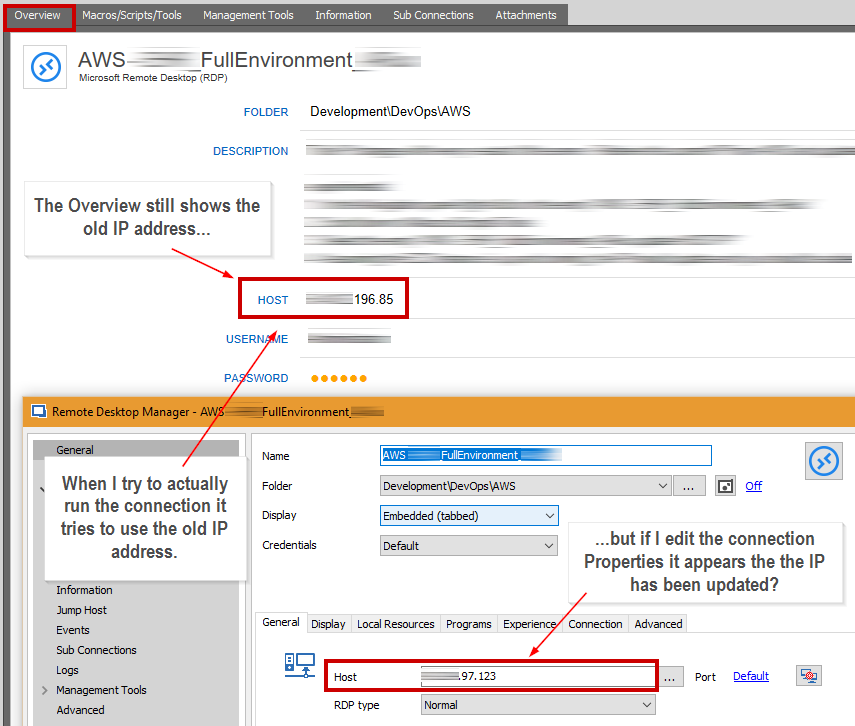
RDM-Overview-mismatch-with-Properties.png
Oops... that's Monday September 3rd.
I could not edit the post :-?
Hello Érica,
I've been re-visiting this idea... since the Before Connect event doesn't seem to be waiting for the script to complete before it attempts to connect the session I've been using the script to just update the IP. The user then has to manually click on the Open Session button. This is working fairly reliably, but if you keep RDM open for an extended period of time it seems the UI fails to update. A restart takes care of it.
Since the script is running and updating the RDM session with the current IP address I thought why don't we just start the required RDM session at the end of the script? I've got something like:
$session = Get-RDMSession -Name 'MySessionNameHere'
Open-RDMSession -ID $session.ID
...but that isn't opening the session. $session.ID does have the GUID ID string.
I also tried passing the GUID itself without success:
Open-RDMSession -ID MyGUIDHere
... but THIS works opening the session externally:
Open-RDMSession -ID $session.ID -ForceExternal
Jamie
Hello Jamie,
I got the same behavior as yours. After a discussion with one of my colleague, I will test some other scenario and will get back to you when I'll get some results.
Best regards,
Érica Poirier
Hello,
So when you try to open a session using Open-RDMSession, if the switch -ForceExternal is not used, PowerShell will try to start new RDM process to open the session. As a work around, you will find in File - Options - Advanced - Other Options the Allow multiple instances option to have the possibility to open multiple RDM processes. 
Best regards,
Érica Poirier
My script calls:
Open-RDMSession -ID $session.ID -ForceExternal
the script completes and the RDP session opens in an external window.
Even if I set Allow Multiple Instances, and the same working script instead calls:
Open-RDMSession -ID $session.ID
then the RDP session never materializes, tabbed or otherwise.
Must be something with my overall script. If I manually run the values through using PowerShell ISE I am getting the RDP Session to open in a Remote Desktop Manager Tab... and that's even without Allow Multiple Instances checked.
The external window isn't a particular problem for us... so I'll leave it for now because everything else is working. We're starting an AWS EC2 instance, getting the fresh IP address, updating the RDM Session and then initiating the RDP connection to the EC2 box.
As always, thanks for your help.
Jamie
Wow... I just discovered the Amazon AWS Console session type. That might be very helpful. Guess I better investigate further...
Hello,
Thank you for your feedback. Glad that opening a session in external mode isn't a stopper for you.
Best regards,
Érica Poirier