Pass Phrase is lost after closing session in VMware

We had this issue before under version 10.6.7 and fixed it with a registry entry. We were not performing a daily refresh of the VM Desktop at that time. We have upgraded to 13.6.6.0 now and need to refresh our desktops on a daily basis to avoid a disk full issue not related to RDM and the pass phrase is getting lost. Is there some way to have the pass phrase survive a desktop refresh in VMware?
All Comments (6)
Hello,
By passphrase, do you mean a PassPhrase Security Provider? Could you post a screenshot of the window that is prompted?
Best regards,
Jeff Dagenais
I have attached the screen shot as requested. I should add we are using Active Directory Integrated login to RDM and that we are prompted for the passphrase every time we log on to the database after a refresh of the desktop.
Capture.PNG
Hello,
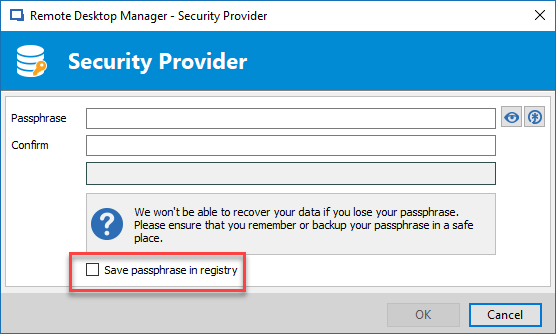
As per the attachment, the window that is prompted is regarding the Security Provider that need to be entered to access the database.
Indeed, if the VM is refresh every day, you would need to re-enter the security provider to access the database again because the information is stored locally.
Best regards,
Jeff Dagenais
So there is currently no way to redirect this file to another location? If not, I'm wondering if your team could develop a way to do so as it is a problem for us here?
Hello,
Let me verify with our engineering department if something can be done regarding this.
Best regards,
Jeff Dagenais
Hello,
We have two different scenarios that should allow you to enable the Security Provider without entering the passphrase at each refresh.
1- In Administration -> Security Providers, select Shared passphrase (v2). After clicking apply, you will have the possibility to save the passphrase in the registry.
2- In Administration -> Security Providers, select Certificate and use a certificate as your security provider. Then, deploying the certificate at the refresh of your VM should open RDM without asking any provider.
Best regards,
Jeff Dagenais
2018-09-19_15-54-15.png