increase RDM performance (RamDisk)

We are considering RamDisk software for our team to speed up our workstations. We already have SSD's but we still see quite a bit of delay when doing things inside RDM.
Are there any performance options we can do to speed up application responsiveness? Specifically things like menu loads, properties of entries, application startup, etc?
Any tricks to recommend? We've found that using the 'menu' theme rather than the 'ribbon' team has significantly sped up the responsiveness of the GUI, but we want to squeeze even more out of it.
Maybe something like moving the RDM temp/scratch directory to a ramdisk? Does RDM use a scratch space of any kind? C:\ProgramData perhaps?
What about the ability to increase the amount of data that is cached from the advanced data source (SQL Server) so modifying entries is quicker?
Would RDM benefit from being entirely installed on a non-volatile ramdisk? Or are there particular directories or folders that would benefit more from having 10x the IOPS of SSD's?
All Comments (19)
How many sessions do you have? Have you tried to do the Pack Data Source and Also run the Index Maintenance in the Pack Data Source?
You can also run the the Diagnostic and check if you use large image or large descriptions. One last thing is to disable the setting Allow entry states in Data Source Settings.
Regards
David Hervieux
We will try those. Do you have links in the online help on how to perform those actions?
We have about 1,550 entries.
As a reference, I have an SSD and a Core i7 processor running Windows 10, and opening RDM for the first time in the morning takes on average 14 seconds. From clicking the icon to the application being ready for me to select an entry.
So I ran the pack data source and index maintenance. And it doesn't seem to have done anything. No entries were optimized, and no space was saved.
Untitled.png
Hello,
Could you please go in Help - Diagnostic - Data Source and click on the Database Diagnostic button to see if you have red X in the Summary tab?
Best regards,
Érica Poirier
It says I have duplicate groups and they are in the same folder. But they aren't.
3.png
2.PNG
1.png
Hello,
So only one duplicate folder should not impact your performance.
Could you please try the following to see if it will increase the performance.
1- Create a Local Data Source in File - Data Sources if it is not already created.
2- Set the On start up parameter to use this Local Data Source as the default data source. (see datasource.png)
3- Close RDM.
4- Open RDM to see if it's faster.
5- Switch to your SQL data source to see if there is any slowness to load all your entries.
The other we could do is to check your settings during a remote session. If you are interested into it, please write us an email at ticket@devolutions.net and please provide a link to this forum thread in the message.
Best regards,
Érica Poirier
datasource.png
What is RDM's ultimate dependencies when starting up and day to day?
IOPS on local disk?
latency between RDM and remote data source?
How do you address each issue? Per my first post, does RDM use any kind of scratch directory or local temp that we can perhaps move to a ramdisk to increase application overall performance?
Is there a way to increase the caching of the remote SQL server so we don't have to go to the database for every single action? How much of the DB is cached? What actions performed in RDM utilize the local cache vs querying the remote DB?
Usually it's not the database access that is slow. It's more the quantity of data to load in the tree. We don't access the database often. Honestly I'm not sure you will gain a lot by using a RAM disk. I think that splitting into different repository could give you better result. You can try to run the Profile in Help->Diagnostic to see where the time is wasted.
Regards
David Hervieux
either way, it would be helpful to better understand what RDM is doing under the hood to know what files are read from and written to the most during normal usage of RDM.
Perhaps there is a particular folder I can create a symbolic link to move to the ramdisk to speed up performance and read/write of particular settings files or cache in RDM.
We save very little to disk. The offline data file (.mcdf2) is the one file we read/write from the most.
Have a look at the following folder/sub-folders:
Installed under "Program Files" or "Program Files (x86)"
%LocalAppData%\Devolutions\RemoteDesktopManager
Application running on Terminal Server
%AppData%\Devolutions\RemoteDesktopManager. This is the roaming profile and avoids multi-user conflicts.
Other
Installation folder
[/table]
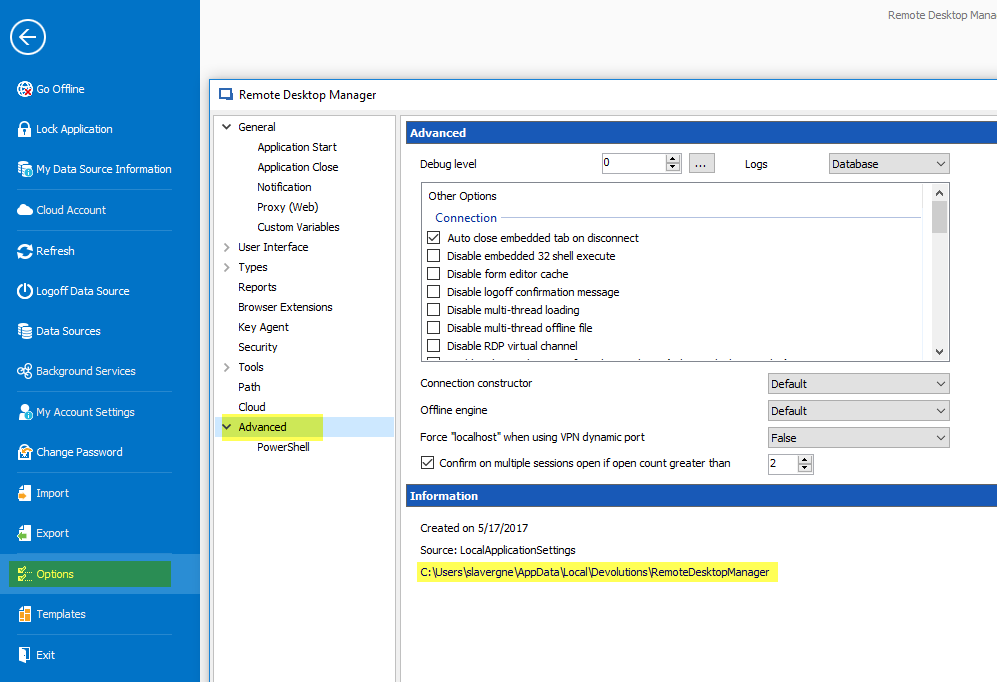
Can't find the files, have a look in: File > Options > Adavanced
Stéfane Lavergne
2018-08-31_9-18-35.png
Is there a way to get some granular control over this folder?
Taking a look, my 'EO.WebBrowser.Cache' folder is over 580mb!
What are the repercussions of this folder being volatile? If this cache is deleted/reset at every reboot will that lead to application inconsistencies? Will it make RDM actually run *slower* since it's having to rebuild this web cache every time?
Is there a way to control how large this cache gets?
Can the main folder "%LocalAppData%\Devolutions\RemoteDesktopManager" be volatile? Or must it be persistent to maintain user settings?
If so, can just the EO.WebBrowser.Cache folder be made to be volatile through a symbolic link to a ramdisk?
The "EO.WebBrowser.Cache" folder is the web cache folder of Chrome Embedded sessions (third party control). We will verify if we can redirect it to another location or control it's growth. As for volatility, yes this folder can be cleared between sessions.
The remaining files in the "%LocalAppData%\Devolutions\RemoteDesktopManager" folder should/must be persisted for best performance.
Stéfane Lavergne
Hello,
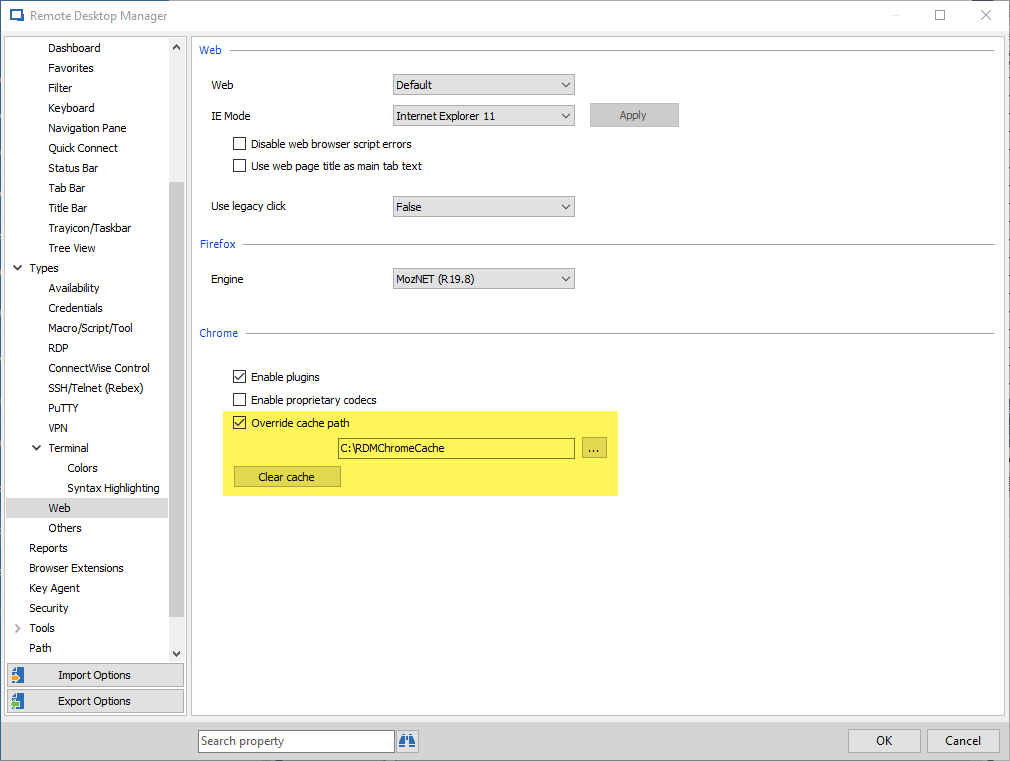
This cache is for the Chrome embedded entries, you can override its path and clear the cache from inside RDM if you go in File > Options > Types > Web:
Clearing this cache (located by default in the EO.WebBrowser.Cache folder) shouldn't affect RDM's speed by a large amount because recreating it should be fast, so you can feel free to.
Can you try the cache path setting and see if it works for your case?
Regards,
Hubert Mireault
2018-09-04_10-20-58.png
Thank you. This is all very good information.
I will make sure that the other folders within the LocalAppData directory are persistent. It's great to know I can redirect the cache folder from within RDM. This saves me from having to make a symbolic link.
Are there any other 3rd party integration cache directories?
As far as I know, there shouldn't be any other third party caches that are persisted on disk.
Regards,
Hubert Mireault
Is there a cache directory used by RDM for the integrated internet explorer? Or do you reuse the IE temporary internet files directory within the operating system?
Hello,
For the IE embedded browser, we use the default .NET WebBrowser control, which uses the system's Internet Explorer cache.
Regards,
Hubert Mireault
Hello,
In our setup we have at the moment 23560 Entries. We use a (central) SQL-server, we use "Intelligent" Caching Mode. And I notice our "off-line Cache" is almost 58MB in size. B.t.w. I assume this "off-line Cache" is the "offline.db" file.
RDM is used on laptops and on Terminal Server / Citrix XenApp servers.
I have done a reference analyse.
From START until READY we need 21-22Seconds, and during 9-10seconds I see the message "Loading sessions from data source".
I think this is good, but this always can be better...
We only complain a bit if we want to "Edit the Properties" of an entry as we currently need almost 30 seconds before we see the properties. And if we change something and click on OK to save this change we again need 10-15 seconds. Adding/duplicating allso needs almost the same amount of time.
And I think with some correct tuning this could be much faster as adding or editing is only a an action on ONE specific DB-record.
Is there somebody that can give me additional information in tuning these actions ?
Thanks for sharing!
Greetings from Belgium,
Chris Marreel
@Chris Marreel,
20k+ sessions is a large data source. The first suggestion would be to look at Repositories to split your data. https://help.remotedesktopmanager.com/index.html?datasource_repositories.htm
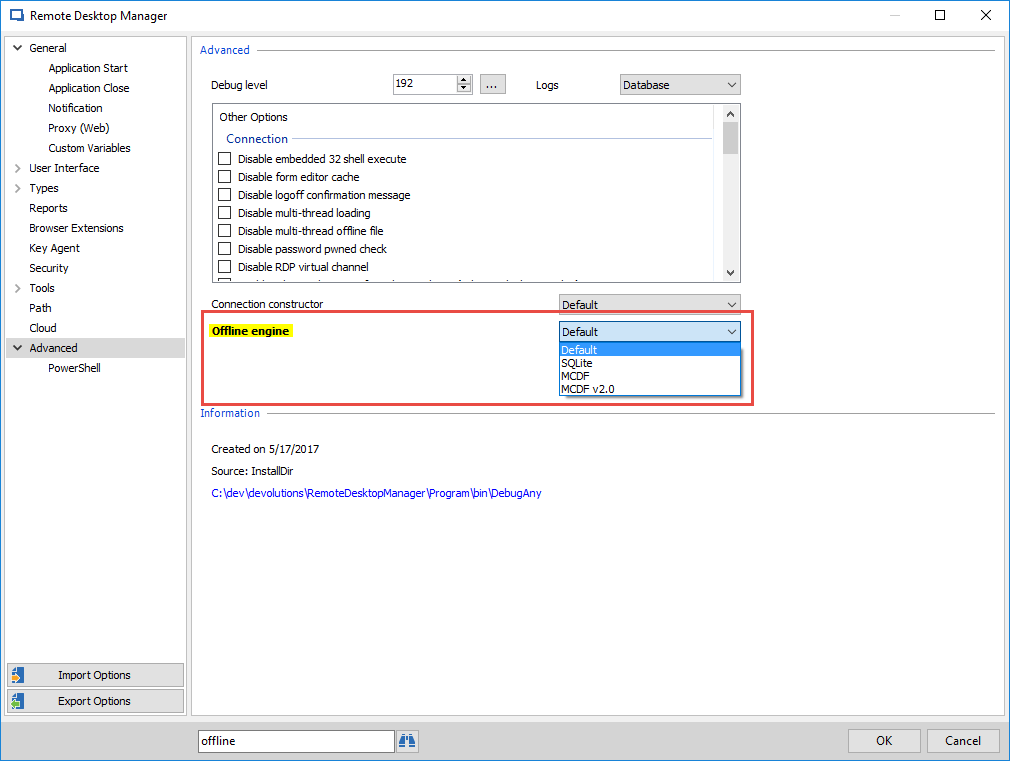
If you offline file ends with .db you are running SQLite (.db) offline engine. Try setting it to MCDF v2.0 (.mcdf2) (File > Options > Advanced > offline Engine).
What is the difference between the engines? The major is the storage mechanism. Depending on your infrastructure one may be faster than the other.
Give it a try and let us know how it goes.
Stéfane Lavergne
2018-09-17_8-07-06.png