Passwordstate API Integration
0 vote

Currently we have to enable Anonymous API access within Passwordstate to use it as a credential store for RDM sessions.
Would like to see authentication added for the Passwordstate API or some mechanism to access it that does not require Anonymous access to be enabled.
All Comments (13)
Hello,
We currently offer two different authentication modes:
- Through API keys, which needs the API access enabled
- Through Windows Integrated, which allows you to specify credentials to authenticate, if your server is setup to allow it
Did you try using the Windows Authentication mode?
Regards,
Hubert Mireault
Some of the end users will be coming from a different AD domain so Windows Auth mode will not work for us.
We understand that the API key -is- the authentication when making the calls but it would be great if we didn't have to enable Anonymous API access.
Unless we are misunderstanding how the PWstate API works.
Hello,
The two API modes we currently use are the only ones available to us at the moment, with their restrictions and requirements. In the Windows Integrated mode, you can enter a domain: would this not work for your users?
I know you mentioned to our support team that you're using the Passwordstate API through powershell or other scripting languages, do you have an example of those? It might help to figure out what we can do differently to integrate Passwordstate in RDM.
Regards,
Hubert Mireault
Our PS scripts are using passthru authentication on the same domain, maybe that's how you would do it...allow users to specify credentials for the API access and pass those on to the PWstate API. The goal is to not have to allow Anonymous PWstate API access.
By using the Windows authentication mode you can specify the credentials in the entry, you could check the "use my account settings" box so the users could enter their own credentials, or check "use default credentials" to take the credentials of the current logged in windows user on execution:
Regards,
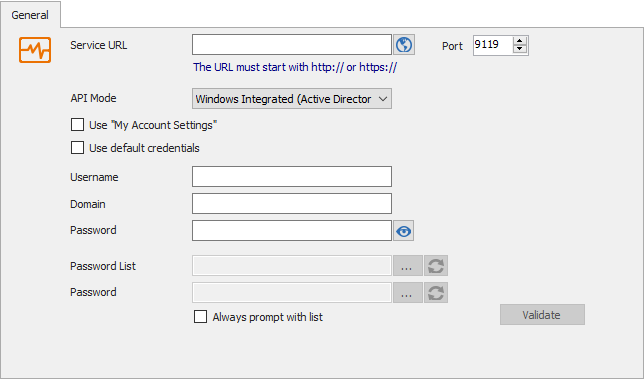
Hubert Mireault
2018-08-06_15-21-35.png
Tried that with a "service account" (multiple ones, actually) but it did not seem to work and kept on popping up the login dialog box when opening the RDM RDP sessions.
That's what prompted this feature request in the first place.
Could you share one of your scripts so we could see how exactly you do the authentication and API calls? I think it would help us, we must have overlooked something when implementing it.
Regards,
Hubert Mireault
same issue. any idea?
@fabio,
What version of RDM are you running?
Best regards,
Jeff Dagenais
We have the same issu, we are running RDM Version 2020.3.19
and Passwordstate V8.9
@fabio,
What version of RDM are you running?
Best regards,
we use the current version (last) of passwordstate and RDM
the issue is also present since the past versions
Hello,
Thank you for reaching us on that matter!
Since you are both experiencing the same issue, would it be possible for you to send me a screenshot of the configuration of your PasswordState entry via a private message along with a screenshot of the error message you are receiving when you attempt to use your Passwordstate entry?
Best regards,
James Lafleur