New line key-combinations do not work in RDP

I have an issue where using ctrl-enter or shift-enter for new lines does not work in RDP sessions.
Is there an option I am missing?
All Comments (7)
Hello,
To better assist you, we require more information about the issue
What version of RDM are you using?
Are you starting RDM with specific options ? (32-64 bits run as administrator or standard)
Is the RDP session is configured by default (are you using a different RDP engine)?
Best regards,
David Grandolfo
RDM - Free 4.6.0.0 64 bit
RDP - Default
Hello,
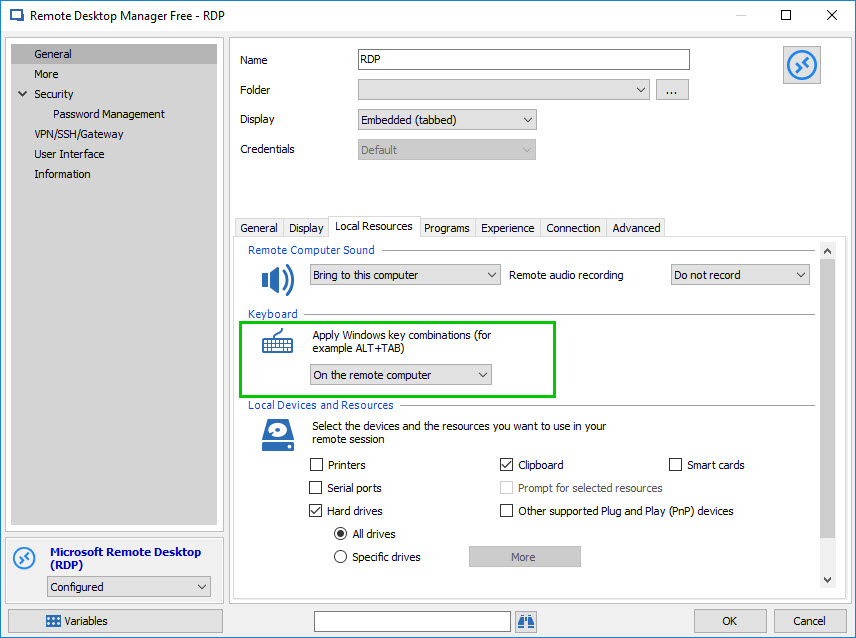
In order to be able to use both of these key-combination, please do the following:
Go the Properties of your RDP entry - General - Local Resources - Keyboard and use the dropdown menu to select ''On the remote computer''
Best regards,
James Lafleur
OnRemoteComputer.jpg
Yep, thats the first thing I tried. Still no luck.
Im dumb. Forgot to restart the session. Works fine. Thanks.
Hello,
That’s good news! Thank you so much for your feedback!
If there is anything else we can help you with, please let us know.
Best regards,
James Lafleur
Good news that Im dumb? :) jk. Thanks for your quick replies as always.