telnet terminal chinese no

My RDMF the ver 4.6.0.0
The device I use with the telnet connection has Chinese characters,
But Chinese displays chaotic codes
ont add 1 3 sn-auth "485754431471FE12" omci ont-lineprofile-id 1
ont-srvprofile-id 1 desc "▒▒▒▒▒ٷ▒4-4-101 133038"
among ▒▒▒ is chinese
terminal font is song typeface
terminal encoding is UTF-8
What's the problem?
All Comments (7)
Hi,
I already made some tests on my side. I have no problem displaying chinese characters from a linux server using the standard menlo font. I will make more research to understand what could go wrong in your case. It's possible that the device does not use UTF-8 by default and that it must be negotiated during connection.
Best regards!
Denis Vincent
I'm connected to is HUAWEI's switch and HUAWEI's OLT
emmm
can u speak chinese?
New problem
telnet characters color Cannot take effect
ssh/telnet(rebex) - terminal colors - custom
foreground(text) - chartreuse
but telnet after the connection ,color is white no chartreuse
sorry
my english is not good.
Use google to translate Chinese into English
Hi,
For the chinese character display, I may have found the problem. We will have a beta version in a few days for you so you can test if it fixes your problem.
I will have to check for the color problem.
And I am sorry, I do not speak chinese.
Regards!
Denis Vincent
OK, Thank you very much!
Hello,
For the colors, if you are using our terminal, make sure to set the colors in File>Options>Types>Terminal>Colors.
The other colors are for the Rebex terminal.
Regards,
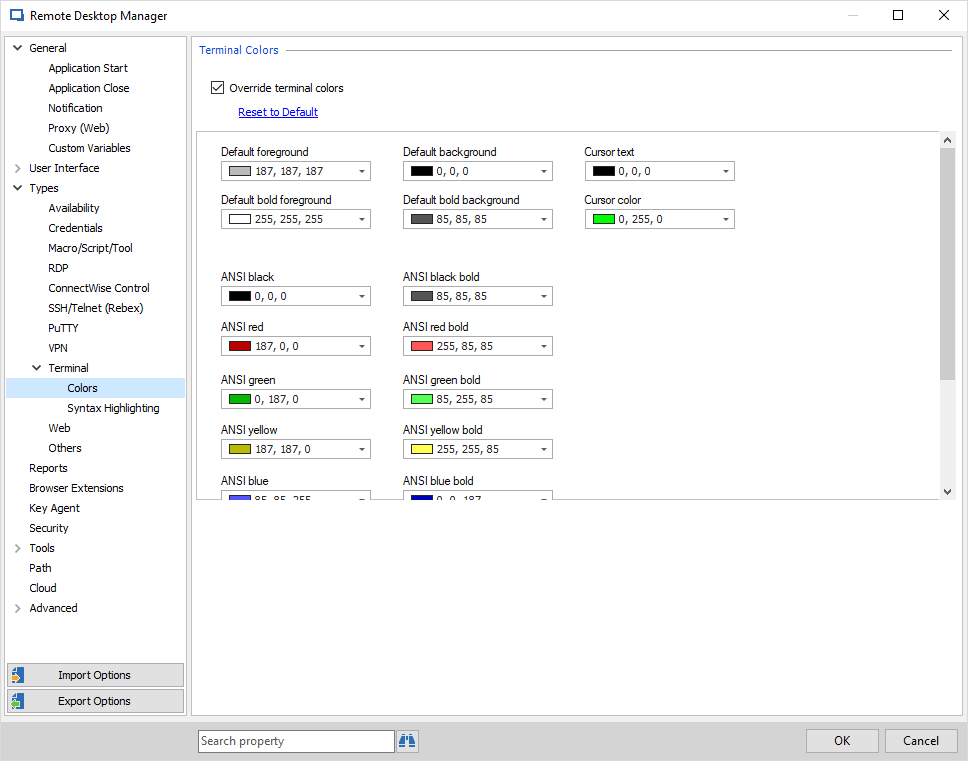
Hubert Mireault
2018-07-24_9-06-03.png
Hi,
For the chinese character support, I would like you to make sure the Huawei device is set to use UTF-8 encoding. You can do this by entering this command on the device (according to Huawei's support web page):
language character-set UTF-8
More research on my side leads me to think telnet terminal should already work.
Best regards!
Denis Vincent