RDM crashes randomly

Hi,
we got feedback from our users that RDM is crashing randomly, the get the windows message "Remote Desktop Manager has stopped working".
here is one log of the eventviewer:
Name der fehlerhaften Anwendung: RemoteDesktopManager64.exe, Version: 13.5.6.0, Zeitstempel: 0x5acfde3f
Name des fehlerhaften Moduls: KERNEL32.dll, Version: 10.0.16299.431, Zeitstempel: 0x309fae94
Ausnahmecode: 0xc00000fd
Fehleroffset: 0x00000000000021cb
ID des fehlerhaften Prozesses: 0x1d58
Startzeit der fehlerhaften Anwendung: 0x01d4135c857d54df
Pfad der fehlerhaften Anwendung: C:\Program Files (x86)\Devolutions\Remote Desktop Manager\RemoteDesktopManager64.exe
Pfad des fehlerhaften Moduls: C:\WINDOWS\System32\KERNEL32.dll
Berichtskennung: ccae0189-6ae9-4ede-8f43-0daa5cb1b205
Vollständiger Name des fehlerhaften Pakets:
Anwendungs-ID, die relativ zum fehlerhaften Paket ist:
It is happening, when they work normal (switching tabs, closing connection,...) and when RDM is idle (only opened in background).
here are our used versions:
Devolution-Server 5.0.2.0
RDM 13.5.6.0
Windows 10 / Server 2012 R2 / Server 2016
.Net Version 4.7 / 4.6
Greetings Steffen
All Comments (9)
Hello Steffen,
Could you send us at support@devolutions.net the Application Log and the full event viewer of two differents computer please?
Best regards,
David Grandolfo
Mail with logifles sent
Thanks, we received it and we are currently looking with the engineering department about the crash.
Regards,
David Grandolfo
Hi,
Base on multiple test the QA department did, they probably see something with the Check Out option. Do you have Check Out enable in RDM?
Best regards,
David Grandolfo
Hi,
i don't know this feature, i proved the settings and it is set to default, see picture.
greetings
Steffen
settings_checkout.PNG
Hi,
The check out setting is located in the Root (Settings) under the Security tab.
What is the Checkout mode value?
Best regards,
David Grandolfo
Hi,
new screenshot attached.
greetings
Steffen
settings_checkout.PNG
Hello,
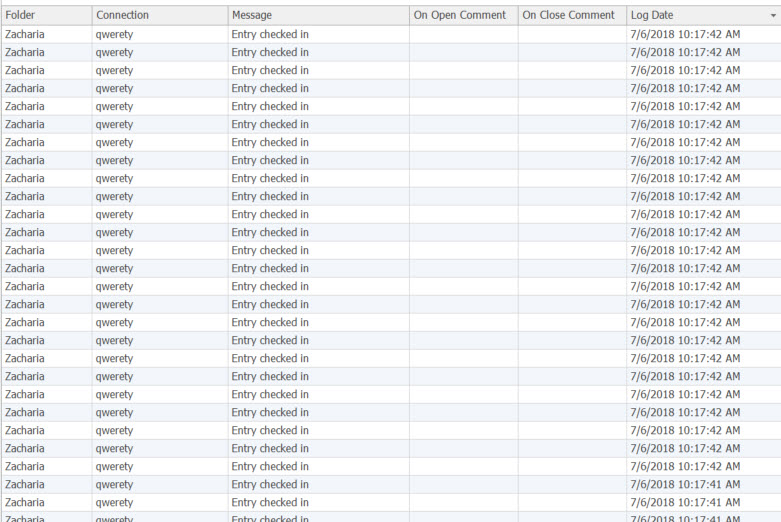
For the check in/out feature, there was a loop caused by the automatically check in after (x) Minute feature, when the timer was reached it would freeze RDM and crash it pretty much instantly.
If you take a look in your activity log at the time of the crash, you'd be able to see when that loop happened and would look like this.
If you have notting like this in your activity logs It probably is something else causing the crash. If that is the case let us know what the activity logs says around the time of the crash.
Best regards,
Alexandre Roy
Activity log.jpg
Hi,
the application log has no check in/out entries and there is no entry generated in the application log when it's crashing.
Greetings
Steffen