Password problems with 13.6.2
After upgrading from 13.6.1 to 13.6.2 the following problems are observed:
- RDM no longer autofills the password from the local credential repository when signing in to LogMeIn.
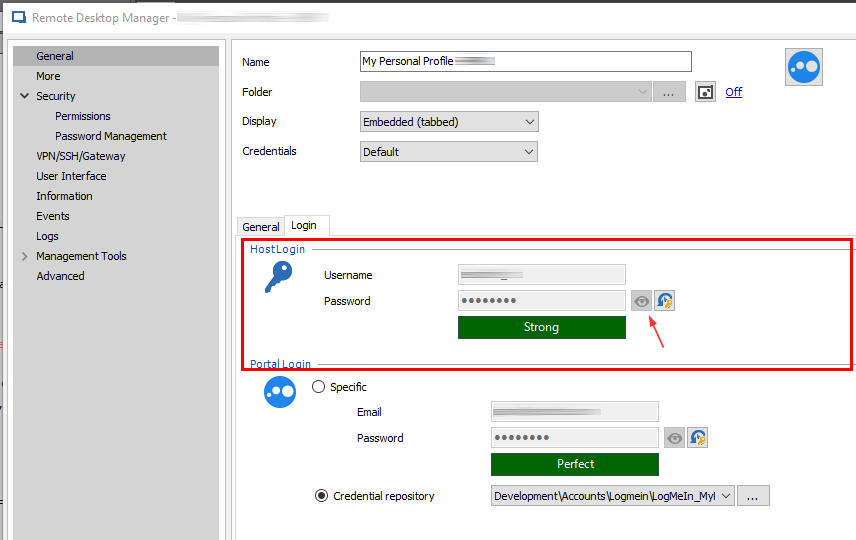
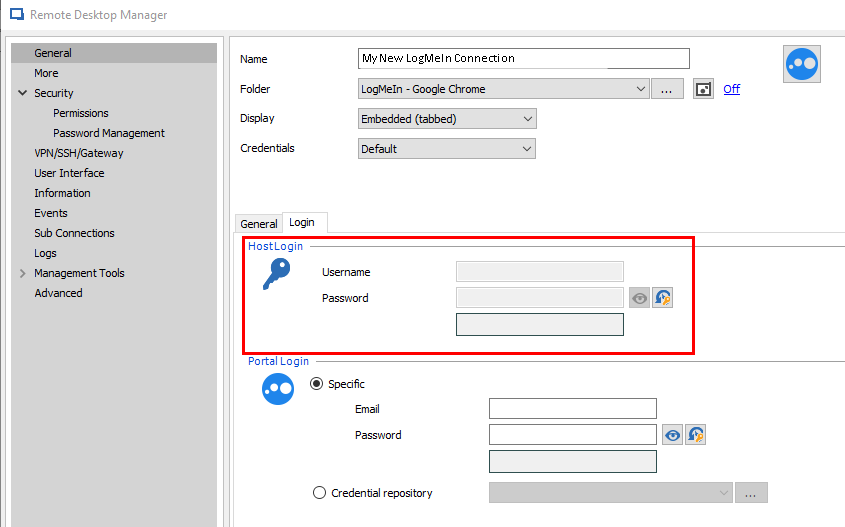
- The Username and Password fields in the HostLogin section on the Login tab of the Properties sheet for a LogMeIn connection are disabled and cannot be edited. The 'reveal password' button is also disabled.
- RDM no longer autofills the password from the HostLogin section on the Login tab of the Properties sheet when connecting to a remote site via LogMeIn.
These problems did not exist in 13.6.1. This is RDM 32-bit version running on Windows 10 Pro 1803.
All Comments (10)
Hello,
Could you please send us a video of the issue? We have a tool in the Help tab called Record to assist.
You can send us an email to support@devolutions.net or you can send it to me via private message.
Best regards,
Marc Beauséjour

We are seeing the some of the same here as well in 13.6.2.0 64-bit:
1. The HostLogin credentials on a LogMeIn connection can no longer be revealed.
2. Creating a new LogMeIn connection and the HostLogin area is disabled... cannot add credentials to a new connection
Hello,
I have been able to reproduce both of your issues. I just created a ticket and I assigned it to our engineering department.
I will notify you as soon as I have any update on that matter.
For further reference, the ticket number is WIN-937
Best regards,
James Lafleur
While we await the fix for this bug (Ticket # WIN-937) is there a way we can access the 'HostLogin' credentials via PowerShell?
I can extract the 'Portal Login' credentials (which is the LogMeIn portal) ... but not sure how to extract the HostLogin so we can at least manually get to these sites.
At this moment we are effectively locked out of certain connections because of this issue.
Hello,
Since our engineering department has already made a fix internally that should solve this issue in the version 13.6.3.0 of RDM, I recommend that, until this version is released, you revert to the version 13.6.1.0 of RDM since this issue did not occur in the past.
You can do so by using the following link:
https://cdn.devolutions.net/download/Setup.RemoteDesktopManager.13.6.1.0.exe
Best regards,
James Lafleur