RDM Agent issue

Disabled
Hello Devolutions,
Any idea why when I click on the RDM agent I get all these pop-up errors?
I need to configure a jump host on one of our client servers, and CPU gets overloaded every time I try to open start RDM agent to set it to autostart.
Thanks in advance.
rdm agent issue 5.jpg
RDM agent issue 3.jpg
RDM agent issue 4.jpg
RDM agent issue 1.jpg
rdm agent issue.jpg
All Comments (36)
Hello,
What version of RDM Agent is installed on your computer?
Could you try to uninstall it and reinstall it by downloading it from our website
https://remotedesktopmanager.com/home/download
Best regards,
Jeff Dagenais
This is very strange, we are trying to figure out what is going on.
Stéfane Lavergne
Can you try to start RDMAgent manually? In your install directory. Usually: C:\Program Files (x86)\Devolutions\Remote Desktop Manager\RDMAgent.exe
Open an elevated command prompt, go to the install directory then execute RDMAgent.exe /Install
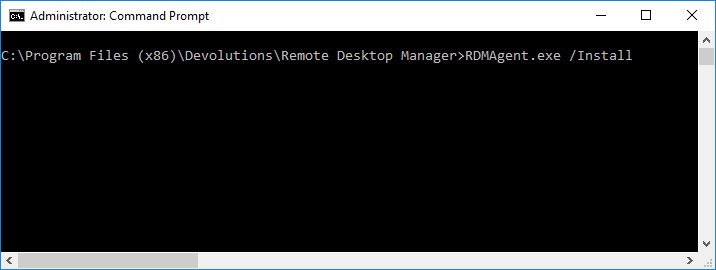
Stéfane Lavergne
2018-06-14_15-06-53.png
Disabled
Hi all,
Thanks for your response, just to let you know I work in a corporate environment and I don't have the privileges to install any applications in my laptop.
So having to reinstall RDM should be our last option and if that fixes the problem we will then have to reinstall it in all the user's laptop I have over 50
users running RDM,being that said I remember this happened once before, long time ago with an older version the same thing happened when I was getting to know the tool, I did not have the need to configure RDM jump host so I did not pay much attention to it now I really need this to work.
We are currently running version 13.5.6.0 64 bit.
Let me know if you need anything else from my end.
regards.
"/Install" is not actually installing anything, RDMAgent.exe is already present on your system. It simply starts RDMAgent.exe and specifies that it should be registered in the Windows Registry to start on logon. It's exactly what the application is trying to do when you click on the "RDM Agent" tool icon.
Stéfane Lavergne
Disabled
Hi Stefane,
Please take a look at the screenshot attached.
install rdm agent.jpg
It looks like your environment is locked down to the point where RDMAgent is allowed to execute. Very odd.
If you start the cmd.exe with elevated privileges (Run as administrator) does that solve it for you?
Note: RDMAgent.exe only needs to start once with Admin privileges to register itself to auto start on logon.
Stéfane Lavergne
Disabled
Ok thanks for the help, I wasn't aware that in order to run RDM agent admin privileges are required.
regards.
Disabled
Hello Devolutions,
I want to let you know that I was able to run RDM agent, I had to request admin privileges for the agent to run and it worked fine in our server.
I have the following question though:
is it possible to run the RDM agent without being an admin? and I'm asking you this because I need to install RDM in one of our client's server to be able to jump host connections to other servers and allow the rest of the team to connect, in order for me to be able to do this, I will have to ask the administrator of the server (our client) to install RDM and run RDM agent with admin rights.
If RDM agent stops working for some reason will be a way for me to bring it back up without being an admin? I don't feel comfortable having to ask the client we provide support to provide me with admin privileges for a tool we recommended to use on their servers.
Please let me know if I did not explain this scenario correctly.
Thanks in advance
Just to be clear, RDMAgent needs elevated privileges to register itself in the Windows Registry so that it will always be running. It will only do this once, every other time it will start normally without elevated privileges.
- install RDMAgent using the /install like mentioned in the previous post. This requires elevated privileges the first time RDMAgent is started. After the fact it will run without elevated privileges
- start RDMAgent normally when prompted to self register for auto start, click Yes. RDMAgent will restart asking for elevated privileges and self register
- start RDMAgent manually every time you connect via RDP
- regsiter RDMAgent to auto start using the GPO or other. for example on Windows 10 you could: Windows + R, type shell:startup and create a shortcut to RDMAgent.exe. This will only register RDMAgent to auto start for this Windows user and not all users on this server.
Stéfane Lavergne
Disabled
Hello guys,
Hope you are all doing fine, I just have a quick question in regards RDM agent.
I was able to install and configure a few jump host connections for one of our clients and one of the problems that I have noticed when I try to connect using the jump host is that I get an error message saying that the RDM agent has stopped working (please see attached image).
Any ideas what this error could be?
Thanks in advance.
RDM Agent issue.jpg
Hello,
Actually, this is a very good question.
In the task bar, are you seeing the RDM Agent icon?
Is this issue occurs on all your servers or only a specific one?
Best regards,
Jeff Dagenais
Disabled
Hello Jeff,
Yes, I do see the agent icon on the server taskbar.
This is the only server I have configured so far with RDM agent, the agent is also configurated with autostart.
Please let me know if you need me to provide any other information.
thanks
jump host issue.jpg
Hello,
Stefane who help us in thread is on vacation for the next 2 weeks, so I will try to help you with this issue, but my knowledge may be limited.
Have you tried to uninstall and reinstall RDM Agent?
After the installation of RDM + RDM Agent on the jumphost, have you restarted the server?
Best regards,
Jeff Dagenais
Hello,
Luckily, I was able to spoke with Stefane really fast and we may think that this occurs because of a slowness with the server.
Once connected to the server, in RDM, if you right-click on the RDP tab and select Agent Status, what are you seeing in that window?
Does it mentioned that the RDM Agent is connected?
We can also increase the timeout value of the Jumphost to see if that help. To do so, go in File -> Options -> Types -> RDP and change the Agent Connection Time Out for 30 or 40 seconds to see if that help.
Best regards,
Jeff Dagenais
Disabled
Great!
That was exactly what I needed, as default the agent connection timeout is 15 sec, I was unable to find the agent connection timeout option and that's why the users were getting the timeout message. Excellent!
I was wondering if this configuration can be pushed for the entire team, as far as I can see this option needs to be changed by each individual.
Is there a way to do that?
Thanks in advance.
Hello,
Since it's a local settings, you would need to use the Custom Installer to distribute RDM on your workstations with the appropriate options selected in File -> Options.
For more information on the Custom Installer, please consult https://helpcloud.devolutions.net/custominstaller_introduction.htm
Best regards,
Jeff Dagenais
Disabled
Jeff,
Thanks for that info, I will take a deeper look at the document and I will reach out to you guys if I have any questions.
Once again thanks for your help.
I have the issue that RDM agent is started, but not connected.
We use RDM agent on 14 virtual machines for jump hosts.
Currently we use to start up RDM automatically, but we would prefer to only start the RDM Agent.
What are we doing wrong here ?
RDM Agent no connected.jpg
Could you please perform the following:
1 - Right click on the RDM Agent > Settings > check Log Debug Messages
2 - close the RDP session
3 - open the RDP session
4 - Right click on the RDM Agent > View Logs
5 - send us the logs (here or via private messge)
Thanks,
Stéfane Lavergne
Here's the debug log of RDM Agent :
[17-9-2018 15:00:58] RDMJump: 2442823801792
[17-9-2018 15:00:58] Deze implementatie maakt geen deel uit van de Windows Platform FIPS-gevalideerde cryptografische algoritmen.
[17-9-2018 15:00:58] bij System.Security.Cryptography.MD5CryptoServiceProvider..ctor()
bij Devolutions.Utils.EncryptionUtils.get_MD5CryptoServiceProvider()
bij Devolutions.Utils.EncryptionUtils.GetEncryptorTransform(String key)
bij Devolutions.Utils.EncryptionUtils.EncryptInternal(Byte[] bytes, String key)
bij Devolutions.Utils.EncryptionUtils.Encrypt(Byte[] bytes, String key)
bij Devolutions.RemoteDesktopManager.Managers.VirtualChannelManager.SendMessage(JumpMessage message)
[17-9-2018 15:01:04] RDMJump: Acknowledge timeout
[17-9-2018 15:01:04] Started
Could you please try the following:
https://help.remotedesktopmanager.com/index.html?troubleshooting_fips.htm
Stéfane Lavergne
In your case if you need to use the "Solution 2" approach make sure you call the file RDMAgent.exe.config (zip attached)
Stéfane Lavergne
RDMAgent.exe.config.zip
Unfortunately both are no option, as they are already enabled (solution 1) or in the config file (solution 2).
See attachments
local policy.jpg
RemoteDesktopManager_exe_config.jpg
FIPS needs to be disabled in RDM Agent also, please try adding the RDMAgent.exe.config with the FIPS settings in the RDMAgent.exe directory.
Stéfane Lavergne
That did the trick ! Thank you so much.
RDM Agent is working perfectly now.
Sorry to bother again, but still it is not working as it should....
- I have the RDMAgent.exe.config in the same directory as RDMAgent.exe
- The RDMAgent.exe.config has the line <enforceFIPSPolicy enabled="false"/>
- RDMAgent on jump host shows as "Connected"
- *.rdmj is associated with Remote Desktop Manager
Jump to jump host is being made, RDM starts up but doesn't proceed.
When manually starting the RDMJ file in my TEMP folder (see screenshot) by double clicking, the sessions starts correctly.
RDM completely reinstalled, no solution.
Using RDM 13.6.7.
Any idea ?
Screenshot_1.jpg
Could you please try checking the option "Do not use file association (.rdmj)" in the RDMAgent settings?
If that doesn't work, please test the following:
Start RDM on the jump server, keep the RDP to the jump server open and launch the jump session. It should re-use the same RDP and, since RDM is already running, send the open command directly to RDM not RDMAgent.
Stéfane Lavergne
Both didn't work.
Also tried manual installation of RDMAgent 1.3.0 (download from website), didn't work eighter.
Then tried complete reinstallation of RDM, also not working.
Attached is the debug log of RDMAgent.
Maybe you can find something in there,
@Ron van Elteren
It looks like the issue might be with RDM on the jump server. Could you please enable debug logging on the RDM Jump server, clear the log file and try the jump again.
- File > Options > Advanced > Debug Level > set it to 1025
- Help > Application Logs > Clean Up > Delete all > Delete
- Jump
- send log entries
If this doesn't help, we might have to do a remote session to figure out what the issue is.
Best regards,
Stéfane Lavergne
Hi Stefane,
First of all, thank you very much for the extensive help.
Short inventory of our environment :
We have 14 virtual machines (Windows 10) configured as jump hosts, to set up VPN connections to our customers.
These VPN connections can be of any kind, any client (Cisco, SonicWall, Citrix, etc).
These VPN clients are all installed on the virtual machines.
When I set up an entry, using VPN of any kind, I make sure that I am able to manually connect to the customer using the VPN client itself.
Secondly I add the RDP session to the customers's server and test it again.
Once that is working correctly, last change I make is set up the jump to the correct jump server/virtual machine.
Even then I test the connection.
If it works, I move the session entry to another folder within RDM to be visible to our agents/consultants.
Mind you that I have RDM in autostart on the virtual machines/jump hosts AND RDMagent starts automatically.
Each consultants who uses the jump host, will get RDM opening automatically and RDMagent starting automatically.
I have done what you asked me and tested even a little further.
This time I left RDM open on the jump host and simply disconnected, so my session is still there.
From my laptop I started the session entry. It jumped again to the jump host.....and it started the session correctly.
Then I completely logged of the jump host and started again the same session....this time it jumped but wouldn't start the session.
So I have 2 sessions : first one at 15:45:24 where I start the session to the jump host picking up my disconnected session --> it worked
Second one was at 15:46:45 where I started from scratch, making the jump, started RDM automatically but it didn't pick up the session.
Error :
System.Threading.ThreadAbortException: De thread is afgebroken. (translated : the thread is disconnected)
bij Devolutions.RemoteDesktopManager.Business.HttpBrowserLinker.c36e11a71b2027cacbbca5f70b6ed33df()
bij System.Threading.ExecutionContext.RunInternal(ExecutionContext executionContext, ContextCallback callback, Object state, Boolean preserveSyncCtx)
bij System.Threading.ExecutionContext.Run(ExecutionContext executionContext, ContextCallback callback, Object state, Boolean preserveSyncCtx)
bij System.Threading.ExecutionContext.Run(ExecutionContext executionContext, ContextCallback callback, Object state)
bij System.Threading.ThreadHelper.ThreadStart()
I really hope you have a solution for this.
Another finding :
When starting a session from my laptop, the jump (as said) to the jump host is made but the session won't be picked up by RDMAgent.
However....when manually starting the *.rdmj session in my TEMP folder (which should be picked up by RDM or RDMAgent), the sessions starts and works correctly.
And I think I have found the solution !
Problem doesn't occur when I use the 32 bit version of RDM
I changed the shortcut (in Windows autostart) to the 32 bit version and tested 2 different sessions.
Both of them work.
After the weekend I am going to test a little more, also on our other jump hosts.
I'll come back to you about this.
Amazing find. I'm not sure why that would be the case, we will investigate on our end. Looking forward to see if that resolves it for all or your hosts & sessions. Please keep us posted. Have a good weekend.
Stéfane Lavergne
I've tested some more and can tell you that the 32 bit vs 64 bit is not the problem.
I have found out that the problem is related to my login on the jump host.
When I use another login (test-user) account, exactly the same sessions works perfectly and I haven't changed anything (just the login credentials).
My account is local admin on all virtual machines (jump hosts) and DB owner/administrator in RDM.
When I start RDM with my Windows credentials and start the session, it will automatically log on to the jump host with my Windows credentials and start RDM on the jump host. After the jump, the session is not being picked up by RDM (agent).
When I start RDM on my laptop using different credentials (SHIFT - logon as different user) and log on as a test user (domain user, read-only user in RDM), and start exactly the same sessions --> jump is made, RDM starts as test-user and proceeds without any problem.
Tested this with multiple test accounts, even with another RDM administrator account (a colleague is also administrator in RDM).
It is like my own account is holding wrong information in some kind of cache.
So I tested even more to delete my Windows profile on the jump host in C:\users
When I tried to log back on to the jump host, I got the error that Windows is using a temporary profile to log on.
So it seems that my profile was corrupted.
I corrected that, by editting the registry and delete the pointer to my profile.
Re-started the remote session in RDM which logged me back on to the jump host, my Windows profile was re-created on the jump host and RDM was automatically started.
Once RDM was started, the jumped session was working perfectly again !
So it strongly points to a correct Windows profile and not a RDM (Agent) issue
I would have never found that on my own. We will add it to our knowledge base of RDMAgent/Jump issues.
Best regards,
Stéfane Lavergne