Embedded Tabbed https

Hi,
I have an issue when you first launch an embedded https link. I will get back
Navigation to the webpage was canceled
If i click refresh it works.
These entries have been created with a script.
I have exported the xml below ( i have removed sensitive data )
<?xml version="1.0"?>
<ArrayOfConnection>
<Connection>
<JumpDesktop />
<Web>
<AutoSubmit>false</AutoSubmit>
<ForceHttps>true</ForceHttps>
<FormId>frm1</FormId>
<PasswordControlId>sSysPass</PasswordControlId>
<SafePassword>x.x.x.x</SafePassword>
<ScriptErrorsSuppressed>true</ScriptErrorsSuppressed>
<SubmitControlId>[SUBMIT]</SubmitControlId>
<UserName>admin</UserName>
<UserNameControlId>sUserName</UserNameControlId>
</Web>
<AllowPasswordVariable>true</AllowPasswordVariable>
<ConnectionSubType>IE</ConnectionSubType>
<ConnectionType>WebBrowser</ConnectionType>
<Group>aaaaaaaaaa</Group>
<ID>fb972baa-a7fa-439f-b895-10f06954fc0c</ID>
<Name>bbbbbbbbb</Name>
<OpenEmbedded>true</OpenEmbedded>
<Stamp>356343b4-d8a2-459b-a0c6-b2a1e553870e</Stamp>
<TemplateName>Web-HTTPs</TemplateName>
<TemplateSourceID>80dd3b8a-c04a-41d4-a202-b11028c67840</TemplateSourceID>
<WebBrowserApplication>IE</WebBrowserApplication>
<WebBrowserUrl>https://x.x.x.x</WebBrowserUrl>
</Connection>
</ArrayOfConnection>
I am passing the username and password via form HTML controls.
All Comments (11)
Hello,
What version of RDM are you running?
As I can see, you are using IE in embedded mode. Are you encountering the same issue with Firefox and Chrome?
Best regards,
Jeff Dagenais
Hi Jeff,
We are using version 13.5.6.0. I have tried chrome but the username and password don't get passed if we use embedded mode (we want to use embedded).
Hello,
Is this public URL? If yes, could you provide it to me.
Does the Username ID and Password ID fields are properly populate in the HTML Control ID tab?
Best regards,
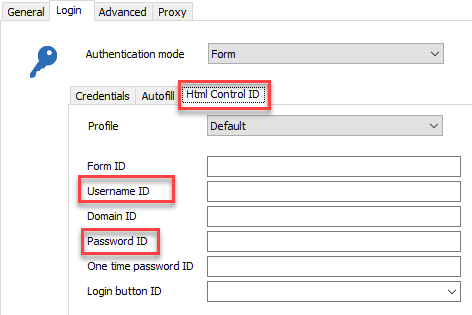
Jeff Dagenais
2018-06-12_13-34-19.png
Hi Jeff,
The HTML control was discovered. As i said in the original post it will work if you refresh the page. Images attached.
snip2.PNG
snip1.PNG
Hello,
Could you confirm the information below to me please;
When you mean that the refresh make it work, do you mean that you refresh the page to get access to the page or you making a refresh to be able to send the credentials to the webpage?
Hope my question is clear.
Best regards,
Jeff Dagenais
Hi Jeff,
Please see the attached image
snip3.PNG
Hello,
Thank you for the screenshot.
I had a chat with our engineering department and for the moment, we don't know if something can be done regarding this.
However, we would like to test this internally, but I cannot find a public URL that brings up the issue in our environment.
Is there a public URL that you have in hand that you are encountering the refresh issue with that you can provide us?
We would like to test this behavior internally.
Best regards,
Jeff Dagenais
Hi Jeff
Email me and I will send you a link
Hello,
I've sent you a private message regarding the URL.
Best regards,
Jeff Dagenais
Hello,
With the URL that you've sent me in Private Message, I am able to reproduce your issue with IE.
I'll see with our engineering department if something can be done.
Best regards,
Jeff Dagenais
Hello,
Could you install RDM 13.6.2.0, change the web browser application for Firefox or Chrome and uncheck the option Only send password in HTML password field.
Are you now able to load the website properly? Does the credentials are now populated as expected?
You can download RDM 13.6.2.0 here
https://remotedesktopmanager.com/home/download
Best regards,
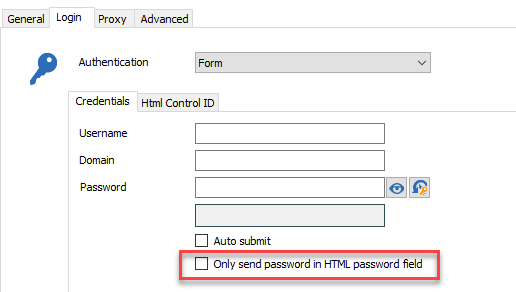
Jeff Dagenais
2018-06-22_14-56-30.png