Web login not submitting passwords correctly after upgrade to RDM v4.6
Web login not submitting passwords correctly after upgrade to RDM v4.6

As per title, Chrome Based Web login is not submitting passwords for Sonicwall devices after upgrade to RDM v4.6. I've inspected the fields in a full Chrome browser and the HTML Control ID matches. It will aslo fill in the Usernames and hit submit correctly.
I also note that Automatic is grayed out, and Discover doesn't discover anything.
Any Ideas? This was working perfectly until v4.6.
Also, I'll be upgrading to Enterprise soon, if anybody has the latest Enterprise RDM and a sonicwall device to test?
All Comments (11)
Hello,
Are you launching your session in embedded or external mode?
If it's external mode, what version of Devolutions Web Login is installed in your browser?
Best regards,
Jeff Dagenais
It's embedded mode in RDM. Apologies I wasn't aware of a browser plugin (will check that out though)
I'm going to roll out an enterprise trial when I get the time, to see if there is any difference.
Hello,
Recently, our engineering department did some changes that affected how the web browser entries autofill the credentials on a website.
This new configuration is not allowing the autofill feature to fill a “non-password field” in a Website.
This is the reason why only your Username is filled.
Our engineering department is currently working on a new feature that will allow our clients to check an option in their Advanced Setting to bypass this check directly on the entry level. This was required for security reasons.
Until then, we recommend using Internet Explorer to be able to autofill your credential for this website.
Best regards,
Jeff Dagenais
Hi Jeff - that's good to know thanks. Makes sense too from a security perspective.
I can confirm that everything still works in v13.5.6 enterprise. So I'll be switching a bit sooner than planned.
Arrghh - somebody updated to v13.6 and it's broken our weblogins. Is there a v13.5 download available somewhere?
EDIT:- Never mind - found the original installer.
Using RDM Enterprise V13.6.2.0 64-bit
There is an issue with the submission of web passwords when set to use Internet Explorer or Firefox. Google Chrome works correctly.
I set up a test connection as follows:
1. Created a New Entry of type Session > Remote Connection > Web Browser (http/https)
2. Display set to Embedded
3. Credentials set to Default
General Tab
4. Web Browser URL set to http://testing-ground.scraping.pro/login (a publicly available test site)
5. Web browser application set to Internet Explorer
Login Tab
6. Authentication set to Form
Login - Credentials Tab
7. Username set to admin
8. Password set to 12345
9. Auto Submit is Unchecked
10. Only send password in HTML password field is Unchecked
Login - Html Control ID Tab
11. Username ID set to usr
12 Password ID set to pwd
Test:
The Web browser application setting is set to Internet Explorer:
Open the session and the site opens but only the Username is populated.
Change the Web browser application setting to Firefox:
Open the session and the site opens but only the Username is populated.
Change the Web browser application setting to Google Chrome:
Open the session and the site opens and the Username AND Passwords are populated.
Hello,
This issue is caused by the fact that the password field of your website is a "text" type field.
From there 2 options are available:
1- Use another field within your Web Browser entry in order to send you password
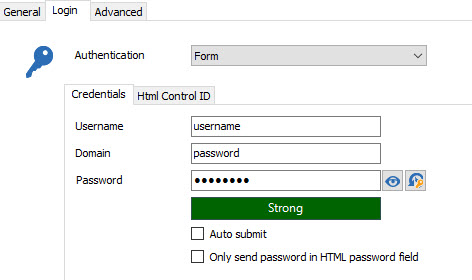
1.1- To do so, please go to your Web Browser entry Properties -> General -> Login -> Enter you password in the "Domain" field
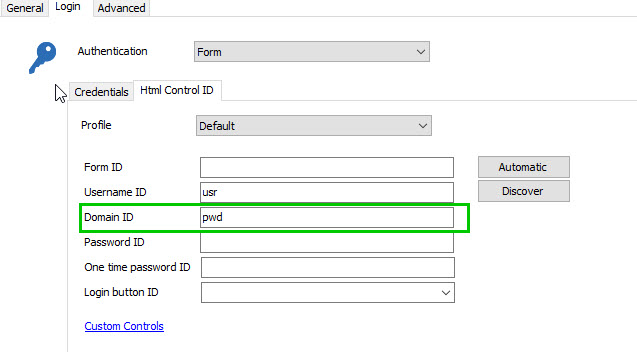
1.2- In the "HTML Control ID" tab, enter "pwd" in the "Domain ID" field
*Please note that a password will still be required by the entry even though it won't be used
2- Use "Google Chrome" as your "Web Browser Application"
Best regards,
James Lafleur
DomainID.jpg
PasswordDomain.jpg
Anybody know if I can force a rollback to the older version? The Installer sees the new version and wont proceed. Tried combing the registry for version numbers to amend.
If I have to uninstall (its on a terminal server), will all users lose their config? I'd rather not have to go around to each user again to setup access to the Database if possible.
Hello,
You shouldn't have any issues reinstalling with a previous version.
Here's the quick download link for 13.5.6.0;
https://cdn.devolutions.net/download/Setup.RemoteDesktopManager.13.5.6.0.exe
Best regards,
Marc Beauséjour
Thanks James.
So even if "Only send password in HTML password field" is not checked, RDM won't send the password entry to a field of type 'text' (when using IE or Firefox)? It must be a field of type 'password' to work in IE or Firefox.
It's not unreasonable to want to make sure the password remains obfuscated once it gets to the form field. It's just that the checkbox option makes it sound like it should work if it's not checked.
I appreciate the feedback.
Hello,
Our engineering department is currently working on the implementation of a warning within RDM.
Also, I just sent an email to our documentation team asking them to clarify this section in our online documentation.
Best regards,
James Lafleur