Cant see stored passwords after migration

I was able to see the passwords for devices in the properties of a connection when I was using RDM free. Now that I switched to pro it won't show the plain text password. Some of these connections I'd like to easily see what the password is if I forget what it was set to.
All Comments (9)
Hello,
If a feature is available in the free edition, the same feature will be available in the Enterprise edition.
That being said, not sure to understand what is missing. Could you post some screenshots as well as the version of RDM that you are using?
Best regards,
Jeff Dagenais
Hello,
I forgot to ask, what type of data source are you using?
It's maybe the reveal password option that is not enabled in your new configuration.
Best regards,
Jeff Dagenais
Attached is an image of where I can create a blank RDP session. In this instance I am using the Online Devolution Database. Before I purchased the ODB and the Pro I was using the free with a local data source.
With the free version and local source I could open up connection properties and see a password that I have typed in if I needed to. This one only has a button for a password generator.
RDM Blank RDP.jpg
Hello,
Does your user is an administrator?
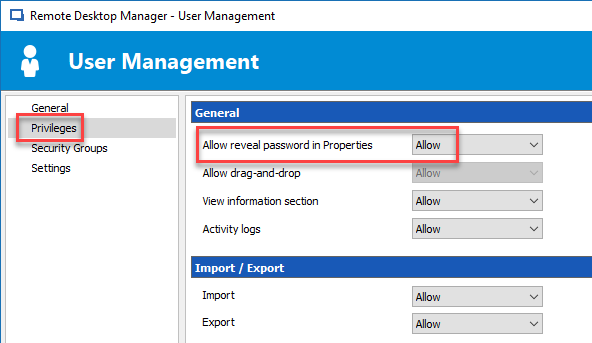
If not, and that you would like to have the blue eye icon, your administrator would need to go in Administration -> Users -> Edit -> Priviliges and turn the Allow reveal password in Properties option on.
Best regards,
Jeff Dagenais
I see that when I am in the Administrator account. I have different security groups set up for other password controls so no one uses the admin account. But I logged into it and checked the box. From there while still in the Admin account it worked. But when I went back to my account it doesn't and it shows the check box as checked.
RDM Security Settings.jpg
I could make myself and admin but from there it doesn't hide other users personal connections. That is why we have an admin account we don't use and no one is administrator. That was I can set up personal connections and my colleague won't see them. and Visa-Versa. The rest of the connections are shared.
Hello,
The screenshot in your previous post is not the menu that I am refering to.
Please connect with the administrator account and do the following steps;
Here's a screenshot to help
In conclusion, when you will reconnect with your non-admin account on the Online Database, the reveal password button should be present.
If not, please perform a CTRL + F5 to refresh the local cache.
Best regards,
Jeff Dagenais
2018-06-08_13-37-56.png
I did see that and that was the answer. Thank you.
Hello,
Glad that is now working.
Thank you for your feedback.
Best regards,
Jeff Dagenais