overview window still has old type showing

I have just imported all my connections from Putty, and gone through and reconfigured them as "SSH Shell (Rebex)". I even changed the icon to match. But in the Overview window, it still says 'putty'. Is there a way to change this?
All Comments (5)
Hello,
SSH Shell (Rebex) and Putty will display the same icon in RDM.
Best regards,
Jeff Dagenais
See screenshot. I opened the properties and changed the type from 'Putty' to 'SSH Shell' and clicked OK. However when I re-open the properties it still says 'putty', although the drop down says SSH Shell.
In the Overview window (also in screenshot) it still says Putty underneath the server name.
Screenshot_4.png
Hello,
SSH Shell (Rebex) and Putty are almost the same type of session. I would recommend using our SSH Shell Session type instead
https://help.remotedesktopmanager.com/sessions_sshshell.htm
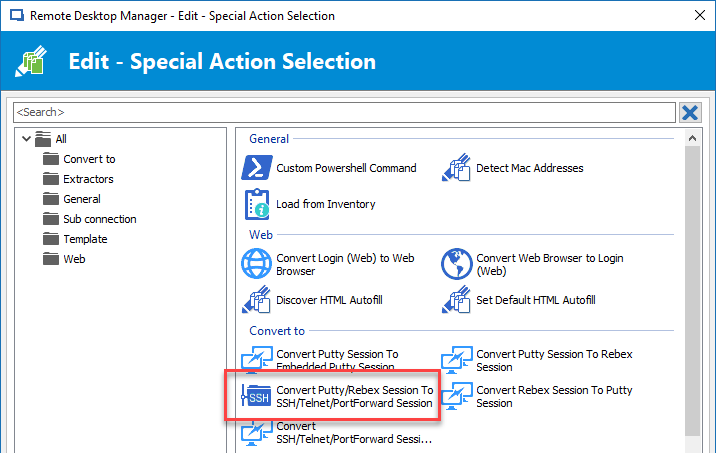
To change the current putty session into the format proposed above, select your Putty session and do a right-click -> Edit -> Edit (Special Actions).
In that area, select Convert Putty/Rebex session
Then, you will see SSH Shell in the Dashboard.
If the session works fine, you can do the same process on all of them at the same time to convert this into SSH Shell sessions.
Best regards,
Jeff Dagenais
2018-06-04_10-43-14.png
OK cheers. Do I need to enable the Special Actions sub Menu? When I right click I just get "edit Entry", "Create Shortcut" and "rename".
I have installed the Free version, 4.6.0.0 64 bit in case that makes a difference?
Screenshot_6.png
Hello,
The Edit (Special Actions) menu is only available in the Enterprise Edition of RDM, this is why you are not seeing it.
Sorry about that, I had in mind that you we're on the Enterprise version.
Best regards,
Jeff Dagenais