Templates missing

I recently upgraded to 13.5.8.0, and other users remained on an older version.
It seems that after I did this upgrade, Templates are no longer available to other users, even after they upgrade to 13.5.8.0
I can see all templates. I used to see Shared/Local but now just see Database instead.
I am an administrator, whereas the other user having this problem is just a normal user
When I go into his templates to edit them, I see they belong to a folder he has created. I don't have this folder in my own list (different repository), so it's weird I can see his template properties. I don't think I used to see his templates.
Is there a permission setting somewhere to enable this, or is it a bug?
2018-05-31_12-24-28.jpg
All Comments (3)
Hi,
What version your colleague are using? We do not recommend mixing new and old version because when upgrading the database is updated and some feature can stop working.
Best regards,
David Grandolfo
He is using the same version now, and still the same thing.
I found that if I make him an Administrator, he can see templates. But if he is a User, or Restricted User, he cannot see any templates.
I haven't changed permissions, so it seems this changed during the upgrade to 13?
Hi Chad,
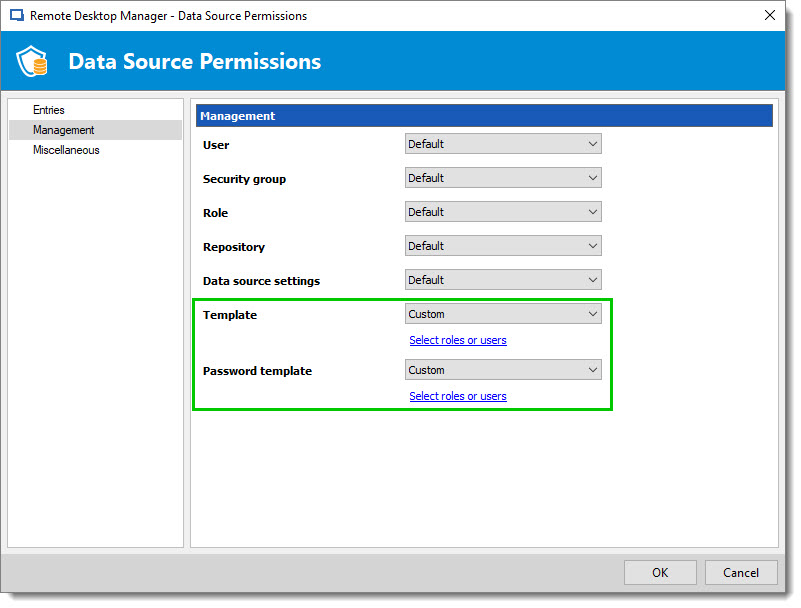
As an administrator, could you click Data Source Permissions under the Administration tab and change the security for Template and/or Password Template for Custom. You will see a Select roles or users, so you could add the specific user to manage the templates too.
Best regards,
David Grandolfo
DataSourceTemplates.jpg