Run dialog appears when trying to log off

Disabled
I'm trying out RDCM and like it so far but can't figure how to use Log Off correctly. Most of the settings are default (RDP Default, logoff method automatic. When I'm trying to logoff nothing happens on the remote machine but run dialog opens on local.
I have tried checking/unchecking the box 'Disable run dialog check on logoff' but it doesn't seem to change anything.
I'm using Free Edition 4.5.3.0
All Comments (10)
Hello,
In the Run window, do you see ashutdown?
After disabling the disable run dialog check on logoff option, have you restarted RDM?
Best regards,
Jeff Dagenais
Disabled
Restarting after disabling doesn't help.
In the run I can only see the last command I have entered (not the ashutdown).
I was eventually able to log off by setting the mode to RDM Agent and entering the username. But it takes quite a while to log off that way.
Hello,
This is strange.
I don't know if this gonna help, but I would like you to try to change the setting below if possible. In the properties of your RDP session, go in the Local Resources tab and in the Keyboard section, select On the remote computer.
Best regards,
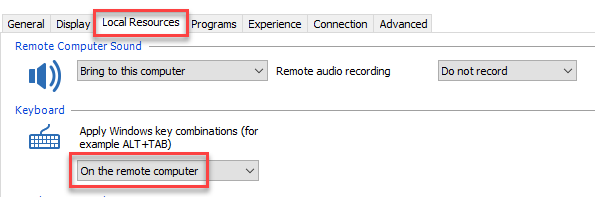
Jeff Dagenais
2018-05-29_09-41-31.png
Disabled
I encounter the same issue and the solution you provided works.
How do I make it works for all my RDP session?
However, now I can't use Alt+Tab to navigate on my local host. It struck in remote host.
@Charles Tiu,
What version of RDM are you running?
Have you tried the solution proposed in this article?
https://help.remotedesktopmanager.com/troubleshooting_logoffissue.htm
Best regards,
Jeff Dagenais
Disabled
Currently running 4.6.
Encounter the issue since 4.04
@Charles,
Have you tried the solution proposed in this article?
https://help.remotedesktopmanager.com/troubleshooting_logoffissue.htm
Best regards,
Jeff Dagenais
Disabled
Yes, I did but it doesn't helps.
Disabled
In the 4.6.0.0 it works fine with the 'Disable run...' Enabled and Local Resources Keyboard set to 'On the remote computer'.
Is it possible to set the Keyboard to remote computer as default? I have only found this setting under individual machine. If it's possible to Export, edit it in XML and import that would be fine as well. Just some option to edit this for many servers all at once.
@Charles Tiu = The solution for now is to have the On the remote computer option on in the RDP session to accomplish the logoff.
@Jacek Walerczyk = It's possible to change the Default Settings of a session, however, you would need the Enterprise Edition of RDM to get access to this feature - https://help.remotedesktopmanager.com/file_template_defaultsettings.htm
Best regards,
Jeff Dagenais