User interface - Color - share settings with other users?

When viewing server properties, in the User Interface section, there is a Color option which is useful, such as for making all production servers RED to indicate DANGER!
When using a SQL Server shared data source, is there any way to share these colors with other users, or are these settings per-user only?
Also, I don't see a way to apply a color to multiple servers at once. Is there a way? Ideally, I'd like to apply a different color to each folder, such as red for PRODUCTION, yellow for QA, green for DEVELOPMENT, etc...
All Comments (3)
Hello,
In order to change the color and to share it across your Data source, please do the following:
Go to the Properties of your RDP entry -> User Interface -> Color -> Use the dropdown menu to choose the color you wish to use.
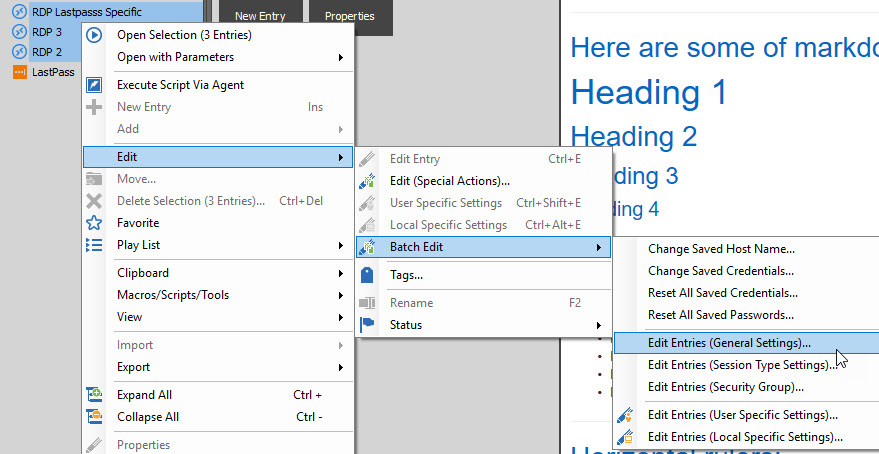
On the other hand, if you wish to do this for multiple entries at once, please do the following:
Select the entries you wish to affect -> Right-Click -> Edit -> Batch Edit -> Edit entries (General Settings)
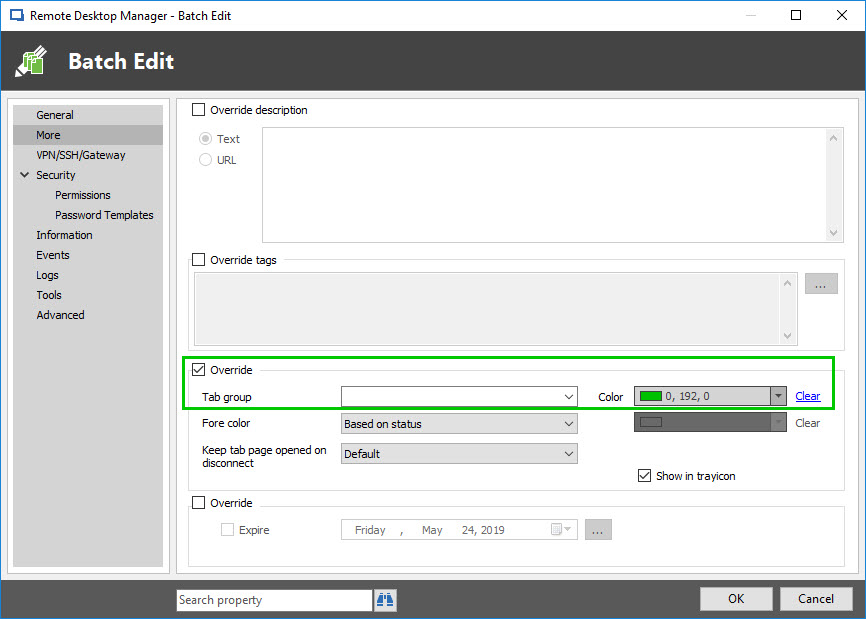
In the Batch Edit window, go to More and check "Override". You will then be able to choose the color you wish to use for all of the entries you selected.
Best regards,

James Lafleur
BatchEditColor.jpg
BatchEdit.jpg
TabColor.jpg
Thank you for the quick response! I was able to get the batch edit to work, and then found that my co-workers weren't seeing the changes until they did a forced refresh from the data source with CTRL + Refresh button in the title bar.
Hello,
That’s good news! Thank you so much for your feedback!
If there is anything else we can help you with, please let us know.
Best regards,
James Lafleur