Login to SSH without prompting for user crednetials?

Hello,
does anyone know how to use ssh without having Remote Desktop Manager prompt for user/pass and just allow the server to ask?
Like in Putty... where you are prompted for a User/pass.
I have a machine that i would like to add into RDM but to login I need to enter a response based on challenge string that appears on the console.
with RDM's popup prompts for user/pass I am not able to get that challenge string.
All Comments (3)
Hello,
The SSH Shell session type is our own integration of Putty. This mean that if you are able to make this work in Putty, it may be possible for us to make this work in RDM as well or modify the code to implement the missing feature.
https://help.remotedesktopmanager.com/sessions_sshshell.htm
That being said, could you post some screenshots on how you accomplish this in Putty. It will then be possible for me to verify if it's possible to do something similar in RDM.
Best regards,
Jeff Dagenais
Attached is what my server looks like when i log into it via putty.
when i try to log into it via Remote Desktop Manager i am prompted via pop up for Username and Password.
I believe the problem can be solved if RDM was able to allow the server to prompt me for user/pass.
RDM Login.PNG
Putty.PNG
Hello,
Are you using a Private Key to establish the connection?
As a workaround, you can create a Putty entry in RDM to establish this type of connection since it's working with Putty.
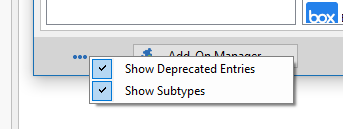
In the New Entry window, click on the ellipsis button at the bottom left and select Show Deprecated Entries.
This will allow you to create a Putty session type directly in RDM.
Best regards,
Jeff Dagenais
2018-05-23_14-02-28.png