Offline mode crashing when the Azure SQL is not accessable

Hi,
we have our DB in an Azure SQL, which is only reachable from our office IPs without MultiFactor Authentication. Since MFA is not working with RDM, it usually switches over to offline mode but since last update, it crashes instead.
Best Regards
Christian Franzén
Here is the stack:
AggregateException - One or more errors occurred.
at System.Threading.Tasks.Task.ThrowIfExceptional(Boolean includeTaskCanceledExceptions)
at System.Threading.Tasks.Task.Wait(Int32 millisecondsTimeout, CancellationToken cancellationToken)
at System.Data.SqlClient.SqlInternalConnectionTds.GetFedAuthToken(SqlFedAuthInfo fedAuthInfo)
at System.Data.SqlClient.SqlInternalConnectionTds.OnFedAuthInfo(SqlFedAuthInfo fedAuthInfo)
at System.Data.SqlClient.TdsParser.TryRun(RunBehavior runBehavior, SqlCommand cmdHandler, SqlDataReader dataStream, BulkCopySimpleResultSet bulkCopyHandler, TdsParserStateObject stateObj, Boolean& dataReady)
at System.Data.SqlClient.TdsParser.Run(RunBehavior runBehavior, SqlCommand cmdHandler, SqlDataReader dataStream, BulkCopySimpleResultSet bulkCopyHandler, TdsParserStateObject stateObj)
at System.Data.SqlClient.SqlInternalConnectionTds.CompleteLogin(Boolean enlistOK)
at System.Data.SqlClient.SqlInternalConnectionTds.AttemptOneLogin(ServerInfo serverInfo, String newPassword, SecureString newSecurePassword, Boolean ignoreSniOpenTimeout, TimeoutTimer timeout, Boolean withFailover, Boolean isFirstTransparentAttempt, Boolean disableTnir)
at System.Data.SqlClient.SqlInternalConnectionTds.LoginNoFailover(ServerInfo serverInfo, String newPassword, SecureString newSecurePassword, Boolean redirectedUserInstance, SqlConnectionString connectionOptions, SqlCredential credential, TimeoutTimer timeout)
at System.Data.SqlClient.SqlInternalConnectionTds.OpenLoginEnlist(TimeoutTimer timeout, SqlConnectionString connectionOptions, SqlCredential credential, String newPassword, SecureString newSecurePassword, Boolean redirectedUserInstance)
at System.Data.SqlClient.SqlInternalConnectionTds..ctor(DbConnectionPoolIdentity identity, SqlConnectionString connectionOptions, SqlCredential credential, Object providerInfo, String newPassword, SecureString newSecurePassword, Boolean redirectedUserInstance, SqlConnectionString userConnectionOptions, SessionData reconnectSessionData, DbConnectionPool pool, String accessToken, Boolean applyTransientFaultHandling, SqlAuthenticationProviderManager sqlAuthProviderManager)
at System.Data.SqlClient.SqlConnectionFactory.CreateConnection(DbConnectionOptions options, DbConnectionPoolKey poolKey, Object poolGroupProviderInfo, DbConnectionPool pool, DbConnection owningConnection, DbConnectionOptions userOptions)
at System.Data.ProviderBase.DbConnectionFactory.CreatePooledConnection(DbConnectionPool pool, DbConnection owningObject, DbConnectionOptions options, DbConnectionPoolKey poolKey, DbConnectionOptions userOptions)
at System.Data.ProviderBase.DbConnectionPool.CreateObject(DbConnection owningObject, DbConnectionOptions userOptions, DbConnectionInternal oldConnection)
at System.Data.ProviderBase.DbConnectionPool.UserCreateRequest(DbConnection owningObject, DbConnectionOptions userOptions, DbConnectionInternal oldConnection)
at System.Data.ProviderBase.DbConnectionPool.TryGetConnection(DbConnection owningObject, UInt32 waitForMultipleObjectsTimeout, Boolean allowCreate, Boolean onlyOneCheckConnection, DbConnectionOptions userOptions, DbConnectionInternal& connection)
at System.Data.ProviderBase.DbConnectionPool.TryGetConnection(DbConnection owningObject, TaskCompletionSource`1 retry, DbConnectionOptions userOptions, DbConnectionInternal& connection)
at System.Data.ProviderBase.DbConnectionFactory.TryGetConnection(DbConnection owningConnection, TaskCompletionSource`1 retry, DbConnectionOptions userOptions, DbConnectionInternal oldConnection, DbConnectionInternal& connection)
at System.Data.ProviderBase.DbConnectionInternal.TryOpenConnectionInternal(DbConnection outerConnection, DbConnectionFactory connectionFactory, TaskCompletionSource`1 retry, DbConnectionOptions userOptions)
at System.Data.SqlClient.SqlConnection.TryOpenInner(TaskCompletionSource`1 retry)
at System.Data.SqlClient.SqlConnection.TryOpen(TaskCompletionSource`1 retry)
at System.Data.SqlClient.SqlConnection.Open()
at Devolutions.RemoteDesktopManager.Business.DataSources.DatabaseConnectionDataSource.ExecuteScalar[T](String sql, IDbDataParameter[] parameters)
at Devolutions.RemoteDesktopManager.Business.DataSources.SQLServerConnectionDataSource.ExecuteScalar[T](String sql, IDbDataParameter[] parameters)
at Devolutions.RemoteDesktopManager.Business.DataSources.SQLServerConnectionDataSource.GetConnectionCacheID()
at Devolutions.RemoteDesktopManager.Business.DataSources.DatabaseConnectionDataSource.HasSecurityChanged()
at Devolutions.RemoteDesktopManager.Managers.ConnectionManager.c5ef36373244cdf2ba529a3f9d55c7fda(BaseConnectionDataSource c7f28727fc7a5daa94ba08f688b2a5781)
at Devolutions.RemoteDesktopManager.Managers.ConnectionManager.LoadConnections(BaseConnectionDataSource dataSource)
at Devolutions.RemoteDesktopManager.Managers.ConnectionManager.RefreshConnections()
at Devolutions.RemoteDesktopManager.Forms.FrmMainRibbonBase.RefreshAllConnectionView(Boolean saveState, Boolean checkOnline)
at Devolutions.RemoteDesktopManager.Managers.MainFormManager.DoFirstLoad(IMainForm mainform)
at Devolutions.RemoteDesktopManager.Forms.FrmMainDocumentManager.cae3b4c7c167cf0d9747ac4fee11ac00a(Object c19f185fd70cefc696ba148af1c4faf54, EventArgs cf1018bb83ec7debd818319fd3cb4844e)
at System.Windows.Forms.Timer.OnTick(EventArgs e)
at System.Windows.Forms.Timer.TimerNativeWindow.WndProc(Message& m)
at System.Windows.Forms.NativeWindow.Callback(IntPtr hWnd, Int32 msg, IntPtr wparam, IntPtr lparam)
------------------- INNER -----------------------
AggregateException - One or more errors occurred.
at System.Threading.Tasks.Task`1.GetResultCore(Boolean waitCompletionNotification)
at System.Data.SqlClient.SqlInternalConnectionTds.<>c__DisplayClass134_1.<GetFedAuthToken>b__3()
at System.Threading.Tasks.Task`1.InnerInvoke()
at System.Threading.Tasks.Task.Execute()
------------------- INNER -----------------------
AdalException - AADSTS50076: Due to a configuration change made by your administrator, or because you moved to a new location, you must use multi-factor authentication to access '022907d3-0f1b-48f7-badc-1ba6abab6d66'.
Trace ID: 07510162-b766-4e53-85cb-0b3627ad2100
Correlation ID: 9a28bc59-ef81-4490-9547-3380d7a0bf68
Timestamp: 2018-05-21 18:14:27Z
at ADALNativeWrapper.ADALGetAccessToken(String username, IntPtr password, String stsURL, String servicePrincipalName, ValueType correlationId, String clientId, Boolean* fWindowsIntegrated, Int64& fileTime)
at ADALNativeWrapper.ADALGetAccessToken(String username, String password, String stsURL, String servicePrincipalName, ValueType correlationId, String clientId, Int64& fileTime)
at System.Data.SqlClient.ActiveDirectoryNativeAuthenticationProvider.<>c__DisplayClass2_0.<AcquireTokenAsync>b__0()
at System.Threading.Tasks.Task`1.InnerInvoke()
at System.Threading.Tasks.Task.Execute()
------------------- AGGREGATE -----------------------
AdalException - AADSTS50076: Due to a configuration change made by your administrator, or because you moved to a new location, you must use multi-factor authentication to access '022907d3-0f1b-48f7-badc-1ba6abab6d66'.
Trace ID: 07510162-b766-4e53-85cb-0b3627ad2100
Correlation ID: 9a28bc59-ef81-4490-9547-3380d7a0bf68
Timestamp: 2018-05-21 18:14:27Z
at ADALNativeWrapper.ADALGetAccessToken(String username, IntPtr password, String stsURL, String servicePrincipalName, ValueType correlationId, String clientId, Boolean* fWindowsIntegrated, Int64& fileTime)
at ADALNativeWrapper.ADALGetAccessToken(String username, String password, String stsURL, String servicePrincipalName, ValueType correlationId, String clientId, Int64& fileTime)
at System.Data.SqlClient.ActiveDirectoryNativeAuthenticationProvider.<>c__DisplayClass2_0.<AcquireTokenAsync>b__0()
at System.Threading.Tasks.Task`1.InnerInvoke()
at System.Threading.Tasks.Task.Execute()
------------------- AGGREGATE -----------------------
AggregateException - One or more errors occurred.
at System.Threading.Tasks.Task`1.GetResultCore(Boolean waitCompletionNotification)
at System.Data.SqlClient.SqlInternalConnectionTds.<>c__DisplayClass134_1.<GetFedAuthToken>b__3()
at System.Threading.Tasks.Task`1.InnerInvoke()
at System.Threading.Tasks.Task.Execute()
------------------- INNER -----------------------
AdalException - AADSTS50076: Due to a configuration change made by your administrator, or because you moved to a new location, you must use multi-factor authentication to access '022907d3-0f1b-48f7-badc-1ba6abab6d66'.
Trace ID: 07510162-b766-4e53-85cb-0b3627ad2100
Correlation ID: 9a28bc59-ef81-4490-9547-3380d7a0bf68
Timestamp: 2018-05-21 18:14:27Z
at ADALNativeWrapper.ADALGetAccessToken(String username, IntPtr password, String stsURL, String servicePrincipalName, ValueType correlationId, String clientId, Boolean* fWindowsIntegrated, Int64& fileTime)
at ADALNativeWrapper.ADALGetAccessToken(String username, String password, String stsURL, String servicePrincipalName, ValueType correlationId, String clientId, Int64& fileTime)
at System.Data.SqlClient.ActiveDirectoryNativeAuthenticationProvider.<>c__DisplayClass2_0.<AcquireTokenAsync>b__0()
at System.Threading.Tasks.Task`1.InnerInvoke()
at System.Threading.Tasks.Task.Execute()
------------------- AGGREGATE -----------------------
AdalException - AADSTS50076: Due to a configuration change made by your administrator, or because you moved to a new location, you must use multi-factor authentication to access '022907d3-0f1b-48f7-badc-1ba6abab6d66'.
Trace ID: 07510162-b766-4e53-85cb-0b3627ad2100
Correlation ID: 9a28bc59-ef81-4490-9547-3380d7a0bf68
Timestamp: 2018-05-21 18:14:27Z
at ADALNativeWrapper.ADALGetAccessToken(String username, IntPtr password, String stsURL, String servicePrincipalName, ValueType correlationId, String clientId, Boolean* fWindowsIntegrated, Int64& fileTime)
at ADALNativeWrapper.ADALGetAccessToken(String username, String password, String stsURL, String servicePrincipalName, ValueType correlationId, String clientId, Int64& fileTime)
at System.Data.SqlClient.ActiveDirectoryNativeAuthenticationProvider.<>c__DisplayClass2_0.<AcquireTokenAsync>b__0()
at System.Threading.Tasks.Task`1.InnerInvoke()
at System.Threading.Tasks.Task.Execute()
All Comments (4)
Can you please check what version of your adalsql.dll files?
C:\Windows\SysWOW64\adalsql.dll
C:\Windows\System32\adalsql.dll
Stéfane Lavergne
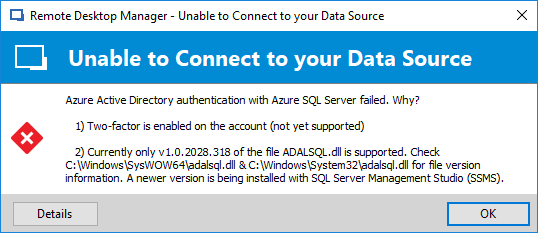
I've added a fail-safe that will handle the exception. You will now get a message something like the following and if offline is available you will be able to go offline, if not the data source will go "not connected".
Stéfane Lavergne
2018-05-23_14-50-35.png
Hi,
these are versions:
C:\Windows\SysWOW64\adalsql.dll 10.0.2044.0414
C:\Windows\System32\adalsql.dll 10.0.2044.0414
Thanks for the fix, when will it be available?
Best Regards
Christian Franzén
Unfortunately the fix wouldn't be before v14 of RDM.
Not the answer I would have liked to give you but in reality we won't be able to move any faster it requires to target a newer version of the .NET framework.
Your only option to get it going is to install an older version of the software that installed the newer versions of the ADALSQL.dll. The major culprit of this is SSMS (SQL Server Management Studio). If you have v17.6+ or higher it for sure installed the newer version of the ADALSQL.dll. Look for v1.0.2028.318
Stéfane Lavergne