SSH Tabs Auto Close On Disconnect / Error

Hi,
I am using Remote Desktop Manager Free v4.5.3.0 on Windows 10.
When connected to servers via SSH, upon error or disconnect (incl. server shutdown), the session/tab automatically closes.
This makes it impossible to trace or look back on previous commands.
I have configured the following:
SSH entry/favorites with 'Keep tab page opened on disconnect = True'.
Program -> Options -> Types -> 'Keep tab page opened on disconnect = True'.
Program -> Options -> Advanced -> 'Auto close embedded tab on disconnect = False'.
I noticed it works only for RDP but not SSH. Is this a limitation, a bug or some configuration issue on my side?
For your kind advice.
Best Regards
Fu Keong
All Comments (11)
Hello,
What type of SSH SHell session are you using?
If it's our own SSH Shell session type (https://help.remotedesktopmanager.com/sessions_sshshell.htm), I would suggest trying to uncheck the Close on disconnect or error option in the Advanced tab.
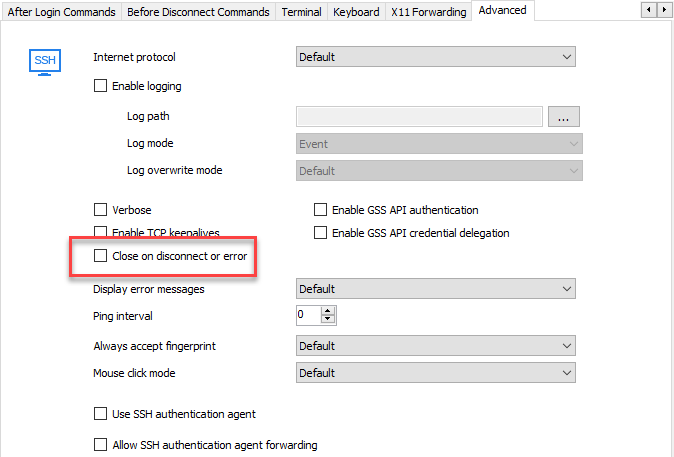
Best regards,
Jeff Dagenais
Hi Jeff,
Thank you for the quick reply!
Yes, I'm using 'SSH Shell' session type.
I have tried your suggestion. Didn't work when the session was active.
But restarted the program, reconnected the session, disconnect again and the tab will remain with 'disconnected' in the tab name.
I wish to expand the question further:
Can this setting be applied by default at program level instead of entry level?
What is the difference between this and the earlier options I've tried?
Best Regards
Fu Keong
Hello,
I suspect that this is a legacy setting and it was not ported to the new and generic settings. I will assign this to one of our dev to rework it including the default value.
Regards
David Hervieux
Okie thanks! :cheers:
Hello,
I am unable to reproduce the issue, what would be the OS of the machine you are connecting to remotely using SSH?
Best regards,
Alexandre Roy
Hi, I am using Windows 10 Enterprise 1710.
Hello again!
I'm sorry if I wasn't clear enough, I meant the OS of the machine you are trying to access, not the one you are currently using to connect to it.
Best regards,
Alexandre Roy
Hello again!
I'm sorry if I wasn't clear enough, I meant the OS of the machine you are trying to access, not the one you are currently using to connect to it.
Best regards,
I was connecting to an OS with RHEL 7.x with the default SSHD.